
Citrix
--
Questions
--
Followers
Top Experts

The old terminal server is 2008 R2 and the replacement is running 2012 R2.
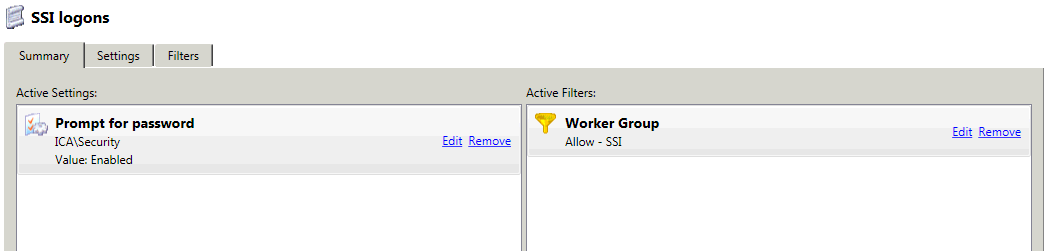
On the old server we have policies in place that disable Single Sign-On and Prompt for a password as the user's login using shared generic accounts tied to roles rather than individuals.
Existing Computer Policy
Existing User Policy
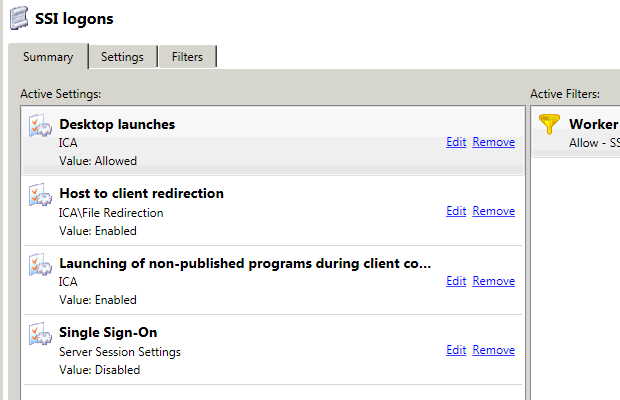
The problem is I cannot seem to find any policies in the new system that would match these settings.
Any help is appreciated.
Thanks
Zero AI Policy
We believe in human intelligence. Our moderation policy strictly prohibits the use of LLM content in our Q&A threads.

Citrix also dropped the prompt for password policy, since Microsoft already provides the exact same policy.
https://support.citrix.com
They show you where the MS policy is for this..
Computer Configuration – Policies – Administrative Templates – Windows Components – Remotes Desktop Services – Remote Desktop Session Host – Security – Always prompt for password upon connection
Coralon
Thanks for your comment.
The SSON aspect is working which is our problem. Currently the signed-on user is automatically signed into the Citrix app using their credentials. Unfortunately, the app has several predefined accounts which must be used to gain access. We have disabled SSON and forced the user to sign in using the alternate credentials. This has been working for us for many years using the older version of Citrix.
Now that we are in the process of upgrading our terminal servers to the newer version of Citrix, we are having issues with duplicating the setup we have now.
It's kind of goofy by some peoples standards, but it's what works for us.
We need to use the logged in users' credentials to publish the app in Citrix Receiver. Those which permission will see the app. Then once the app is launched, we need to prompt the users to sign in with alternate cred's so they can use the predefined user accounts that are setup within the app.
Hope this makes sense.
I understand that some of these settings can be set using Group Policy and have already tried using them, but so far without any luck.
Any help is greatly appreciated.
I do this myself.. I have my 4.5 client installed, and I manually sign on with differing accounts depending on what I need to do at any given moment. The *easiest* way is to install the client *without* the AM & SSON options.. typically, just ENABLE_SSON=no. http://docs.citrix.com/en-
If you don't want to upgrade the client on your old servers, you can uninstall the 3.1 that it comes with and reinstall it, and again.. use the command line to turn off the SSON option.. I believe it uses the same option (its not supported anymore, so the documentation is a little tough to find.
But, you can go through the configuration options for SSON, and undo them.. https://support.citrix.com
Coralon


EARN REWARDS FOR ASKING, ANSWERING, AND MORE.
Earn free swag for participating on the platform.

Thanks for the comments.

Get a FREE t-shirt when you ask your first question.
We believe in human intelligence. Our moderation policy strictly prohibits the use of LLM content in our Q&A threads.
Citrix
--
Questions
--
Followers
Top Experts
Citrix is the synonym for the virtualization and application infrastructure systems developed by the company of the same name. Main areas are application virtualization, Software-As-A-Service (SaaS), cloud-computing and networking. The two most well-known are Citrix XenApp or Citrix CloudPlatform.