
Microsoft Access
--
Questions
--
Followers
Top Experts

I have a subform with a combo box that looks up values in a query. The values returned should fall between two dates located on two bound text boxes on the form.
I can't use a simple query for the Row Source of the combo box because the query doesn't recognize controls from a subform.
I can't use DLookup because it only returns a single value.
I've tried setting up a record set with VBA but I can't seem to get the code right (or it doesn't work this way either).
parent form: frmAssignment
tabcontrol: pg 1
subform: frmAssignmentSchedule
LinkMasterField: OrderID
LinkChildField: OrderID
On the subform the date fields are AStartDate and AEndDate, both bound to the subform's record source. The combo box is cmbHolidayView and I need this:
SELECT qryHolidayDates.HolidayNam
FROM qryHolidayDates
WHERE (((qryHolidayDates.Holiday
ORDER BY qryHolidayDates.HolidayDat
which works great from when the subform is opened directly, but I need it to work when the subform is opened from the parent form.
The combo box does not have to update any underlying table nor does it have to hold any data. It only needs to show the user which holidays fall between the two dates. Once the user views them, they are no longer needed.
Any ideas?
Zero AI Policy
We believe in human intelligence. Our moderation policy strictly prohibits the use of LLM content in our Q&A threads.

SELECT qryHolidayDates.HolidayNam
FROM qryHolidayDates
WHERE (((qryHolidayDates.Holiday
ORDER BY qryHolidayDates.HolidayDat
OR
SELECT qryHolidayDates.HolidayNam
FROM qryHolidayDates
WHERE (((qryHolidayDates.Holiday
ORDER BY qryHolidayDates.HolidayDat

SELECT qryHolidayDates.HolidayName, qryHolidayDates.HolidayDate, qryHolidayDates.HolidayDayName
FROM qryHolidayDates
WHERE (((qryHolidayDates.HolidayDate) Between Form_subfrmAssignmentSchedule.AStartDate And Form_subfrmAssignmentSchedule.AEndDate]))
ORDER BY qryHolidayDates.HolidayDate;Thanks for the feedback. But those were the first things I tried. I couldn't figure out what was wrong with my SQL until I read somewhere that a query can't use a subform as a criteria parameter. --- or something like that.
John,
Thank you for the feedback as well. I've never seen the underscore used before. Unfortunately, yours as well as Pat's suggestions all result in a pop-up request for the parameter.
I'm using Access 2016 if that makes any difference.


EARN REWARDS FOR ASKING, ANSWERING, AND MORE.
Earn free swag for participating on the platform.
ParameterPrompt.png
Get a FREE t-shirt when you ask your first question.
We believe in human intelligence. Our moderation policy strictly prohibits the use of LLM content in our Q&A threads.
This seems so convoluted so I'm holding out for a better option.
activated the cide behind
I don't know what that means.
EARN REWARDS FOR ASKING, ANSWERING, AND MORE.
Earn free swag for participating on the platform.
I've created a very simplified sample db showing the problem I'm having. See the form "frmExample" , tab "page 7", click the combo box "Holidays"
Database12.zip
my SQL until I read somewhere that a query can't use a subform as a criteria parameter. --- or something like thatNot true.
Did you verify that you were using the Name Property of the Subform CONTROL rather than the actual name of the subform object in your reference?
Get a FREE t-shirt when you ask your first question.
We believe in human intelligence. Our moderation policy strictly prohibits the use of LLM content in our Q&A threads.

SELECT tblHolidays.HolidayID, tblHolidays.Day, tblHolidays.Holiday, tblHolidays.Date
FROM tblHolidays
WHERE (((tblHolidays.Date) Between [Forms]![frmExample]![subf
ORDER BY tblHolidays.Holiday;
I just can't seem to get the query to recognize the controls.
Could it have anything to do with the tab control? My understanding is that we can ignore any reference to the tabs themselves. But I'm really out of ideas as to what I'm doing wrong naming those controls as parameters.
Just in case this is significant - although I can't imagine why...
The parent form clears the tab controls:
Private Sub Form_Load()
    Me.TabCtlAssignmentDetails.value = 0
    TabCtlAssignmentDetails_Change
End SubThen the tab control's on current event opens individual forms...
Private Sub TabCtlAssignmentDetails_Change()

        Select Case Me.TabCtlAssignmentDetails.value
            Case 0
                Me.tabctlsubform.SourceObject = "subfrmAssignmentDetails"
            Case 1
                Me.tabctlsubform.SourceObject = "subfrmAssignmentSchedule"
            Case 2
                Me.tabctlsubform.SourceObject = "subfrmAssignmentMPInsurance"
             Case 3
                Me.tabctlsubform.SourceObject = "subfrmAssignmentExpenses"
            Case 4
                Me.tabctlsubform.SourceObject = "subfrmAssignmentReimbursables"
            Case 5
                Me.tabctlsubform.SourceObject = "subfrmAssignmentSummary"
        End Select

End SubIt's hard to be stuck for so long on something that should have been so straightforward. :-/
EARN REWARDS FOR ASKING, ANSWERING, AND MORE.
Earn free swag for participating on the platform.
You've lost me with this:
Did you verify that you were using the Name Property of the Subform CONTROL rather than the actual name of the subform object in your reference?
Get a FREE t-shirt when you ask your first question.
We believe in human intelligence. Our moderation policy strictly prohibits the use of LLM content in our Q&A threads.
This may be relevant in the production version of the app although it isn't in the sample you posted. Most of the time these two properties end up with the same name because Access uses the name of the ControlSource object as the Name of the control but you can change that and it might be different if someone else built the form or if you added the subform by using the subform control in the ribbon rather than dragging the subform onto the main form from the navigation pain (sic).
An y idea why my naming is affecting how this should work? I just can't get sql to recognise those controls.
This was what I duplicated given yours and John's examples, but neither worked. Still getting a parameter prompt when clicking the combo box on the subform when the subform in opened inside the parent form.
I have no trouble at all with it if I create the sql to work outside the parent form (with the subform as a stand alone form). It's only when it's combined with the parent form that those controls get lost.
SELECT qryHolidayDates.HolidayName, qryHolidayDates.HolidayDate, qryHolidayDates.HolidayDayName
FROM qryHolidayDates
WHERE (((qryHolidayDates.HolidayDate) Between [Forms]![frmAssignments]![subfrmAssignmentSchedulel]![AStartDate] And [Forms]![frmAssignments]![subfrmAssignmentSchedulel]![AEndDate]))
ORDER BY qryHolidayDates.HolidayDate;EARN REWARDS FOR ASKING, ANSWERING, AND MORE.
Earn free swag for participating on the platform.
ControlSource property of the subform control and check its Name property
The subform doesn't have a control source, it has a record source which queries 3 tables.
The name of the subform is subfrmAssignmentSchedule.
The combo box is unbound (no control source) and named cmbHolidayView. The query above is set up as the RowSource.
The problem has something to do with referencing the subform's controls from the parent form. Otherwise, it works fine.
The db is 1.4 Mb when I zip it up. Is that too large?
If so, maybe I can spend some time next week creating a copy that only includes the pertinent tables and forms.
1.4 mb is probably too big to upload, plus you don't want to post any sensitive data.
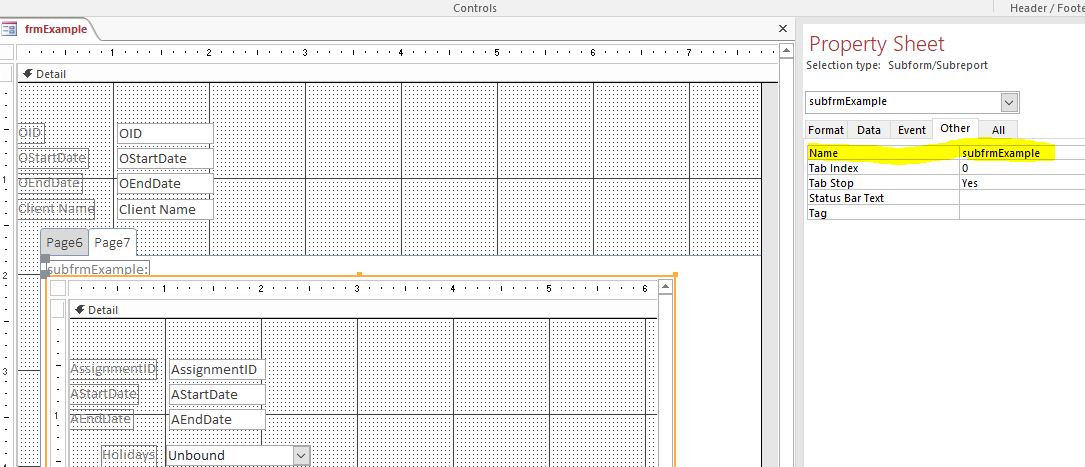

The parent form contains a tab control minimized so only the tabs show. Then there is a subform directly beneath it called tabctlsubform.
The tabctlsubform shows different subforms depending on which tab is clicked.
When "Case 1
Me.tabctlsubform.SourceObj
then we see the subfrmAssignmentSchedule.
So, how do I reference subfrmAssignmentSchedule since it will be the "SourceObject" of the tabctlsubform?
I tried Forms!frmAssignments!tabct
Get a FREE t-shirt when you ask your first question.
We believe in human intelligence. Our moderation policy strictly prohibits the use of LLM content in our Q&A threads.
It was a problem of my own making and not enough skill to understand what you were saying from the very beginning.
Thank you!!!
And thank you to John as well for solving the problem as presented in the sample. It just wasn't exactly what I was dealing with in the real db because I didn't set up the sample to match.
Breath of relief. Much better way to start the weekend now.
Thanks again to both of you!
EARN REWARDS FOR ASKING, ANSWERING, AND MORE.
Earn free swag for participating on the platform.
Microsoft Access
--
Questions
--
Followers
Top Experts
Microsoft Access is a rapid application development (RAD) relational database tool. Access can be used for both desktop and web-based applications, and uses VBA (Visual Basic for Applications) as its coding language.