
Windows OS
--
Questions
--
Followers
Top Experts

Any ideas why my networking is not functioning properly.
regedit-NetBios-Linkage.PNG
registry-editor-BetBT-Parameters-Int.PNG
regedit-lanmanworkstation-parameters.PNG
network-connection-detail--netbios.PNG
advanced-tcp-ip-settings-netbios.PNG
Zero AI Policy
We believe in human intelligence. Our moderation policy strictly prohibits the use of LLM content in our Q&A threads.

SoftPerfect's network scanner is a great utility which scans your network's ip range and displays every device it finds:
https://www.softperfect.com/products/networkscanner/
It also lets you open the shares or webpages of those devices.
P.S. What versions of what O/S's are on the other computers?


EARN REWARDS FOR ASKING, ANSWERING, AND MORE.
Earn free swag for participating on the platform.


registry-netbios-linage-bind-detail.PNG
registry-netbios-linkage-bind.PNG
Here's mine:
C:\Windows\system32>ipconf
Windows IP Configuration
Host Name . . . . . . . . . . . . : Davis-Z97
Primary Dns Suffix . . . . . . . :
Node Type . . . . . . . . . . . . : Hybrid
IP Routing Enabled. . . . . . . . : No
WINS Proxy Enabled. . . . . . . . : No
Ethernet adapter Local Area Connection:
Connection-specific DNS Suffix . :
Description . . . . . . . . . . . : Realtek PCIe GBE Family Controller
Physical Address. . . . . . . . . : 00-C0-BB-DF-55-C0
DHCP Enabled. . . . . . . . . . . : Yes
Autoconfiguration Enabled . . . . : Yes
Link-local IPv6 Address . . . . . : fe80::cd28:3925:6d35:80d2%
IPv4 Address. . . . . . . . . . . : 192.168.0.84(Preferred)
Subnet Mask . . . . . . . . . . . : 255.255.255.0
Lease Obtained. . . . . . . . . . : Thursday, October 05, 2017 8:42:22 AM
Lease Expires . . . . . . . . . . : Wednesday, October 11, 2017 8:42:21 AM
Default Gateway . . . . . . . . . : 192.168.0.1
DHCP Server . . . . . . . . . . . : 192.168.0.1
DHCPv6 IAID . . . . . . . . . . . : 272927323
DHCPv6 Client DUID. . . . . . . . : 00-01-00-01-21-34-99-D1-00
DNS Servers . . . . . . . . . . . : 192.168.0.1
NetBIOS over Tcpip. . . . . . . . : Enabled
Tunnel adapter isatap.{8BD1CE7E-8567-4F51
Media State . . . . . . . . . . . : Media disconnected
Connection-specific DNS Suffix . :
Description . . . . . . . . . . . : Microsoft ISATAP Adapter
Physical Address. . . . . . . . . : 00-00-00-00-00-00-00-E0
DHCP Enabled. . . . . . . . . . . : No
Autoconfiguration Enabled . . . . : Yes
Tunnel adapter Teredo Tunneling Pseudo-Interface:
Media State . . . . . . . . . . . : Media disconnected
Connection-specific DNS Suffix . :
Description . . . . . . . . . . . : Teredo Tunneling Pseudo-Interface
Physical Address. . . . . . . . . : 00-00-00-00-00-00-00-E0
DHCP Enabled. . . . . . . . . . . : No
Autoconfiguration Enabled . . . . : Yes
Get a FREE t-shirt when you ask your first question.
We believe in human intelligence. Our moderation policy strictly prohibits the use of LLM content in our Q&A threads.
ipconfig-all--netbios.PNG
Control Panel=>All Control Panel Items=>Network and Sharing Center=> Change Adapter Settings
Press Alt key, click on Advanced => Advanced Settings.
select Ethernet on the top section and see the preference of the IP protocol on the second section.
Select IPv4 and change the order using the up arrow on the right.
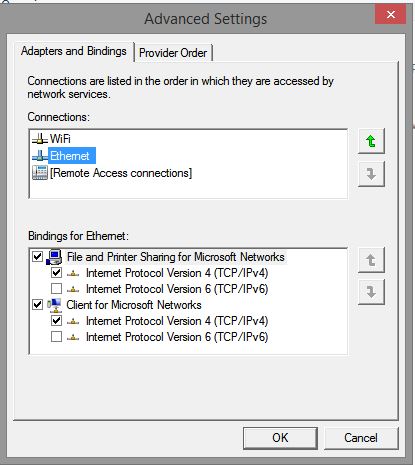
Reboot and see if that fixes the NetBIOS issue.
Thanks,
Sudeep
change-adapter-settings-advanced.PNG
EARN REWARDS FOR ASKING, ANSWERING, AND MORE.
Earn free swag for participating on the platform.
Thanks,
Sudeep
The bind settings that you have posted earlier has the priority. There you have three TCPIP6 there, bring it down which would give TCPIP4 priority.
You have reboot before the changes could take effect.
Let us know how it goes.
Thanks,
Sudeep
Get a FREE t-shirt when you ask your first question.
We believe in human intelligence. Our moderation policy strictly prohibits the use of LLM content in our Q&A threads.
There has to be somewhere in the registry that is causing this computer to have the NetBIOS over tcpip turned off.
EARN REWARDS FOR ASKING, ANSWERING, AND MORE.
Earn free swag for participating on the platform.
As I had indicated in the original screen caps, all of the NetBIOSoptions had been set to 1 in the currentcontrolset. HKLM\SYSTEM\CurrentControl
I changed the one set in curentcontrol001, but it made no difference. but I will reboot and see if it then affects it.
registry-netbios-options-1.PNG
registry-netbios-options-2.PNG
Get a FREE t-shirt when you ask your first question.
We believe in human intelligence. Our moderation policy strictly prohibits the use of LLM content in our Q&A threads.
command-entries.PNG
If you use WinKey+X, you will get a menu which has Run Powershell as Administrator listed in it. That is what you need to be using.
Something I don't think has been checked is what your network type is so, run Powershell as Admin and do:
Get-NetConnectionProfile<e
EARN REWARDS FOR ASKING, ANSWERING, AND MORE.
Earn free swag for participating on the platform.
netsh-command-1.PNG
netsh-command-2.PNG
netsh-command-3.PNG
netsh-command-4.PNG
netsh-command-5.PNG
netsh-command-6.PNG
Get a FREE t-shirt when you ask your first question.
We believe in human intelligence. Our moderation policy strictly prohibits the use of LLM content in our Q&A threads.
Windows OS
--
Questions
--
Followers
Top Experts
This topic area includes legacy versions of Windows prior to Windows 2000: Windows 3/3.1, Windows 95 and Windows 98, plus any other Windows-related versions including Windows Mobile.