
Windows 10
--
Questions
--
Followers
Top Experts

Microsoft's latest/last version of LifeCam software (version 3.6) isn't compatible with the current version of Windows 10. Even if you try to install in in Compatibility Mode (for Win 7 or 8) you get the following error message:
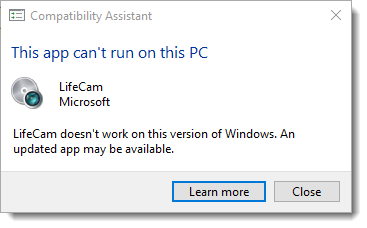
We've tried looking in the registry for clues and even looked at Windows 10 CAMERA application to see if, maybe, there were camera settings there we could use....there aren't.
Now I'm reaching out to see if anybody has found a way to turn Autofocus OFF on a LifeCam Cinema in Windows 10.
Is there a reg hack? A 3rd party tool? A secret handshake I have to do?
Zero AI Policy
We believe in human intelligence. Our moderation policy strictly prohibits the use of LLM content in our Q&A threads.

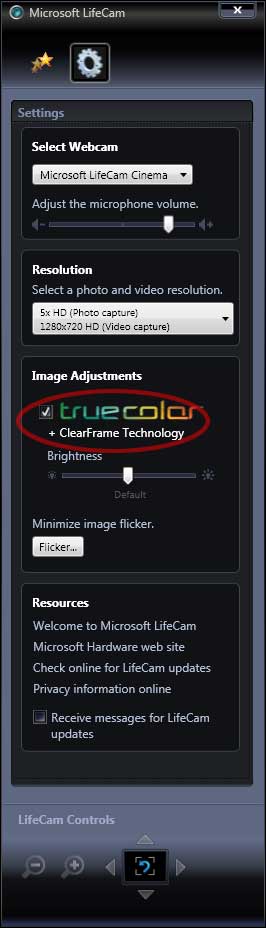
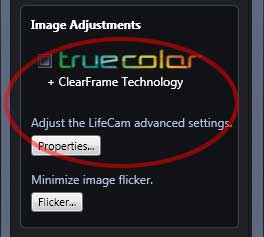 You can then go to Camera Control tab. to disable auto focus.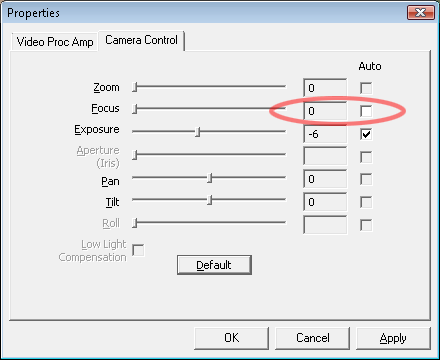

You can find downloads for Ms hardware but they say LifeCam software is not available for Windows 8 and 10
https://www.microsoft.com/accessories/en-us/downloads


EARN REWARDS FOR ASKING, ANSWERING, AND MORE.
Earn free swag for participating on the platform.
The LifeCam software does not work with the latest Windows 10 version. Prior to the Windows 10 anniversary update (sometime last year) you were able to install and run LifeCam software on your Windows 10 machine but it gave a warning that it may not run properly. BTW, it ran just fine.
Now Windows 10 doesn't even give you the option and just produces the message in my original post.
The cameras are working but they want to continually autofocus. For our installations, autofocus is annoying and unacceptable and we've lost the ability to turn it off without the LifeCam software installed.
First and foremost click on the Start Menu and do a search for ‘regedit’ and launch the program.
Now in the left hand sidebar, navigate to the following location: HKEY_LOCAL_MACHINE > SOFTWARE > Microsoft > Windows Media Foundation > Platform.
Once here, right-click on the ‘Platform’ folder in the left hand sidebar and then hover your mouse over ‘New’ and then select ‘DWORD (32-bit) Value.’
Name the value ‘EnableFrameServerMode’ and then set the value to ‘0.’
Now navigate to HKEY_LOCAL_MACHINE > SOFTWARE > WOW6432Node > Microsoft > Windows Media Foundation > Platform.
Right-click on ‘Platform,’ then hover above ‘New’ then add a DWORD value. Name it ‘EnableFrameServerMode’ and set the value to ‘0.’
(The last step is only necessary if you’re running a 64-bit version of Windows 10)

Microsoft Life Cam HD-5000 Driver 4.25.532.0.
I never installed on my Windows 10 machine - just plugged it in and Windows 10 looked after it.
I am running Windows 10 Version 1709 Build 16299.19 (latest)
Get a FREE t-shirt when you ask your first question.
We believe in human intelligence. Our moderation policy strictly prohibits the use of LLM content in our Q&A threads.
Click Start.
In the Start Search box, type "Regedit", and then press ENTER.
Navigate to HKEY_CURRENT_USER\Software
click New, and then click DWORD (32-bit) Value
Give the registry entry the name AutofocusOFF
Right-click the registry entry name, and then click Modify.
Type 1, and then click OK.
"AutofocusOFF"=dword:00000
Restart windows
If you have problem with camera in Skype, maybe you can try uninstall Skype and install it again.
EARN REWARDS FOR ASKING, ANSWERING, AND MORE.
Earn free swag for participating on the platform.
ITSysTech is correct. We had tried this earlier after looking at an existing machine that had the LifeCam software installed. We added the entire HKEY_CURRENT_USER\Software
Unfortunately, it didn't work. My guess is that the LifeCam software looks for these Reg entries and not the camera itself.

We had tried ‘EnableFrameServerMode’ and setting the DWORD value to ‘0.’ which was a recommendation from another tech site
https://wccftech.com/fix-windows-10-webcam-issue-anniversary-update/.
This doesn't resolve the autofocus issue on the LifeCam. I'm wondering if there is something in the Windows SDK that might do the trick? If so, we would be interested in writing a simple utility to manage some of the LifeCam features since the LifeCam software is not compatible.
Does anyone have an idea if this might exist?
Get a FREE t-shirt when you ask your first question.
We believe in human intelligence. Our moderation policy strictly prohibits the use of LLM content in our Q&A threads.
Thanks for the Skype suggestion. And, YES, it DOES work! I use Skype on my personal laptop and it never dawned on me that the Skype Video Capture Filter Properties were different than the Lifecam properties as they both look very similar. So similar, I never noticed the difference (see both images above in the thread).
Unfortunately, most of these PCs are customer PCs and it's doubtful many of them will let us install Skype. Bummer.
Do you happen to know if you remove Skype that the settings will remain? If so, then there's probably a registry setting somewhere that maintains it. I'd be interested to know how they do that.
I'm going to look into the Windows SDK to see if in Media Foundation API's there are calls to do the same thing as the Skype settings. We may end up having to write a little utility/tool just for LifeCam settings. Or, purchase replacement webcams and say goodbye to Microsoft.
EARN REWARDS FOR ASKING, ANSWERING, AND MORE.
Earn free swag for participating on the platform.
The good news is - there IS a solution to turning off a LifeCam's autofocus in Windows 10 (Anniversary Edition and later).
The bad news is - Skype is the method to do this as far we've been able to tell.
It's unfortunate Microsoft doesn't provide any kind of support for this. We're looking into writing a utility to adjust camera setting for Microsoft LifeCams. If we're successful in getting this done we'll be happy to share it with the community.
We spoke with Microsoft directly about this.
Their answer was (Almost Verbatim):
1. "NO - The Lifecam software will not work with Windows 10 after the Anniversary Edition. BUT, the driver is built-in."
2. "NO - There won't be any updates to the Lifecam software"
3. "YES - We understand this upsets a lot of people but, apparently, we don't care".
4. "NO - There is no way to turn OFF Autofocus within Windows"
and
5. "You'll have to find some other way to do this."
Soooo...See the best answer above {via Skype, I guess}. Unless you want to write a custom app just to turn off Autofocus. We considered this option but decided in the end it's just better not to buy any more Microsoft products and are going to find a different camera solution.
I have a Microsoft LifeCam 5000 (purchase a few years back for my Windows 7 machine (sold) and I put it on my Windows 10 Machine (V1709 16299.192) and the camera works fine and in Skype Desktop. Driver 4.24.532.0
Get a FREE t-shirt when you ask your first question.
We believe in human intelligence. Our moderation policy strictly prohibits the use of LLM content in our Q&A threads.
You're right! My last comment is a strange answer.
The Lifecam's do work in Windows 10, even with the Anniversary Edition. That wasn't my initial post, though. I wanted to be able to turn Autofocus off, which you cannot do with the Microsoft Lifecam software because the Lifecam software was no longer compatible.
So I was looking for a way to do this. Everybody was helpful. But, in the end, unless something has changed that I'm not aware of (that would be cool-tho!), we're stuck with using a 3rd party app to turn off Autofocus if we want to continue to use the Lifecams.

Windows 10
--
Questions
--
Followers
Top Experts
Windows 10 is a personal computer operating system featuring the "universal application architecture" (UAP); apps can be designed to run across multiple devices with nearly identical code, including PCs, tablets, smartphones, embedded systems, Xbox One, Surface Hub and HoloLens. Windows 10 also includes a virtual desktop system, a window and desktop management feature called Task View, the Microsoft Edge web browser, support for fingerprint and face recognition login, voice-based search (Cortana), new security features for enterprise environments, and DirectX 12 and WDDM 2.0 to improve the operating system's graphics capabilities for games.