
Windows OS
--
Questions
--
Followers
Top Experts

i want to reset the system to factory settings, but when i start to safe mode>repair your pc> it still asks for a password
how can i start factory reset from the recovery partition -without pasword?
btw nordahls password remover did not work either
Zero AI Policy
We believe in human intelligence. Our moderation policy strictly prohibits the use of LLM content in our Q&A threads.

Use any Windows bootable disk, enter the repair, command line.
In c:\windows\system32\
Rename utilman.exe utilman.bak
Copy cmd.exe utilman.exe
Allow system to boot from hard drive.
At the login scree, hit the ease access, this will bring up a command window running with system level privileges
Net user you could either add a new administrative user, or change the password of the existing one.
Optiplex came with CD, to reset to factory default insert the OS cd, boot from it and wipe.


EARN REWARDS FOR ASKING, ANSWERING, AND MORE.
Earn free swag for participating on the platform.

2. While the computer restarts, press F8 to open the Advanced Boot Options menu
If the Advanced Boot Options menu does not open, wait for the Windows logon screen to appear. Then restart your computer and try again
3. Select Repair My Computer using the Arrow keys and press Enter to open the Windows Recovery Environment
4. On the first System Recovery Options window, click Next to select the default option
5. Check if you can login with Administrator User (most of times no password is set for it).
6. On the Systems Recovery Options window, click Dell Backup and Recovery
7. In the Restore System window, select the backup file that you want to use to restore your system from the drop-down menu and click Next
Source:
http://www.dell.com/support/article/us/en/04/sln147555/how-to-restore-the-dell-factory-image-with-dell-backup-and-recovery?lang=en
790 is likely out of warrantee, but using the service tag, you can check the warrantee status on Dell's site.
You could try and purchase the Dell Windows 7 recovery CD ....
Try the guide I provided thou it will get you access I to the system, it will not provide you with an option to reset the system to factory default unless there is a recovery partition to which you can trigger the system to reset.

By way of example, for an Optiplex 780 "421-2350 : Windows 7 Professional Downgrade to XP Professional SP3, Media, Optiplex, English" would be appropriate. This indicates that W7 Pro can be reinstalled from Dell media without a COA and that you can legally download the Dell W7 recovery DVD image at
https://www.dell.com/support/home/us/en/4/drivers/osiso/recoverytool/WT64A
Also read the Dell W7 reinstall monologues at
http://www.dell.com/support/article/us/en/19/sln299044/how-to-create-and-use-the-dell-windows-recovery-image?lang=en
https://www.dell.com/support/article/us/en/19/sln153735/how-to-reinstall-windows-7-professional-on-a-dell-pc?lang=en
There is a site dedicated specifically to reinstalling Windows 7 on Dell systems. Best to read it, as there are numerous traps along the way when reinstalling W7.
http://dellwindowsreinstallationguide.com/download-dell-skylake-windows-7/
Get a FREE t-shirt when you ask your first question.
We believe in human intelligence. Our moderation policy strictly prohibits the use of LLM content in our Q&A threads.

One important piece you need to make sure you have before using this option is to get the Windows key, typically on the sticker on a computer that has whatever version of Windows it was deployed with. Without that key, you can only install a trial version of Windows and will have to acquire one within 30 day if you want to keep the system up to date.
https://www.dell.com/support/home/us/en/4/drivers/osiso/recoverytool

Use this guide to learn how to use the Dell recovery partition: https://neosmart.net/wiki/dell-recovery-partition/
obaid - there's nothing there to help
others - all will be tried - i'll post results later
EARN REWARDS FOR ASKING, ANSWERING, AND MORE.
Earn free swag for participating on the platform.
You have to see whether you have a recovery partition,
Try escape during the system startup to access the utilit menu
If there is a recovery partition, directing the system to boot from it will reset the system to factory default....
Get a FREE t-shirt when you ask your first question.
We believe in human intelligence. Our moderation policy strictly prohibits the use of LLM content in our Q&A threads.
i don't get that, only a screen with 6 choices for selecting narrator, increase, letterype, contrast etc..
Dr Klahn i see w7P32/64 - take it that means PRO, but what about 32/64 ?
and using the download software - what do i select: extract or install ? https://www.dell.com/support/home/us/en/4/drivers/osiso/recoverytool/WT64A
is that tool bootavble or not?
Copy cmd.exe to utilman.exe
All of these are in the c:\windows\system32 path
Once the above change is done, when you boot the system from the harddrive, hitting the ease access will bring up the command window where you can use net user to add a new user and the add this user to the local administrators group met logalgeoup administrators /add username
Once you do that in the command window, you can return to the login screen and enter the credentials for the newly created user.
If you are OS reinstall will clear..
If you are not, you would need to repeat the earlier process to copy bak the utilman.bak to utilman.exe ...
EARN REWARDS FOR ASKING, ANSWERING, AND MORE.
Earn free swag for participating on the platform.
but it is hidden - so i can't boot from it (that's what i want to do all the time)
i don't believe you need to be able to boot into windows for restting the software - that would just be silly - no?
and i don't understand your last post - or it is simply wrong
this is what i get when i boot to safe mode> repair your PC
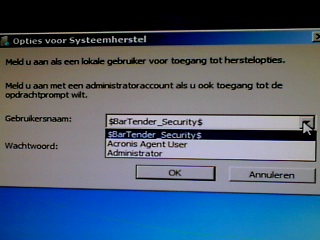 if you know a way to get past it - that's also fine !
Net user you could either add a new administrative user, or change the password of the existing one.
can you postan example of how to edit the password, or add a new user as admin ?
Get a FREE t-shirt when you ask your first question.
We believe in human intelligence. Our moderation policy strictly prohibits the use of LLM content in our Q&A threads.

however, when booted, i only see this
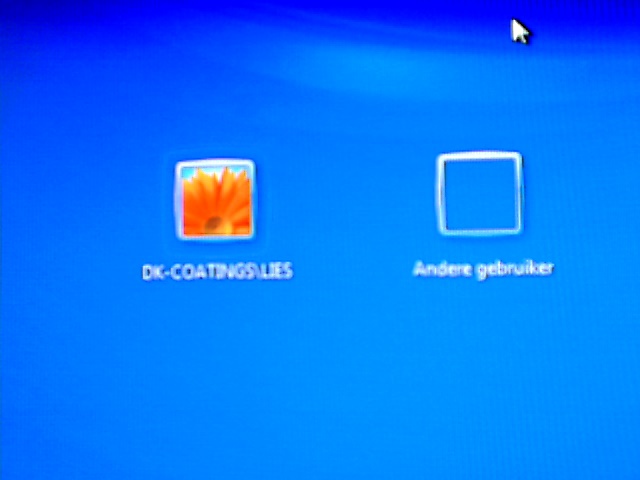 how can i login to the new user??
After you add, you need not reboot, the user
Hit ctrl-alt-delete to bring up old login option and enter username/password.
EARN REWARDS FOR ASKING, ANSWERING, AND MORE.
Earn free swag for participating on the platform.
net user, does the new user appear in the list?
then run the below
net localgroup administrators
does the new user appear in the list?
the system may have something else setup, that clears the user?
you could use net user
then
net user <one of the listed usernames> *
and create a new password for the account...
then see if you can login with that account and the new password.
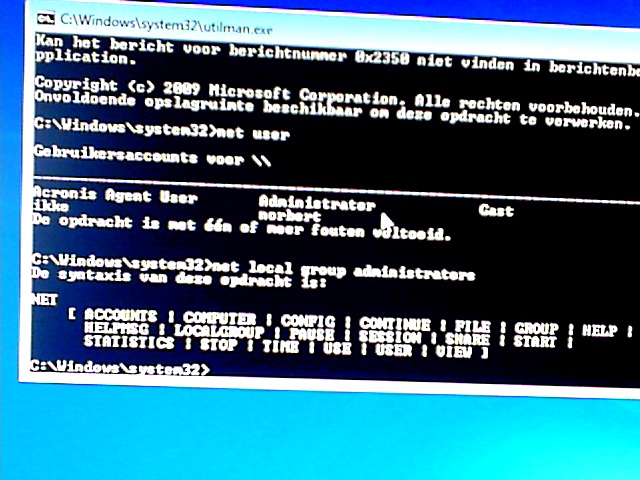 i created the users ikke and norbert
below it says that the task finished with 1 or more errors
but you see it in the administraters list
butt how do i login ? on norbert?
Are you able to login with either Ike or norbert
if you reboot the system after the addition and on the display you do not have a listing of all four?
Get a FREE t-shirt when you ask your first question.
We believe in human intelligence. Our moderation policy strictly prohibits the use of LLM content in our Q&A threads.
https://www.petri.com/enable-the-windows-7-administrator-account
net user administrator /active
will enable the account, but without a password, the account will only be accessible/usable under safe mode bootup.
Boot the system in safe mode, and see if the two accounts you added are there and functional.
try running the net user ikke /Active and the same for norbert just in the event the creation of the account automatically came up as disabled......
net localgroup administrators norbert passwrd ?
btw - you may notice that the account to which i don't have the password - is not shown in that list DK-COATINGS/LIES
EARN REWARDS FOR ASKING, ANSWERING, AND MORE.
Earn free swag for participating on the platform.
It displays two users, and you have two users Ikke and Norbert
Create a somenewuser literally. Set a password, add this user into the administrators group and see what the result is.
when i do that i get "at the moment there are no contact servers available to process your login request"
Set its password
Add the user to the local administartors group.
Login using this user.
Get a FREE t-shirt when you ask your first question.
We believe in human intelligence. Our moderation policy strictly prohibits the use of LLM content in our Q&A threads.
when you add a user, you should be able to hit ctrl-alt-del (possibly hit delete twice while the two other buttons are depressed in order to get the old style login prompt where you can type in a username and password.)
as long as you can loginto start+U, or go through start+R utilman.exe you can bring up the command window running with system rights, where you can add the user to the administrators, group. yous hould be able to login following the addition/creation of a user. without the need to reboot the system.
try when you are at the login screen and use the ease access, in the command line run
diskpart
list disk
select disk 0
list partition
list volume
if there are more than one disk,
Lets see if you have three partiions
100MB or so for the boot sector/uefi
most of the space for C:\
2-10GB for the recovery
you have to gain access into the system, without regaining access, getting the restore media from Dell is your ..
here the partitions:
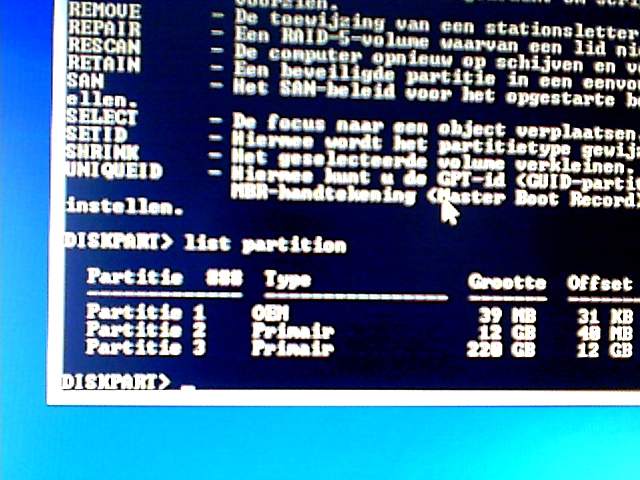
but tell me how this helps me??
EARN REWARDS FOR ASKING, ANSWERING, AND MORE.
Earn free swag for participating on the platform.
Accessing the system is only needed if you need to pull data off, or attach the drive to another system.
Looks strange, the partitioning looks as though it is an XP not Windows 10.
List volume which partition is the c:\ ?
The restore to factory relies on the system manufacturer and whether they provide a recovery partition. In some cases, during hitting F9, F11 gets the system to boot up into the Manufacturer utility that provides for a factory reset provided the recovery partition is present and has not been altered by a user who overwrote the manufacturer data with their own system image backup. Had a situation such as this, where the user used the recovery partition to store the current image which by iteself is not an issue, the issue is the person elected to delete the manufacturer provided image. The options when performing the backup was not complete meaning the image was not bootable. Some use ctrl+F9 or F11 to get into the recovery......
The dell recovery and backup tool, is usefull but still relies on the existence of the recovery partition.
Were you able to gain access to the system? From my understanding of your posts, you have not. Creating users, etc. did not seem to have gotten you onto the system in a capacity where you could try the recovery option if available.
In windows 8/10 the F8 includes an option to restore the system to .... but would still require the recovery partition onto which the system will boot and follow the BootPE/WindowsPE image and reset the system to the factory image or the image present there if it works......
Dell at times includes a recovery partition,
Get a FREE t-shirt when you ask your first question.
We believe in human intelligence. Our moderation policy strictly prohibits the use of LLM content in our Q&A threads.
i want to try to access the system first - it has NOTHING to do with recovery or data
i just want to know HOW to get past the login
on boot, you create a new user, and grant that user administrators rights.
what happens after that?
using alt-ctrl+del(twice) do
try net user <newuser> /active just in the event the user gets created disabled
The computer could have a restriction that prevents creation of new users that leads to the user account being disabled/deleted on reboot.....
Based on your image, the computer appears to be a member of an AD domain.
1) are you able to gain access to the system as a user of any level?
2) if you are, and you elevate the user's right ...
1) - no
2) - i can create an admin level - so i can't elevate it (i can also delete it
strange thing is the NORMAL, inaccessible user is NOT displayed with net user
EARN REWARDS FOR ASKING, ANSWERING, AND MORE.
Earn free swag for participating on the platform.
First thing is first gain access to the system by whatever means you have.
once you are logged into the system, your control is limited to this system only, you can not piggy back to reach other systems in the environment.
or do i miss something there?
If you want to reset the system to factory default and if you do not need to pull data, why not use the recovery media you have to reinstall the system.
Perhaps I am missing what the end goal you are after. In a prior comment, if a system recovery partition exists on this drive, using the ctrl+F9 or F11 right after the system is turned on might be all that you need.
The issue if this is a domain joined system, it will enforce its rules ........
It may have software from the Domain that shields its from being accessed.
Get a FREE t-shirt when you ask your first question.
We believe in human intelligence. Our moderation policy strictly prohibits the use of LLM content in our Q&A threads.
i'll post my previous post again :
i have the dell recovery ready - that's not the point - and i'll do that when i have exhausted other options
i want to try to access the system first - it has NOTHING to do with recovery or data
i just want to know HOW to get past the login
while you could not give a solution, i'm happy with what i learned
You should set forth the criteria of the situation as the starting point.
i.e. my computer rebooted, and now I am unable to login, I did not have a password on my account, now it asks me for one.
or I forgot the administrative account password and I need it to install an application I need. This is a stand alone computer.
EARN REWARDS FOR ASKING, ANSWERING, AND MORE.
Earn free swag for participating on the platform.
in the Original question - all what you ask is posted - i suppose you skipped it, after reading the title
I could ask the exact same question as you posted.
One post addressed the regaining access
One post addressed trying to invoke the manufacturer recovery option if exists.
And finally, having the recovery media on-hand you can restore the system to factory default, excluding recovery partition, especially if you delete.
Get a FREE t-shirt when you ask your first question.
We believe in human intelligence. Our moderation policy strictly prohibits the use of LLM content in our Q&A threads.
ctrl+F8 , F8 safe mode will not get into the recovery.
ctrl+F11 windows error repair, with options safe boot, command prompt
Windows OS
--
Questions
--
Followers
Top Experts
This topic area includes legacy versions of Windows prior to Windows 2000: Windows 3/3.1, Windows 95 and Windows 98, plus any other Windows-related versions including Windows Mobile.