Link to home
Create AccountLog in
Printers and Scanners

Printers and Scanners

--

Questions

--

Followers

Top Experts

Avatar of davebo4503
davebo4503

LaserJet 400 pro m401n - PCL XL Error Insufficient memory
HP LaserJet 400 Pro m401n -
User sent a PDF to print and it only partially printed along with a page that reads - PCL XL Error
Error: InsufficentMemory

We cleared the queue and shut off the printer, but the error page returns with subsequent random printouts (not the PDF).
At HP's advice, we updated the firmware, but no apparent relief.  Occasionally a part of the problematic PDF will print again and the error pages persist.

Any way to permanently clear this without resetting to factory default?
The printer is 4 years old and this is the first occurrence of this issue.

Zero AI Policy

We believe in human intelligence. Our moderation policy strictly prohibits the use of LLM content in our Q&A threads.


Avatar of Jason JohanknechtJason Johanknecht🇺🇸

How big is the PDF?  Can you print using PS driver?

Avatar of davebo4503davebo4503

ASKER

It was 5 pages long and file size is 2MB.  I can print it on an OfficeJet printer.
At HP's suggestion we used PCL5 and that did print the entire document, but the error pages continue, and random sections of the original error-inducing printout.

Type of connection to printer (USB or network)?

Reward 1Reward 2Reward 3Reward 4Reward 5Reward 6

EARN REWARDS FOR ASKING, ANSWERING, AND MORE.

Earn free swag for participating on the platform.


gigabit ethernet

Can you do a ping to the IP address of the printer and use the /t switch (Ping until stopped by Ctrl + C).  Do this for 50 pings, and see if you have any dropped packets.

Also, are you using a universal driver for the PCL 6?

Free T-shirt

Get a FREE t-shirt when you ask your first question.

We believe in human intelligence. Our moderation policy strictly prohibits the use of LLM content in our Q&A threads.


no dropped packets - I suspect the printer memory got corrupted somehow with that print job, and remnants of it are still there and are still using the memory.  Is there a specific way to clear the memory without factory resetting and reconfig?

There is a new firmware upgrade release this week for that specific printer.  I would also recommend upgrading that.

If you unplug the printer from power for a minute, that will do what you need.

Reward 1Reward 2Reward 3Reward 4Reward 5Reward 6

EARN REWARDS FOR ASKING, ANSWERING, AND MORE.

Earn free swag for participating on the platform.
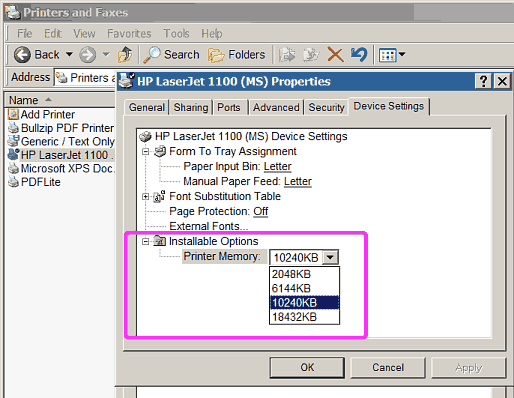

As far as determining if the RAM in the printer is faulty, that i cannot help you with.  There is a real chance that is the problem.

Avatar of Dr. KlahnDr. Klahn

Check the amount of memory installed in the printer (this will be printed on the printer's internal test page), and then confirm that this is the number that is set in the printer's properties page.  If the printer has 128 MB of memory installed but Windows thinks there is only 2 MB, the extra memory in the printer won't be used and the error described above may occur.

User generated image
Another possibility is that the memory in the printer (either on-the-board or add-in) is marginal.  Unfortunately there's no convenient way to test the memory in the printer; add-in memory must be removed and tested in a PC that uses the same type of memory, and on-the-board memory can't be tested at all.

I just upgraded the firmware yesterday - datecode is 30180318.  Current status on display is "Memory is low.  Job canceled.  Press OK to continue"  This persists.

Free T-shirt

Get a FREE t-shirt when you ask your first question.

We believe in human intelligence. Our moderation policy strictly prohibits the use of LLM content in our Q&A threads.


The RAM is replaceable, so that is an option.

That error, HP solution is:
select PRINT --> ADVANCED OPTIONS --> PRINT AS IMAGE.

printer config says 128MB and Windows shows 128 MB also

Reward 1Reward 2Reward 3Reward 4Reward 5Reward 6

EARN REWARDS FOR ASKING, ANSWERING, AND MORE.

Earn free swag for participating on the platform.


we did unplug for 15 minutes - didn't resolve.   Also tried print as image and it didn't work.  using the PCL5 driver did allow the doc to print but the errors persist.  Memory appears to have been corrupted.

Don't forget, you could always use PS or PCL 5 drivers.  Especially the PS should work best for PDF files.  Determine if after powering down for a short while, only try printing with PS and see if the problem persists.

The RAM shouldn't be real expensive.  I would try that next.

Free T-shirt

Get a FREE t-shirt when you ask your first question.

We believe in human intelligence. Our moderation policy strictly prohibits the use of LLM content in our Q&A threads.


Is there a way to clear RAM on this printer?

HP suggested the way to clear the RAM is to power off, hold the right arrow and X together, then turn on.  When display reads 'permanent storage', release keys.  Client did this, printed the bad partial pdf again, and for the moment appears to be OK.

Sometimes it's all about who you get on the support line.

Reward 1Reward 2Reward 3Reward 4Reward 5Reward 6

EARN REWARDS FOR ASKING, ANSWERING, AND MORE.

Earn free swag for participating on the platform.


I am saving this one for future notes.  Glad it appears resolved.

Avatar of hdhondthdhondt🇦🇺

@davebo4503 What you did to "clear the RAM" actually resets the printer to factory defaults. It doesn't clear the RAM (cycling the power does that) but rather the NVRAM (non-volatile memory). It is a good way to clear many crazy printer issues.

If the printer stays fixed, make sure to accept your own answer.

Well it appeared to work and didn't require re-addressing the printer, but it was short-lived.  Error returned shortly afterward.
Client is replacing the printer.

Free T-shirt

Get a FREE t-shirt when you ask your first question.

We believe in human intelligence. Our moderation policy strictly prohibits the use of LLM content in our Q&A threads.


ASKER CERTIFIED SOLUTION
Avatar of davebo4503davebo4503

ASKER

Link to home
membership
Log in or create a free account to see answer.
Signing up is free and takes 30 seconds. No credit card required.
Create Account
Printers and Scanners

Printers and Scanners

--

Questions

--

Followers

Top Experts

A printer is a peripheral which makes a persistent human readable representation of graphics or text on paper or similar physical media. Traditional printers are being used more for special purposes, like printing photographs or artwork, and are no longer a must-have peripheral; 3D printing has become an area of intense interest, allowing the creation of physical objects. An image scanner is a device that optically scans images, printed text, handwriting, or an object, and converts it to a digital image. Hand-held scanners, where the device is moved by hand, have evolved from text scanning "wands" to 3D scanners used for industrial design, reverse engineering, test and measurement, orthotics, gaming and other applications.