
Routers
--
Questions
--
Followers
Top Experts

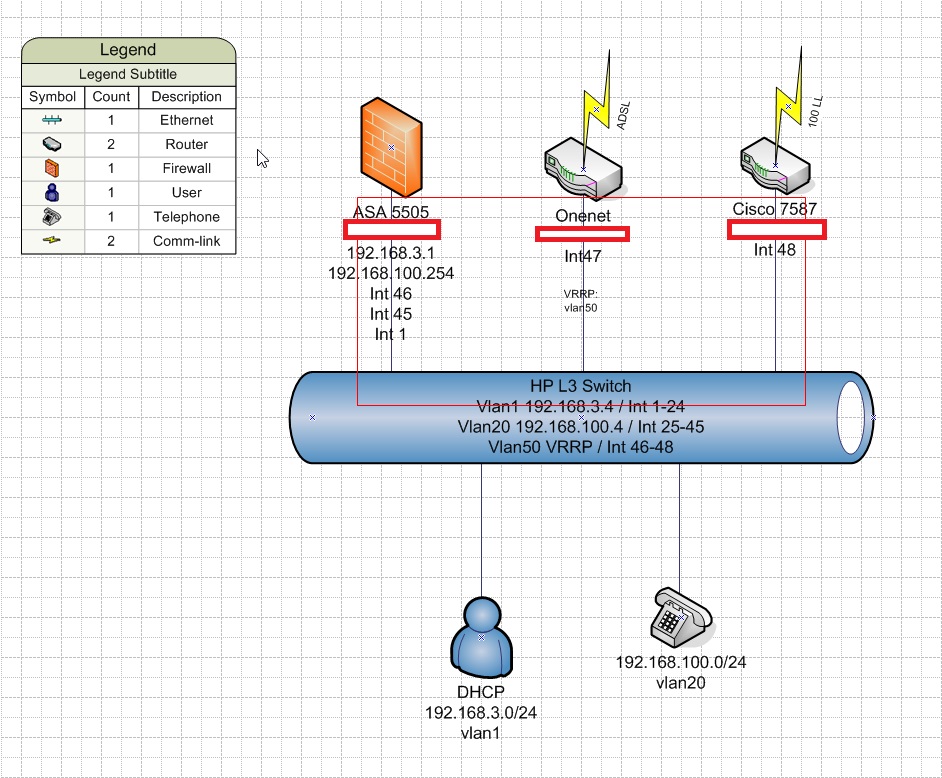
We are moving from incumbent ISP who manage our WAN and firewalls. The current config is the following:
HP L3 switch
vlan1 192.168.3.0/24
vlan20 192.168.100.0/24
vlan50 (no IP)
Firewall connected to vlan1 and vlan20
Router(s) running VRRP and connected to vlan50..
We now are changing the setup slightly for the new config.
Same principle but the firewall is in the cloud as an MPLS.
What/how best to deploy the routers in HSRP?
Thanks
Zero AI Policy
We believe in human intelligence. Our moderation policy strictly prohibits the use of LLM content in our Q&A threads.


Well they want to leverage HSRP.


EARN REWARDS FOR ASKING, ANSWERING, AND MORE.
Earn free swag for participating on the platform.
Configure router's interfaces normally (replace IP addresses with your real IP addresses):
R1:
interface gi0/0
 ip address 10.0.0.2 255.255.255.0
no shutinterface gi0/0
ip address 10.0.0.3 255.255.255.0
no shutinterface gi0/0
standby 1 ip 10.0.0.1There are many optimizations that can be done (timers, priority etc), but that depends on your actual needs. To use VRRP - just replace keyword standby with vrrp. :)
More details regarding HSRP configuration can be found - First Hop Redundancy Protocols Configuration Guide, Cisco IOS XE Release 3S
HP L3 switchThat was my first post. On HP you can't configure HSRP, only on Cisco.
:)
But, if switches are Cisco it would be exactly the same as for routers (except maybe that virtual IP supposed to be configured on SVIs).
Most likely L3 switches are using routing to reach routers:
configure route with virtual IP as next hop (for example for default route):
ip route 0.0.0.0 0.0.0.0 10.0.0.1
You can have HSRP on one side and VRRP on other side, there is no issue there.
SInce vrrp is already present on HP switches. Other side may point to virtual IP of vrrp.
Let's say that vrrp virtual IP address is 172.16.0.1 and path to network 192.168.0.0/24 is in direction of HP L3 switches.
On routers just configure route:
ip 192.168.0.0 255.255.255.0 172.16.0.1
Get a FREE t-shirt when you ask your first question.
We believe in human intelligence. Our moderation policy strictly prohibits the use of LLM content in our Q&A threads.

Where the ARP is answered by the active router. So the MAC address of the active router is known with the shared IP addres.
Thus it provides a transparant way to exit some network. You will need some sharing of information between the routers if the router does stateful inspection because otherwise you will looses all connections when a transition occurs.
Can we use the same vlan50 for HSRP or do we need to add two ports in vlan1 and vlan20 (data and voice) connected to the two routers and tag the ports?
If no IP-address is involved the switches are not part in either VRRP or HSRP... they are used as L2 switches.
EARN REWARDS FOR ASKING, ANSWERING, AND MORE.
Earn free swag for participating on the platform.
So they need IPs?
That means they are indifferent and thus do not take part in HSRP in whatever form you like.
i think HSRP can be hi-jacked by any equipment (capable of HSRP) because there is no authentication between routers employing it.
Yersinia is a tool that can disrupt it see: https://letusexplain.blogspot.nl/2015/10/hacking-cisco-hsrp-with-kali.html for more info.
HSRP is Cisco only because of patent issues. (That should solve itself in a few years though)
For Unix/Linux based routers UCarp might be a better replacement.
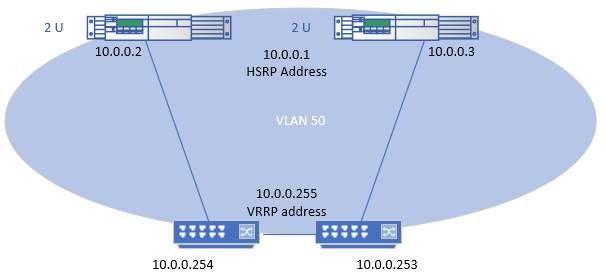
So the L3 switch has vlan50 (with no IP) configured for use with the current cisco routers - using VRRP i believe.Configure VRRP on SVIs for VLAN 50, IP addresses must be present. For high availability for routers in direction of core (If I understand topology).
Get a FREE t-shirt when you ask your first question.
We believe in human intelligence. Our moderation policy strictly prohibits the use of LLM content in our Q&A threads.
(For the same result before and after the change on the routers).
But if VRRP is in direction of Routers with HSRP you need to used the same IP address range.
This would be general idea.
EARN REWARDS FOR ASKING, ANSWERING, AND MORE.
Earn free swag for participating on the platform.
Get a FREE t-shirt when you ask your first question.
We believe in human intelligence. Our moderation policy strictly prohibits the use of LLM content in our Q&A threads.
I guess, your default route is already:
ip route 0.0.0.0 0.0.0.0 192.168.3.1
I guess detail on topology drawing is wrong - firewall is not participate in VRRP and should not be marked with red square (only Cisco 7587 and Onenet are participating in VRRP) .
EARN REWARDS FOR ASKING, ANSWERING, AND MORE.
Earn free swag for participating on the platform.
Running configuration:
; J9729A Configuration Editor; Created on release #WB.15.12.0015
; Ver #05:18.41.ff.35.0d:9b
hostname "HP-2920-48G-POE+ A"
module 1 type j9729a
qos type-of-service diff-services
timesync sntp
sntp unicast
sntp server priority 1 87.124.126.49
sntp server priority 2 178.79.165.21
ip authorized-managers 172.19.0.0 255.255.0.0 access manager
ip authorized-managers 172.16.0.0 255.255.0.0 access manager
ip authorized-managers 192.168.2.0 255.255.255.0 access manager
ip authorized-managers 192.168.3.0 255.255.255.0 access manager
ip authorized-managers 192.168.100.0 255.255.255.0 access manager
ip authorized-managers 10.255.255.0 255.255.255.128 access manager
ip authorized-managers 10.255.254.0 255.255.255.128 access manager
ip default-gateway 192.168.3.1
no ip icmp redirects
ip route 0.0.0.0 0.0.0.0 192.168.3.1
ip route 0.0.0.0 0.0.0.0 192.168.100.254
ip routing
interface 1
name "to asa 5505 e01"
exit
interface 2
name "Colour Printer"
exit
interface 8
name "CJ PC"
exit
interface 9
name "Cisco WAP321"
exit
interface 10
name "RCL PC"
exit
interface 11
name "SL PC"
exit
interface 12
name "JW PC"
exit
interface 13
name "JJ PC"
exit
interface 14
name "MG PC"
exit
interface 15
name "PZ PC"
exit
interface 16
name "Printer 15"
exit
interface 17
name "AY PC"
exit
interface 20
name "Photocopier"
exit
interface 21
name "EP PC"
exit
interface 28
name "CJ Phone"
exit
interface 30
name "PZ Phone"
exit
interface 31
name "AY Phone"
exit
interface 34
name "RCL Phone"
exit
interface 35
name "JW Phone"
exit
interface 37
name "JJ Phone"
exit
interface 38
name "SL Phone"
exit
interface 40
name "MG Phone"
exit
interface 43
name "EP Phone"
exit
interface 44
name "to shoretel lan1"
exit
interface 45
name "to asa 5505 e02"
exit
interface 46
name "to asa 5505 e00"
exit
interface 47
name "onenet"
exit
interface 48
name "cisco 1921"
exit
snmp-server community "public" unrestricted
snmp-server contact " " location "A"
oobm
ip address dhcp-bootp
exit
vlan 1
name "DEFAULT_VLAN"
no untagged 25-48
untagged 1-24,A1-A2,B1-B2
ip address 192.168.3.4 255.255.255.0
exit
vlan 20
name "VLAN20"
untagged 25-26,44-45
tagged 27-43
ip address 192.168.100.1 255.255.255.0
qos dscp 101110
voice
exit
vlan 50
name "vlan50"
untagged 46-48
no ip address
exit
no tftp server
no autorun
no dhcp config-file-update
no dhcp image-file-update
password manager
password operator
 Route:
ip route 0.0.0.0 0.0.0.0 192.168.100.254
Could be deleted since are, most likely, irrelevant - default gateway IP address most likely is not on present on Switch, but it is present elsewhere (on Firewall?). Switch itself is forwarding management traffic to firewall (ip default-gateway 192.168.3.1)
Check IP addresses of VLAN 10 and VLAN 20 devices. Are IP addresses 192.168.3.1, 192.168.100.254 (My assumption is that currently HP switch is configured for routing, but is actually not using it.
If route ip route 0.0.0.0 0.0.0.0 192.168.100.254 is active it would create a lot of problems. So my guess that traffic is forwarded to firewall and then firewall is forwarding traffic into VLAN 50 to virtual public IP address .
route outside 0.0.0.0 0.0.0.0 x.x.x.x <-- x.x.x.x is current virtual vrrp IP address
Get a FREE t-shirt when you ask your first question.
We believe in human intelligence. Our moderation policy strictly prohibits the use of LLM content in our Q&A threads.
ACC047444-ASA5505# show running-config
: Saved
:
ASA Version 8.4(5)
!
hostname
enable password ************** encrypted
passwd ************** encrypted
names
!
interface Ethernet0/0
switchport access vlan 2
!
interface Ethernet0/1
!
interface Ethernet0/2
switchport access vlan 20
!
interface Ethernet0/3
!
interface Ethernet0/4
!
interface Ethernet0/5
!
interface Ethernet0/6
switchport access vlan 2
!
interface Ethernet0/7
switchport access vlan 901
!
interface Vlan1
nameif inside
security-level 100
ip address 192.168.3.1 255.255.255.0
!
interface Vlan2
nameif outside
security-level 0
ip address WAN IP 255.255.255.248
!
interface Vlan20
nameif voice
security-level 50
ip address 192.168.100.254 255.255.255.0
!
interface Vlan901
nameif OOB-MGMT
security-level 0
ip address 10.255.255.254 255.255.255.0

Used two spare ports configured on vlan1 and 20.
Routers
--
Questions
--
Followers
Top Experts
A router is a networking device that forwards data packets between computer networks. Routers perform the "traffic directing" functions on the Internet. The most familiar type of routers are home and small office cable or DSL routers that simply pass data, such as web pages, email, IM, and videos between computers and the Internet. More sophisticated routers, such as enterprise routers, connect large business or ISP networks up to the powerful core routers that forward data at high speed along the optical fiber lines of the Internet backbone. Though routers are typically dedicated hardware devices, use of software-based routers has grown increasingly common.