
Networking
--
Questions
--
Followers
Top Experts

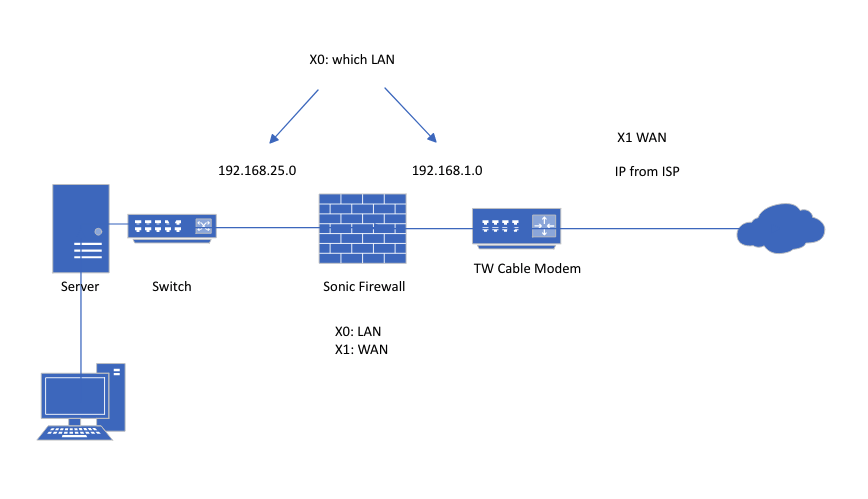 If the configuration with the Time Warner modem were in bridge mode I would create NAT's for X0 and X1 however in the network above it's obvious more configuration is needed on the SonicWall.
 May be worth noting they're not configured with a static IP either. I plan to use Dyn DNS or something similar to address this.
Ultimate goal is configure L2TP VPN server to allow VPN access. I have everything configured for VPN and the users as well, error message just reports can't reach the VPN server.
Zero AI Policy
We believe in human intelligence. Our moderation policy strictly prohibits the use of LLM content in our Q&A threads.

It will be vary hard to configure VPN connection to your internal LAN 192.168.25.0 passing through Modem NAT
I assume you want to use RRAS server configured on your"Server" tower
If you know how VPN is working then you should know that client from outside your network is waiting for authentication and IP from your internal DHCP server to establish tunel
Since you have NAT between your WAN and LAN on Modem, connection can't be established since your Internal DHCP can;t provide local IP through NAT for external client.
You can try a trick. If is possible try to put your "Server" IP to DMZ on sonic then test VPN.
It should work that way, but it will be not very secure.
I think that you have 2 choices.
1. Is to switch modem to Bridge mode and all firewall rules can be configured on SonicWall
2. You can try to put SonicWall WAN IP to Modem DMZ, so all ports will be forwarded (it will work almost like Bridge)
Please let me know if this has any sense for you.
I assume you want to use RRAS server configured on your"Server" towerno actually I don't want to use RRAS at all, I want to make a VPN connection into the L2TP server on the firewall only. RRAS will not be used.
Since you have NAT between your WAN and LAN on Modem, connection can't be established since your Internal DHCP can;t provide local IP through NAT for external client.more reason to go to bridge mode - correct. Not sure I want to mess with the DMZ, will have more regarding this when I take a look at the modem today and get more info regarding it.
Thanks Tom.


EARN REWARDS FOR ASKING, ANSWERING, AND MORE.
Earn free swag for participating on the platform.

Also as Tom mentioned, you only need one LAN (unless you need multiple internal LANs for something). Only the WAN port should be connected to the TW modem.
If for some reason the TW modem cannot be configured into bridge mode, I would recommend replacing it with a modem-only unit. That will keep your life *far* easier.
That's all you can do

I don't know about TW, but I have seen instances where you can connect directly to a router with static public IP (Comcast when you have one of their business gateways). But even then, you're only using one LAN port, and the WAN is connected to the modem/router.
Get a FREE t-shirt when you ask your first question.
We believe in human intelligence. Our moderation policy strictly prohibits the use of LLM content in our Q&A threads.
Networking
--
Questions
--
Followers
Top Experts
Networking is the process of connecting computing devices, peripherals and terminals together through a system that uses wiring, cabling or radio waves that enable their users to communicate, share information and interact over distances. Often associated are issues regarding operating systems, hardware and equipment, cloud and virtual networking, protocols, architecture, storage and management.