
Microsoft Office
--
Questions
--
Followers
Top Experts

 Note that this tenant was created a few years back s didnt have the default labels.
 So we have created some labels
 The Global policy applies to all users and the 'IT' policy applies to just me.
 I have installed the Azure IRM Client onto my PC, restarted Outlook and now I see the following when opening a new email:
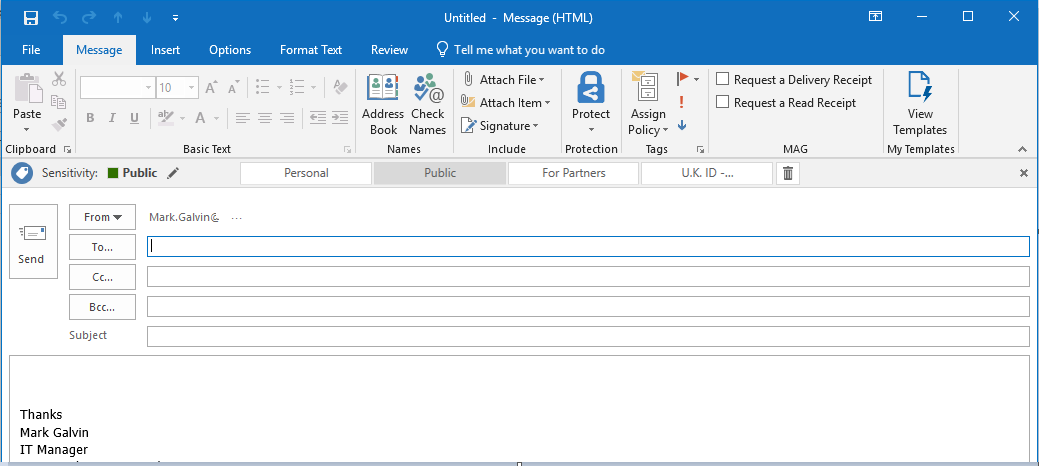 Which is perfect,
The issue is that any label which has Protection enabled, say the 'U.K. ID - Attachment Encryption' one, if I select it I see:
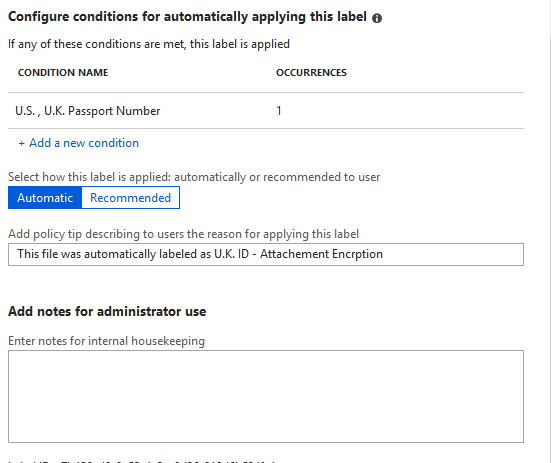
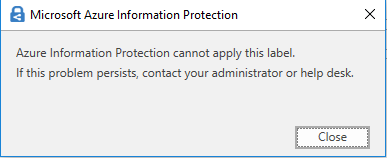 Here is how that Label is setup:
Now, I can go into the Office 365 Exchange Admin portal and configure Mail Rules like this:
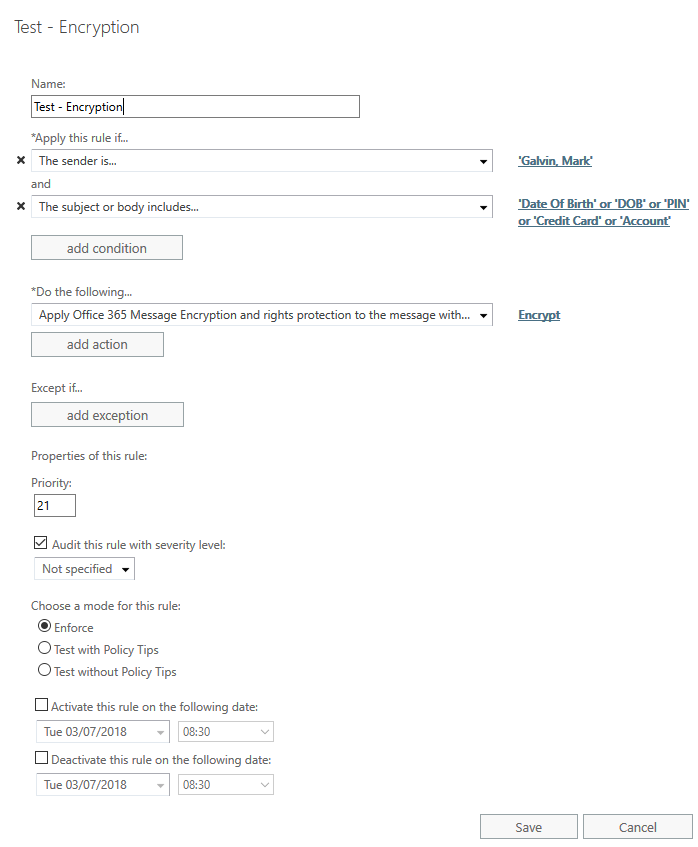 which works perfectly. Here are the RMS Templates available to me: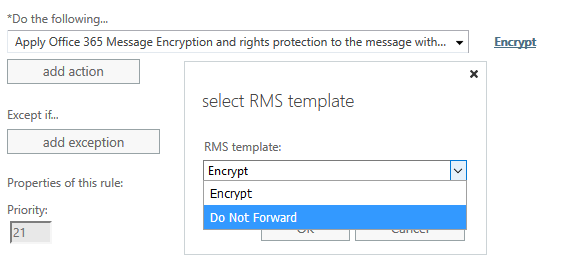
So, my questions/issues are:
- How can I resolve the error, when selecting a Protect Label from withing Outlook 2016?
- Where are the RMS Templates coming from? It doesn't seem to match the list of Labels
The end goal here is to allow Outlook users to apply a Label which will encrypt the email. If I am using the wrong element then please do let me know.
That will do for now!
Thanks
Mark
Zero AI Policy
We believe in human intelligence. Our moderation policy strictly prohibits the use of LLM content in our Q&A threads.


I think we are going to stick with RMS for now. I had already run through that yesterday and its working fine (hence working in Mail Flow).
Can you point me in the right direction for how to create new RMS Templates please?
thanks
Mark
Or if you prefer PowerShell: https://docs.microsoft.com/en-us/powershell/module/aadrm/add-aadrmtemplate?view=azureipps
In general, you have access to few default templates: https://docs.microsoft.com/en-us/azure/information-protection/deploy-use/configure-usage-rights#rights-included-in-the-default-templates
You also have "Do not forward" template: https://docs.microsoft.com/en-us/azure/information-protection/deploy-use/configure-usage-rights#do-not-forward-option-for-emails
and the "Encrypt only" one: https://docs.microsoft.com/en-us/azure/information-protection/deploy-use/configure-usage-rights#encrypt-only-option-for-emails
Any newly created templates will be visible in Exchange after an hours or so. The cmdlets we used previously to refresh the templates are now deprecated.
Because we enabled RMS yesterday in OWA we can now see in the ribbon 'Protect' and from there we can select 'Encrypt' or 'Do Not Forward'. Tested these and they allow users to encrypt emails if they wish.
I assume that to get that to work in Outlook 2016 we need to have the AIP license assigned to a user AND have the AIP Client installed?


EARN REWARDS FOR ASKING, ANSWERING, AND MORE.
Earn free swag for participating on the platform.
Bottom line - if you only care about Outlook, and using "traditional" templates, you should be able to use them without the AIP client. And in 99% of the cases that will be enough. If you want to use RMS/AIP with all the other Office applications, the AIP client will give you a lot more flexibility. It will also allow you to classify/protect any file type directly from Windows Explorer, which is a great feature to have. So as you have purchased the licenses already, I'd definitely go with the AIP client.
The requirement is :for GDPR Outlook users (both web and desktop) need to be able to encrypt emails when sending data that is deemed 'identifiable'. Currently they are using WinRAR to zip up but they need something a little more fluid & automated.
Now, I have configured that test rule mail flow and it works fine. If I send an email to my iCloud account with the phrase 'date of birth' in the email, it encrypts the email and then I can access using the process found here - https://support.office.com/en-us/article/How-do-I-open-a-protected-message-1157a286-8ecc-4b1e-ac43-2a608fbf3098?ui=en-US&rs=en-US&ad=US .However when I try to download any file attached I then need to log into Office 365 which I owuld like to avoid as some clients of my client doesnt use Office 365. So this feels like a rights assignment issue under the Encrypt RMS feature.
How would you achieve both Outlook desktop and Web users being able to encrypt email as & when they need to?
The other party will still have to open the protected message via the method you mentioned above, but Outlook for mobiles supports this functionality natively.
An update to that feature is currently rolling out, the so-called "encrypt-only" template: https://docs.microsoft.com/en-us/azure/information-protection/deploy-use/configure-usage-rights#encrypt-only-option-for-emails
As it will apply to attachments as well, you have some options to control the behavior.
Get a FREE t-shirt when you ask your first question.
We believe in human intelligence. Our moderation policy strictly prohibits the use of LLM content in our Q&A threads.
So I have just tested the OME feature by creating a mail flow rule that makes any email sent to my iCloud acocunt gets the OME applied:
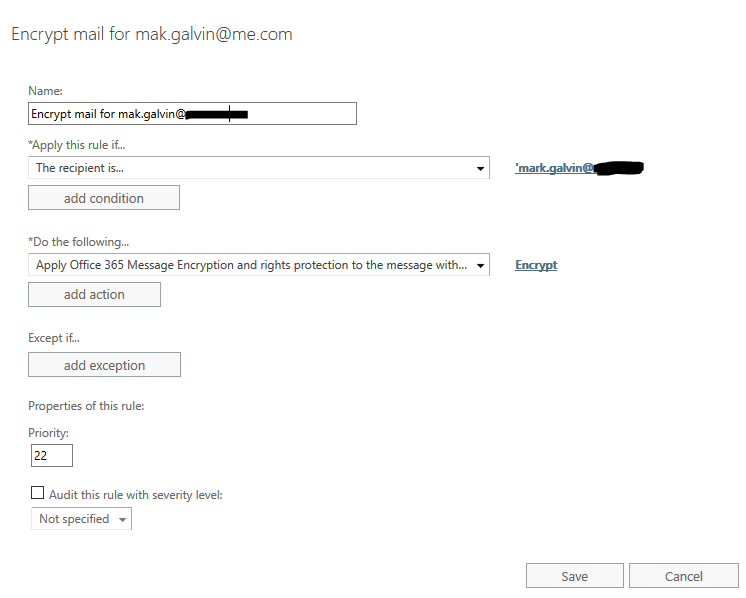
Sent an Excel file to my iCloud account. Received an email stating 'Galvin, Mark (mark.galvin@.co.uk) has sent you a protected message.'. I have clicked the link and it opens in the OME Portal. I have then clicked the 'request one-time passcode to view the message' as I am testing this from the perspective of a user that does not have Office 365 or any other Microsoft account. Once the one time passcode arrives n my iCloud account, I copy the passcode and it opens the email in the OME portal. I then am able to download the Excel file. When I try to open it I get a log on box asking me to log in:

For my client to utilise this type of encryption te recipient must be able to access any file without any rights access issues.
Thanks
Mark
Microsoft Office
--
Questions
--
Followers
Top Experts
Microsoft Office is an integrated suite of applications that includes Outlook, Word, Excel, Access, PowerPoint, Visio and InfoPath, along with a number of tools to assist in making the individual components work together. Coding within and between the projects is done in Visual Basic for Applications, known as VBA.