
Windows Networking
--
Questions
--
Followers
Top Experts

 Comp2-Statis.PNG
Comp1-Network-view.PNG
Comp1-Network-status.PNG
Zero AI Policy
We believe in human intelligence. Our moderation policy strictly prohibits the use of LLM content in our Q&A threads.


Then try access Comp1 from Comp2 by typing \\comp1 in File Explorer:
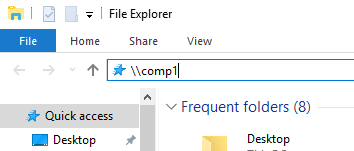
and vice versa from Comp1.
Note: unless you have a domain, to make this work seemlessly, you'll want to create user accounts on BOTH systems that are identical user names and passwords. For example, if you log in as beemmer on one computer MAKE SURE you have the SAME account on the other computer with the same password!

Also try File, Run, \\IP Address of Other Computer
Confirm that you have Network Discovery enabled on both


EARN REWARDS FOR ASKING, ANSWERING, AND MORE.
Earn free swag for participating on the platform.

Note this is the most simple method to get them to see each other.
Make sure both computers have the same workgroup name (right click this PC (my computer) >> properties) you will see the computer name and workgroup name near the bottom.
Make sure each computer identifies the network as a home network (right click the network icon on the task bar >> network and sharing center >> look at the network icon -- it will say home, work, or public. You can click on it to change.
Also while in the network and sharing center, click on advanced settings. make sure...
For home or work networks (whichever you selected above)
Network discovery is turned on
File and printer sharing is turned on
Public folder sharing is turned on (optional)
Password protected sharing is turned off (avoids the complexity of setting up userIDs etc.) unless its absolutely needed.
While setting up the network, if it asks, allow network discovery and file sharing.
It can take a few minutes for changes to propagate. Go to my computer, click on the network (left panel) and then in an open space on the right side, rick click and select refresh. Eventually, if all went well you will see the other PC. If not and the setting were set as described, you may need to reboot them.


Get a FREE t-shirt when you ask your first question.
We believe in human intelligence. Our moderation policy strictly prohibits the use of LLM content in our Q&A threads.
Windows Networking
--
Questions
--
Followers
Top Experts
The Windows operating systems have distinct methodologies for designing and implementing networks, and have specific systems to accomplish various networking processes, such as Exchange for email, Sharepoint for shared files and programs, and IIS for delivery of web pages. Microsoft also produces server technologies for networked database use, security and virtualization.