
Wireless Networking
--
Questions
--
Followers
Top Experts

This is my first post to Exchange Experts. I always tried to find my way by trying different solutions to the issues I had however I ma now facing DHCP issue on our new site with sonicwall product I have never used. Never used sonicwalls at all.
So I have below interfaces set:
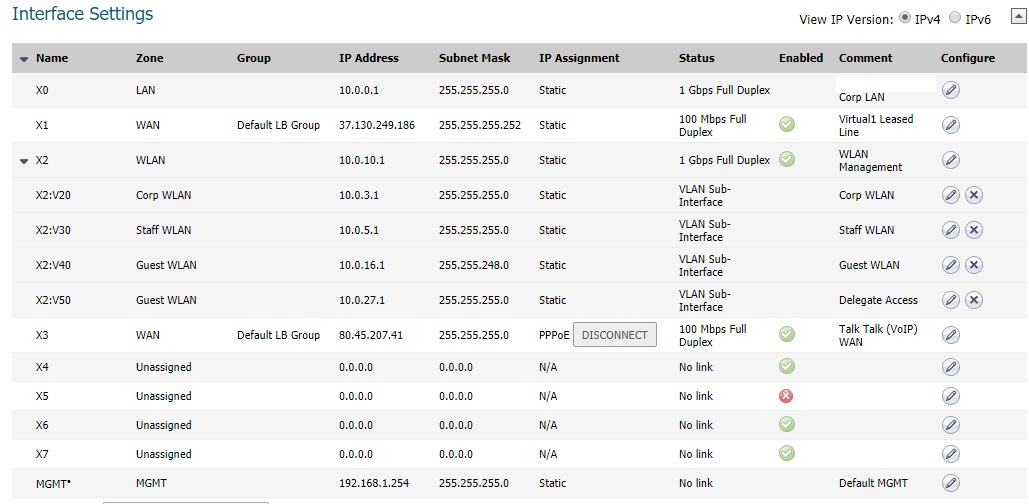
At this site corporate WLAN on X2:V20 is our corporate WIFI with DHCP served from SonicWall with range 10.0.3.xxx to 10.0.3.200
X0 with subnet 10.0.0.1 is a Corporate LAN with DHCP served from Widnows Server 2016 deployed by me with subnet range 10.0.0.xxx to 10.0.0.200
Now I have to merge those so the WLAN network take DHCP from the Windows server instead of sonicwall.
Sonicwall Model: NSA 2600
Any suggestions please?
Zero AI Policy
We believe in human intelligence. Our moderation policy strictly prohibits the use of LLM content in our Q&A threads.

You can however move the 10.0.3.0/4 DHCP scope to your DHCP server, remove the Scope and create an IP Helper policy on the SonicWall.
An alternative is moving that specific VLAN to a Layer2 Bridge with X0. This depends on if your firmware supports it.
Thank you for your reply.
I dont want to move the DHCP, I dont want o use this Scope at all as we have domain scope within 10.0.0.xxx range.
"An alternative is moving that specific VLAN to a Layer2 Bridge with X0. This depends on if your firmware supports it."
This is the way I have worked out last night but is this a good practice?
Although L2B makes it simple in a number of cases, routing wise, especially with VPN routing, can be problematic.
If you are not seeing any issues with routing (especially between WLANs), L2B probably will work for your needs.


EARN REWARDS FOR ASKING, ANSWERING, AND MORE.
Earn free swag for participating on the platform.
Issue I am facing having it done that way is that wifi network is recognised as Public Unauthenticated as per below screenshot:
Both however are within the same subnet 10.0.0.xxx
This is on multiple pcs on Windows 10 Pro
I have tried rebooting DC/DHCP no luck.
unauthenticated_network.png
Get a FREE t-shirt when you ask your first question.
We believe in human intelligence. Our moderation policy strictly prohibits the use of LLM content in our Q&A threads.
try adding a WLAN to LAN NetBIOS IP helper policy.
enable IP helper
enable NetBIOS protocol
click accept
add a new policy
protocol NetBIOS
Source X2:V20
Destination X0 subnet
EARN REWARDS FOR ASKING, ANSWERING, AND MORE.
Earn free swag for participating on the platform.
Address range overlaps with another range
suggest you use WINS server instead
Get a FREE t-shirt when you ask your first question.
We believe in human intelligence. Our moderation policy strictly prohibits the use of LLM content in our Q&A threads.

Wireless Networking
--
Questions
--
Followers
Top Experts
Wireless networking is anything related to the transfer of data between two (or more) devices without the use of a physical connection, ranging from getting advice on a new Bluetooth headset to configuring sophisticated enterprise level networks.