
Windows OS
--
Questions
--
Followers
Top Experts

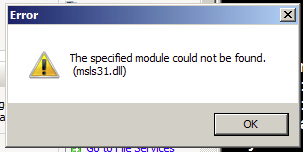
However, every time I click on the Start button for the 1st time I get a windows Error Pop-Up, "The specified module could not be found. (msls32.dll)"
After clicking on OK, the Start Drop Down opens.
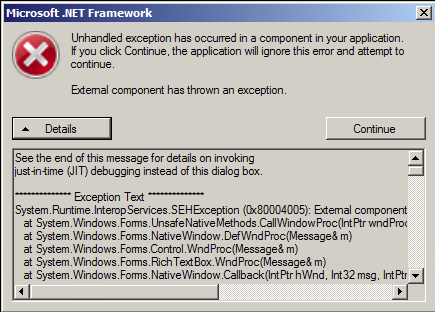
I'm able to install the Windows Update, but when I try to Install the Veeam Backup & Replication Update 9.5.4 . I get the Please wait little Pop-Up and it runs for about 5 to 10 minutes and then I get a Microsoft .NET framework error: "Unhandled exception has occurred in a component in your applaction.".
Zero AI Policy
We believe in human intelligence. Our moderation policy strictly prohibits the use of LLM content in our Q&A threads.

Next, since that file is a core Windows file, the first thing you should do is run "sfc /scannow" and reboot after it's finished. I would also make sure you have some good antivirus software installed - that file shouldn't just go missing by itself.
I performed the scan like you said. However, I'm getting a Windows Resource Protection found corrupt files but was unable to fix some of them.
If that still gives you trouble, you can try running this command to repair the component store:
Dism /Online /Cleanup-Image /RestoreHealth


EARN REWARDS FOR ASKING, ANSWERING, AND MORE.
Earn free swag for participating on the platform.
When I try the Dism statement I get an Error: 87 " The Restorehealth option is not recognized in this context. For more information, refer to the help.
Any other suggestions.
https://support.microsoft.com/en-us/help/947821/fix-windows-update-errors-by-using-the-dism-or-system-update-readiness
Download the right one for your system (there's a 32-bit and a 64-bit package, so pick the one based on which version of Server 2008 R2 you have installed - probably 64-bit but you never know) and run that.
After it runs, try the sfc /scannow tool again.
Get a FREE t-shirt when you ask your first question.
We believe in human intelligence. Our moderation policy strictly prohibits the use of LLM content in our Q&A threads.
While, the patch installed completely, when I ran the scan again it failed again.
Any other suggestions?
EARN REWARDS FOR ASKING, ANSWERING, AND MORE.
Earn free swag for participating on the platform.

I thought I had already mentioned this but it doesn't look like I did, so make sure you run chkdsk on both the VM instance and and on the host.
Get a FREE t-shirt when you ask your first question.
We believe in human intelligence. Our moderation policy strictly prohibits the use of LLM content in our Q&A threads.
Looks like I'm going to have to just reinstall the OS. Thanks.
Windows OS
--
Questions
--
Followers
Top Experts
This topic area includes legacy versions of Windows prior to Windows 2000: Windows 3/3.1, Windows 95 and Windows 98, plus any other Windows-related versions including Windows Mobile.