
JavaScript
--
Questions
--
Followers
Top Experts

Clear dropdown text in JQuery datatable
Hi,
I have a datatable with dropdowns on some columns that filter what it is shown. Then I have a "Clear Filters" button that clears all the filters and therefore all data is displayed. So far so good.
Although, after the filters get reset, the text of whatever filters were applied remains in the dropdown, giving the impression that the table was filtered by that text when in reality it is not since all the filters were cleared.
I found some code but it only clears the text appearing in one of the dropdowns(Priority). I attached a screenshot where you can see that Priority is the only dropdown that got cleared, while LastUpdated, AssignedTo, Status, RequestType, Location and Category were not cleared and have text still appearing in them.
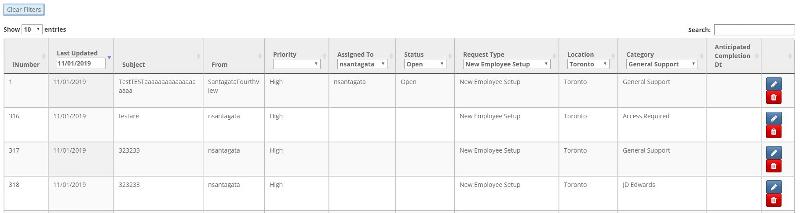
How can I clear the text that appears in the dropdowns once the "Clear Filters" button is clicked?
JAVASCRIPT CODE:
HTML:
I have a datatable with dropdowns on some columns that filter what it is shown. Then I have a "Clear Filters" button that clears all the filters and therefore all data is displayed. So far so good.
Although, after the filters get reset, the text of whatever filters were applied remains in the dropdown, giving the impression that the table was filtered by that text when in reality it is not since all the filters were cleared.
I found some code but it only clears the text appearing in one of the dropdowns(Priority). I attached a screenshot where you can see that Priority is the only dropdown that got cleared, while LastUpdated, AssignedTo, Status, RequestType, Location and Category were not cleared and have text still appearing in them.
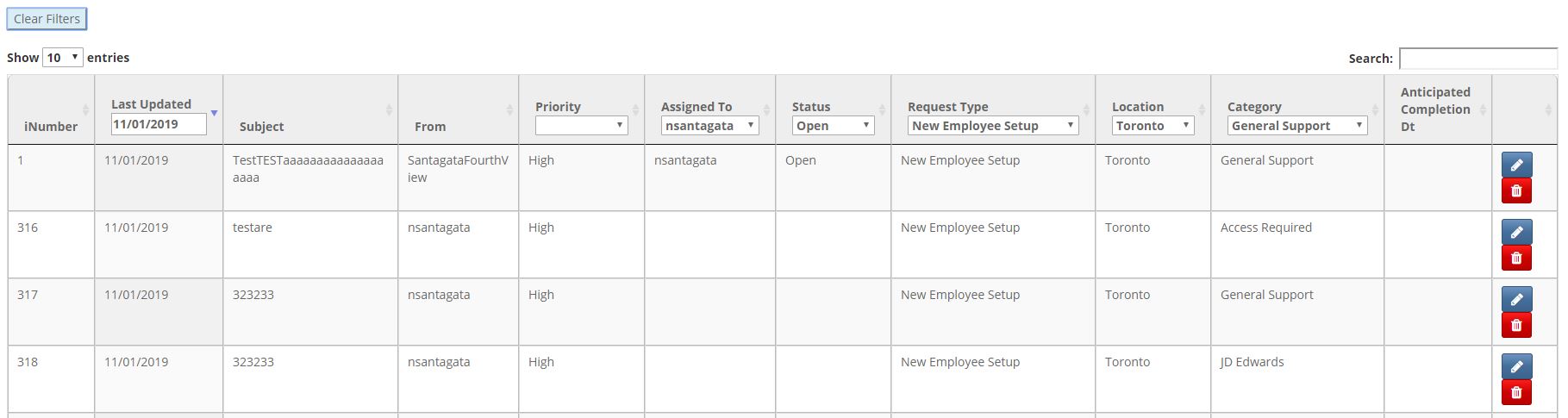
How can I clear the text that appears in the dropdowns once the "Clear Filters" button is clicked?
JAVASCRIPT CODE:
@section scripts
{
    @Scripts.Render("~/bundles/jqueryval")

    @*jQuery Datatable*@
    <script type="text/javascript" charset="utf8"
                    src="https://cdn.datatables.net/1.10.16/js/jquery.dataTables.js"></script>

    <script src="https://code.jquery.com/ui/1.11.4/jquery-ui.js"></script>
    <script src="https://cdn.datatables.net/responsive/2.2.3/js/dataTables.responsive.min.js"></script>
    <script src="https://cdn.datatables.net/colreorder/1.5.2/js/dataTables.colReorder.min.js"></script>

    <script>
        function activatejQueryTable() {

            var table = $('#ticketTable').DataTable({
                rowReorder: { selector: 'tr' },
                colReorder: true,
                "stateSave": true,
                "stateDuration": 0,
                "autoWidth": false,
                "columnDefs": [
                    { "width": "40px", "targets": 0, "visible": true },
                    { "width": "150px", "targets": 1, "visible": true },    //dtLastUpdated
                    { "width": "250px", "targets": 2, "visible": true },    //vcSubject
                    { "width": "150px", "targets": 3, "visible": true },    //vcFrom
                    { "width": "53px", "targets": 4, "visible": true },     //vcPriority
                    { "width": "90px", "targets": 5, "visible": true },     //vcAssignedTo
                    { "width": "53px", "targets": 6, "visible": true },     //vcStatus
                    { "width": "90px", "targets": 7, "visible": true },     //vcRequestType
                    { "width": "90px", "targets": 8, "visible": true },     //vcLocation
                    { "width": "90px", "targets": 9, "visible": true },     //vcCategory
                    { "width": "90px", "targets": 10, "visible": true },    //dtAnticipatedCompletion
                    { "width": "50px", "targets": 11, "visible": true }     //edit and delete buttons
                ],

                //Create the dropdowns
                responsive: true,
                "bAutoWidth": false,
                initComplete: function () {
                    this.api().columns([4, 5, 6, 7, 8, 9]).every(function () {
                        var column = this;

                        var select = $('<select id="myDropdown"><option value=""></option></select>')
                            .appendTo($("#filters").find("th").eq(column.index()))
                            .on('change', function () {
                                var val = $.fn.dataTable.util.escapeRegex($(this).val());
                                column.search(val ? '^' + val + '$' : '', true, false).draw();
                            })
                            .on('click', function (e) {
                                e.stopPropagation();
                            });


                        column.data().unique().sort().each(function (d, j) {
                            $(select).append('<option value="' + d + '">' + d + '</option>')
                        });
                    });
                }
                //End of create dropdowns
            });


            $(".datepicker").datepicker({
                maxDate: 0,
                changeMonth: true,
                changeYear: true,
                dateFormat: 'mm/dd/yy',
                onClose: function (selectedDate) {
                    table.draw();
                }
            }).on("input change", function () {

                filterGlobal();
            });

        }


        //part of Datepicker for dtLastUpdated column
        function filterGlobal() {
            $('#ticketTable').DataTable().search(
                $(".datepicker").val()
            ).draw();
        }


       $(function () {
            activatejQueryTable();
        });


        function cleanFilters() {
        $('#filterBtn').click( function () {
            $('#ticketTable').DataTable().search('').draw();     //CLEARs only THE SEARCH TEXTBOX FILTER
            $('#ticketTable').DataTable().columns().every(function () { this.search('') });
            $('#ticketTable').DataTable().columns('').search('').draw();        //Clears the drop-down filters
            $("#myDropdown").val('').change();                                            //Clears the text of the dropdowns, but only works on Priority column
        });
        }

        $(function () {
            cleanFilters();
        });
    </script>
}HTML:
<input type="submit" value="Clear Filters" id="filterBtn" class="bg-info">
<br />
<br />

    <table class="display table table-striped table-bordered" id="ticketTable" style="width:100%">
        <thead>
            <tr id="filters">
                <th>
                    @Html.DisplayNameFor(model => model.iNumber)
                </th>
                <th>
                    @Html.DisplayNameFor(model => model.dtLastUpdated)
                    <input type="text" id="datepicker" class="datepicker">    @*readonly="readonly"*@
                </th>
                <th>
                    @Html.DisplayNameFor(model => model.vcSubject)
                </th>
                <th>
                    @Html.DisplayNameFor(model => model.vcFrom)
                </th>
                <th>
                    @Html.DisplayNameFor(model => model.vcPriority)
                </th>
                <th>
                    @Html.DisplayNameFor(model => model.vcAssignedTo)
                </th>
                @*<th>
                    @Html.DisplayNameFor(model => model.dtAssignedDate)
                </th>*@
                <th>
                    @Html.DisplayNameFor(model => model.vcStatus)
                </th>
                <th>
                    @Html.DisplayNameFor(model => model.vcRequestType)
                </th>
                @*<th>
                    @Html.DisplayNameFor(model => model.vcBody)
                </th>
                <th>
                    @Html.DisplayNameFor(model => model.dtDateSubmitted)
                </th>*@
                <th>
                    @Html.DisplayNameFor(model => model.vcLocation)
                </th>
                <th>
                    @Html.DisplayNameFor(model => model.vcCategory)
                </th>
                <th>
                    @Html.DisplayNameFor(model => model.dtAnticipatedCompletion)
                </th>
                <th></th>
            </tr>
        </thead>

        <tbody>
            @foreach (var item in Model)
            {
            <tr>
                <td>
                    @Html.DisplayFor(modelItem => item.iNumber)
                </td>
                <td>
                    @Html.DisplayFor(modelItem => item.dtLastUpdated)
                </td>
                <td>
                    @Html.DisplayFor(modelItem => item.vcSubject)
                </td>
                <td>
                    @Html.DisplayFor(modelItem => item.vcFrom)
                </td>
                <td>
                    @Html.DisplayFor(modelItem => item.vcPriority)
                </td>
                <td>
                    @Html.DisplayFor(modelItem => item.vcAssignedTo)
                </td>
                @*<td>
                    @Html.DisplayFor(modelItem => item.dtAssignedDate)
                </td>*@
                <td>
                    @Html.DisplayFor(modelItem => item.vcStatus)
                </td>
                <td>
                    @Html.DisplayFor(modelItem => item.vcRequestType)
                </td>
                @*<td>
                    @Html.DisplayFor(modelItem => item.vcBody)
                </td>
                <td>
                    @Html.DisplayFor(modelItem => item.dtDateSubmitted)
                </td>*@
                <td>
                    @Html.DisplayFor(modelItem => item.vcLocation)
                </td>
                <td>
                    @Html.DisplayFor(modelItem => item.vcCategory)
                </td>
                <td>
                    @Html.DisplayFor(modelItem => item.dtAnticipatedCompletion)
                </td>
                <td>

                    <a class="btn btn-primary btn-sm" onclick="Edit('@Url.Action("EditOneRecord", "Tickets",
                                              new { id = item.iNumber })')"><i class="fa fa-pencil fa-lg"></i></a>
                    <a class="btn btn-danger btn-sm" onclick="Delete('@Url.Action("Delete", "Tickets", new {
                                              id = item.iNumber })')"><i class="fa fa-trash fa-lg"></i></a>
                </td>
            </tr>
            }
        </tbody>
</table>Zero AI Policy
We believe in human intelligence. Our moderation policy strictly prohibits the use of LLM content in our Q&A threads.

There's a problem here:
Because this runs for multiple columns, you're ending up with several HTML select elements with the same ID, which is invalid HTML. So, my recommendation is to swap the ID for a class:
Then, you'll want to iterate over the elements with the class when you clear the text:
var select = $('<select id="myDropdown"><option value=""></option></select>')Because this runs for multiple columns, you're ending up with several HTML select elements with the same ID, which is invalid HTML. So, my recommendation is to swap the ID for a class:
var select = $('<select class="myDropdown"><option value=""></option></select>')Then, you'll want to iterate over the elements with the class when you clear the text:
$('.myDropdown').each(function(i, obj) {
    $(this).val('').change();  //clear the text of the current element and trigger the change event on that element (I'm not sure you want to trigger the change event on each of the select drop downs... depends on what you're trying to do)
});
I will try it and let you know. Thanks
ASKER CERTIFIED SOLUTION


membership
Log in or create a free account to see answer.
Signing up is free and takes 30 seconds. No credit card required.
Hi,
It works on all of the columns with a drop-down but it does not on the LastUpdated column which has a datetimepicker. How could I clear the text of that as well? Thank you.
This is the code I have so far:
It works on all of the columns with a drop-down but it does not on the LastUpdated column which has a datetimepicker. How could I clear the text of that as well? Thank you.
This is the code I have so far:
var table = $('#ticketTable').DataTable({
                rowReorder: { selector: 'tr' },
                colReorder: true,
                "stateSave": true,
                "stateDuration": 0,
                "autoWidth": false,
                "columnDefs": [
                    { "width": "40px", "targets": 0, "visible": true },
                    { "width": "150px", "targets": 1, "visible": true },
                    { "width": "250px", "targets": 2, "visible": true },
                    { "width": "150px", "targets": 3, "visible": true },
                    { "width": "53px", "targets": 4, "visible": true },
                    { "width": "90px", "targets": 5, "visible": true },
                    { "width": "53px", "targets": 6, "visible": true },
                    { "width": "90px", "targets": 7, "visible": true },
                    { "width": "90px", "targets": 8, "visible": true },
                    { "width": "90px", "targets": 9, "visible": true },
                    { "width": "90px", "targets": 10, "visible": true },
                    { "width": "50px", "targets": 11, "visible": true }
                ],

                //Create the dropdowns
                responsive: true,
                "bAutoWidth": false,
                initComplete: function () {
                    this.api().columns([4, 5, 6, 7, 8, 9]).every(function () {
                        var column = this;

                        var select = $('<select class="myDropdown"><option value=""></option></select>')
                            .appendTo($("#filters").find("th").eq(column.index()))
                            .on('change', function () {
                                var val = $.fn.dataTable.util.escapeRegex($(this).val());
                                column.search(val ? '^' + val + '$' : '', true, false).draw();
                            })
                            .on('click', function (e) {
                                e.stopPropagation();
                            });

                        column.data().unique().sort().each(function (d, j) {
                            $(select).append('<option value="' + d + '">' + d + '</option>')
                        });
                    });
                }
                //End of create dropdowns
            });


            //Datepicker for dtLastUpdated column, which has id="datepicker" and class="datepicker"
            $(".datepicker").datepicker({
                maxDate: 0,
                changeMonth: true,
                changeYear: true,
                dateFormat: 'mm/dd/yy',
                onClose: function (selectedDate) {
                    table.draw();
                }
            }).on("input change", function () {

                filterGlobal();
            });
        }
        //});

        function filterGlobal() {
            $('#ticketTable').DataTable().search(
                $(".datepicker").val()
            ).draw();
        }


        $(function () {
            activatejQueryTable();
        });


        function cleanFilters() {
        $('#filterBtn').click( function () {
            $('#ticketTable').DataTable().search('').draw();                //Clears only the search textbox
            $('#ticketTable').DataTable().columns('').search('').draw();    //Clears the drop-down filters
            $('.myDropdown').each(function (i, obj) {                       //Clears the text appearing in the textbox
                $(this).val('').change();                                   //Clears the text of the current element and trigger the change event on that element
            });
        });
        }

        $(function () {
            cleanFilters();
        });
    </script>


EARN REWARDS FOR ASKING, ANSWERING, AND MORE.
Earn free swag for participating on the platform.
SOLUTION
membership
Log in or create a free account to see answer.
Signing up is free and takes 30 seconds. No credit card required.
Thank you very much! Very helpful.
For the second issue this code was the one to work:
$('.datepicker').datepicke
For the second issue this code was the one to work:
$('.datepicker').datepicke
JavaScript
--
Questions
--
Followers
Top Experts
JavaScript is a dynamic, object-based language commonly used for client-side scripting in web browsers. Recently, server side JavaScript frameworks have also emerged. JavaScript runs on nearly every operating system and in almost every mainstream web browser.