
Windows OS
--
Questions
--
Followers
Top Experts

SCCM Required and Available Install
SCCM Required and Available Install
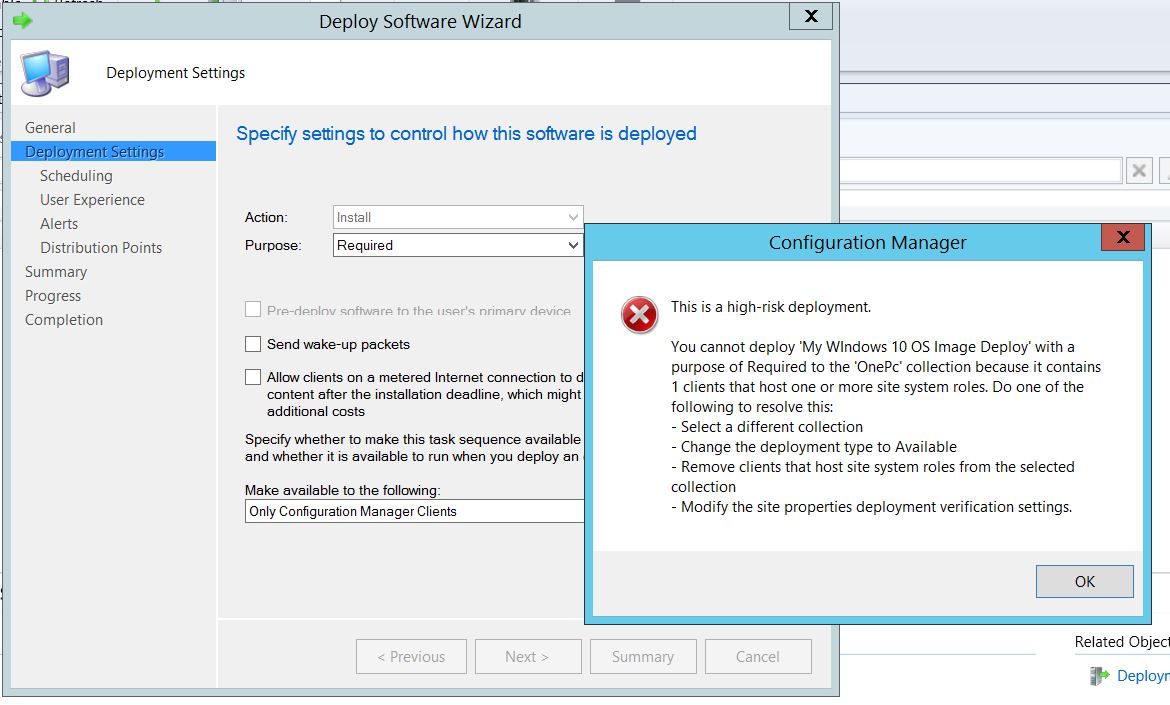
I am trying to Deploy Task Sequence from SCCM, when I select Required and click next, I get the popup error shown on the screenshot below.
Any reason why this is happening?
Thank you

I am trying to Deploy Task Sequence from SCCM, when I select Required and click next, I get the popup error shown on the screenshot below.
Any reason why this is happening?
Thank you
Zero AI Policy
We believe in human intelligence. Our moderation policy strictly prohibits the use of LLM content in our Q&A threads.

Ok, Maybe I've not understood the screen from your other post https://www.experts-exchan

Hi,
Please say what collection this is going to. Is it in a lab or in Production?
This warning is by design to prevent doing things like "deploying XP to every computer in the business including mail servers, SQL servers and SCCM itself". *That* is what "All Systems" contains. It has happened, to a bank. The guy quit and left Australia where he lived.
So, if you' ARE using SCCM in Production I would stop where what you are doing and create a Lab instead. For your own sake.
Mike
Please say what collection this is going to. Is it in a lab or in Production?
This warning is by design to prevent doing things like "deploying XP to every computer in the business including mail servers, SQL servers and SCCM itself". *That* is what "All Systems" contains. It has happened, to a bank. The guy quit and left Australia where he lived.
So, if you' ARE using SCCM in Production I would stop where what you are doing and create a Lab instead. For your own sake.
Mike
this is just a LAB
The collection has just one PC windows 7, if I select "Available" the wizard proceeds , if I select "Required" it pops up that error message
The collection has just one PC windows 7, if I select "Available" the wizard proceeds , if I select "Required" it pops up that error message


EARN REWARDS FOR ASKING, ANSWERING, AND MORE.
Earn free swag for participating on the platform.
It should only display a warning for a "high risk deployment" if you deploy an OS task sequence to a collection containing simple clients. Is it exactly the same error as above?
Hi,
OK. MS added this feature to try to prevent the "Sev 1" incidents I described. It applies to any OSD and defaults to "collections targeting over 100 objects". It is set on the properties of the site (in Admin/Site config). It only applies if Required as you've found.

Ref: https://docs.microsoft.com/en-us/configmgr/core/servers/manage/settings-to-manage-high-risk-deployments
I sounds like the number is set to 1.
The behaviour is by design.
Mike
OK. MS added this feature to try to prevent the "Sev 1" incidents I described. It applies to any OSD and defaults to "collections targeting over 100 objects". It is set on the properties of the site (in Admin/Site config). It only applies if Required as you've found.
Ref: https://docs.microsoft.com/en-us/configmgr/core/servers/manage/settings-to-manage-high-risk-deployments
I sounds like the number is set to 1.
The behaviour is by design.
Mike
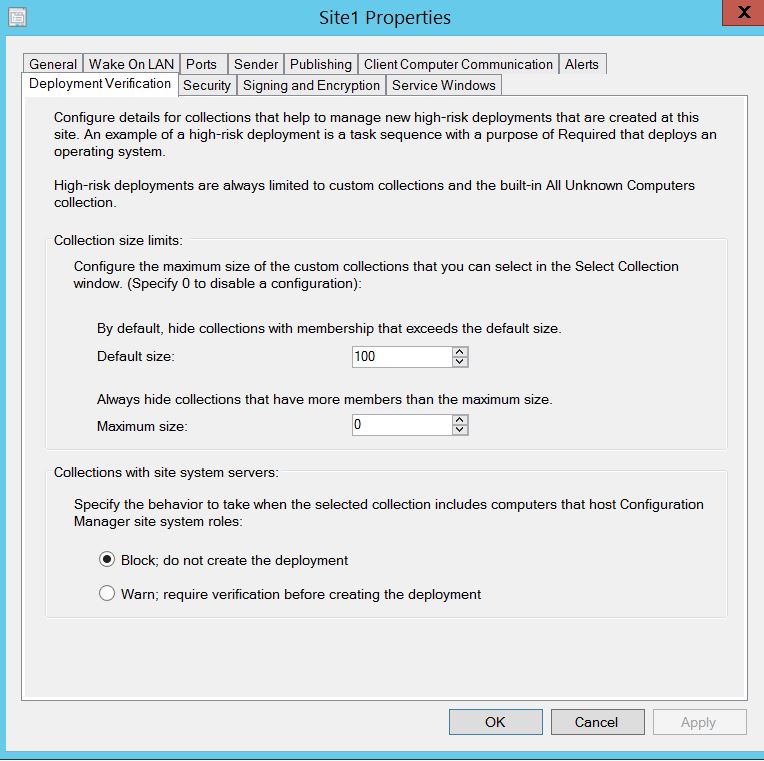
the settings are as shown below:
Get a FREE t-shirt when you ask your first question.
We believe in human intelligence. Our moderation policy strictly prohibits the use of LLM content in our Q&A threads.
Just tick Warn: .... It will show a warning and you can continue.
ASKER CERTIFIED SOLUTION

membership
Log in or create a free account to see answer.
Signing up is free and takes 30 seconds. No credit card required.
Thank you Guys!
I will get back to SCCM Lab later
I will get back to SCCM Lab later
Windows OS
--
Questions
--
Followers
Top Experts
This topic area includes legacy versions of Windows prior to Windows 2000: Windows 3/3.1, Windows 95 and Windows 98, plus any other Windows-related versions including Windows Mobile.