
Windows OS
--
Questions
--
Followers
Top Experts

Windows 10 Quick Access links keep resetting
A client company is running Windows 10 Enterprise on their workstations (various make and models). A few users have started reporting in the last 2 weeks that all their folders that they pin to the Quick Access in File Explorer keep getting removed.
There is no time as to when it gets reset - have had it happen within an hour and also within few days. When it resets, it basically puts back the default items (Downloads, Document, Desktop and Pictures) and removes anything user has pinned.
We have tried deleting all entries in the following folders but no luck
Any suggestions?
There is no time as to when it gets reset - have had it happen within an hour and also within few days. When it resets, it basically puts back the default items (Downloads, Document, Desktop and Pictures) and removes anything user has pinned.
We have tried deleting all entries in the following folders but no luck
- %APPDATA%\Microsoft\Windows\Recent\AutomaticDestinations
- %APPDATA%\Microsoft\Windows\Recent\CustomDestinations
Any suggestions?
Zero AI Policy
We believe in human intelligence. Our moderation policy strictly prohibits the use of LLM content in our Q&A threads.

Have you checked to see if there is a group policy/local security policy in place that is causing this:
https://windowsreport.com/items-pinned-taskbar-disappear/#:~:text=Change%20Group%20Policy%20Settings,pinned%20programs%20from%20the%20Taskbar.
https://windowsreport.com/items-pinned-taskbar-disappear/#:~:text=Change%20Group%20Policy%20Settings,pinned%20programs%20from%20the%20Taskbar.
Andrew
the link talks about Taskbar but we're having issues with Quick Access in File\Windows Explorer
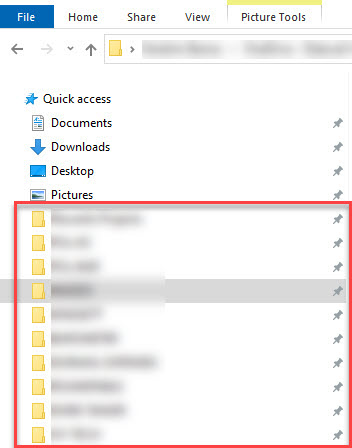
the link talks about Taskbar but we're having issues with Quick Access in File\Windows Explorer
Ahh, I see. My apoligies. Have you had a look at this fix:
https://www.minitool.com/data-recovery/files-missing-win-10-quick-access.html
https://www.minitool.com/data-recovery/files-missing-win-10-quick-access.html


EARN REWARDS FOR ASKING, ANSWERING, AND MORE.
Earn free swag for participating on the platform.
I have tried all suggestions except the registry one from that link - i'll see if it helps.

Have you checked to make sure it's not a profile issue? If something is causing them to login with temp profiles, it'll reset that every time. Are any other settings not saving in between logins?
yes I confirmed they are not logging in with temp profiles. I thought explorer.exe may be crashing but I'm not seeing any evidence of that. one minute user is working and folders are in quick access, next minute they go to explorer and its reset. they dont even have to log off for issue to happen...seen it happen within 10 minutes.
definitely a strange one
definitely a strange one
Get a FREE t-shirt when you ask your first question.
We believe in human intelligence. Our moderation policy strictly prohibits the use of LLM content in our Q&A threads.
Are these Quick Access folders on mapped drives? Is there some kind of conflict or maybe even a permission issue that causing them to reset?
some are folders pinned from mapped drives and some from local c: drive. access to mapped drives works fine when user go directly to the mapped drives and they are able to re-pin the folders after they get removed
ASKER CERTIFIED SOLUTION

membership
Log in or create a free account to see answer.
Signing up is free and takes 30 seconds. No credit card required.
Windows OS
--
Questions
--
Followers
Top Experts
This topic area includes legacy versions of Windows prior to Windows 2000: Windows 3/3.1, Windows 95 and Windows 98, plus any other Windows-related versions including Windows Mobile.