
Windows OS
--
Questions
--
Followers
Top Experts

I'm trying to figure out how to set a specific printer for printing labels in Microsoft Word without having to change the Windows default printer.
I helped a client who is using Word 2013, and I also tested it on Word 2019 (via Mailings > Labels). However, I couldn’t find an option to select a different printer for labels specifically — it appears to default to the system printer with no override.
Workaround Tried:
I was able to work around the issue by setting the label printer as the Windows default, but that’s not a practical long-term solution — especially in environments with multiple printers.
My Question:
Is there a way to set or select a different printer specifically for label printing within Word?
If not directly through Word, are there any reliable macros, settings, or workarounds that don’t require changing the system-wide default printer?
Thanks in advance!
Zero AI Policy
We believe in human intelligence. Our moderation policy strictly prohibits the use of LLM content in our Q&A threads.


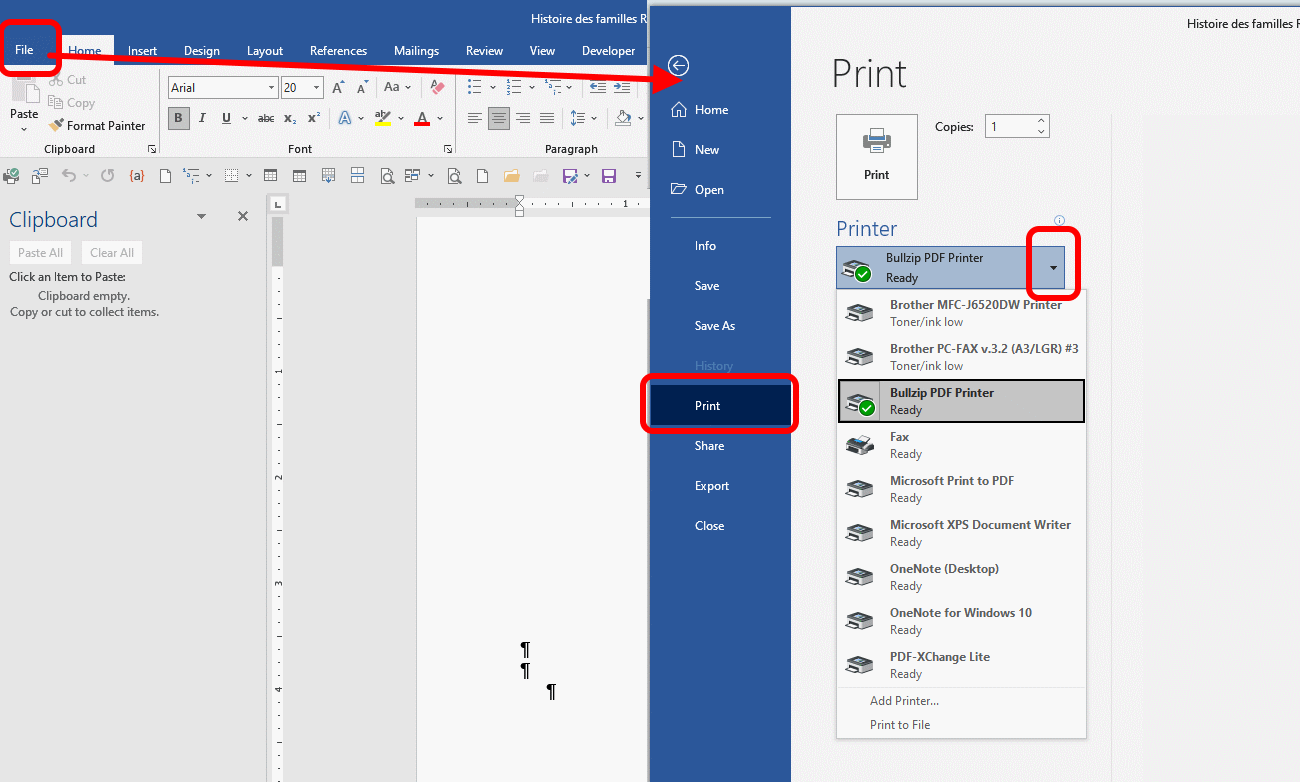
The issue the asker has is with labels. use the mailings menu item select label, and then the image I posted includes the option.
The user want to be able to click on print and the label comes through the label printer while when the user hits print on a document, they want that print to automatically go through a document printer without the need to make printer selection/choices.
At least, that is my read.
As my comment tried to illustrate, once the label is identified and the mode is selected, the new document creates a commensurate document that the user can use the steps in the example you posted.


EARN REWARDS FOR ASKING, ANSWERING, AND MORE.
Earn free swag for participating on the platform.
@arnold: Your solution does appear to do what I want, but requires some extra clicks. That is workable.
@nobus: That's an interesting link that you provided (I'll likely make use of it elsewhere), but I don't think it will help here. Unless I use the method arnold suggested (New Document), there is no document to associate with a printer.
@Paul: As arnold suggested, my issue is strictly with printing labels, not an actual Word document.
Thanks!
Windows OS
--
Questions
--
Followers
Top Experts
This topic area includes legacy versions of Windows prior to Windows 2000: Windows 3/3.1, Windows 95 and Windows 98, plus any other Windows-related versions including Windows Mobile.