
Windows OS
--
Questions
--
Followers
Top Experts

Hi Experts,
How can I force OneDrive to synchronize everything?
As you will see, different files and folders have different synch status icons, and when I drill down I see it is not just recent files and folders, but also those from years ago.
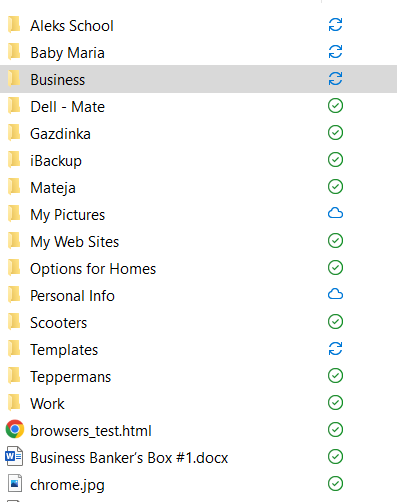
I feel my computer is about to die, and I just want to make sure everything is backed up.
Years ago I used to use Windows 7 Backup which is still available in Windows 10, but OneDrive does not let you select its folders from the Backup utility.
Thank you,
Zero AI Policy
We believe in human intelligence. Our moderation policy strictly prohibits the use of LLM content in our Q&A threads.

I believe the green check marks mean you chose to keep only online.
Click on the OneDrive icon on the lower right tray and view. your sync client and see what you have that is set to sync or not.

If you want to do a full backup, it is better to use utility like Acronis to do the magic.
So, within this single folder, I have many-many sub-folders and files with different status icons.
When I hover over OneDrive, I see...

... but I still see

So, you will see that my C# folder is "Sync Pending, and is going back to 2020. I have not touched this folder since that time, and I have no idea how many other folders are not synched.
Contrary to what I said yesterday, Win 10's Backup now lets me select OneDrive's folder.

...But, why can't I set a time of day, like 7 pm, as I don't want to slow down the PC During working hours?
Also, it allowed me to select an external drive - where to store the backup, but not the target folder?
This said, is it still worthwhile to invest in another Backup utility, like Acronis? Will it let me select to backup OneDrive, web folderse, and specify an external drive/folder?
I'm not sure if I can invest in ongoing cloud backup costs, especially as I have so many external drives lying around.
How can I check the quality of a drive?
Thanks!


EARN REWARDS FOR ASKING, ANSWERING, AND MORE.
Earn free swag for participating on the platform.
For OneDrive, in your settings, click on the account tab and then select Choose Folders. There you can see what folders you have in OneDrive that are available both online and offline.

You can also select to have your Desktop, Documents and Images sent to your OneDrive
https://support.microsoft.com/en-us/office/back-up-your-documents-pictures-and-desktop-folders-with-onedrive-d61a7930-a6fb-4b95-b28a-6552e77c3057?ui=en-us&rs=en-us&ad=us

That should really cover you. As for backing up, the Acronis option is only $50 per year https://www.acronis.com/en-us/products/true-image/. I feel your files are safer there than an external hard drive, especially if it is more than a few years old. When I used an external HD, I changed mine every couple of years because the last thing you want is that to fail. Now I rely 100% on using the cloud.

When I drill down, I noticed that only temp files are blocked.

So, do I have to resolve all manually until I get all green checks?
Besides this, do you also recommend Acronis, and why?
I thought OneDrive keeps deleted files for 30 days plus version control.
Get a FREE t-shirt when you ask your first question.
We believe in human intelligence. Our moderation policy strictly prohibits the use of LLM content in our Q&A threads.

Windows OS
--
Questions
--
Followers
Top Experts
This topic area includes legacy versions of Windows prior to Windows 2000: Windows 3/3.1, Windows 95 and Windows 98, plus any other Windows-related versions including Windows Mobile.