
Windows OS
--
Questions
--
Followers
Top Experts

Hi Experts,
I'm running Windows 10 Pro on a HP Laptop.
I normally run the laptop with the lid closed, connecting via a dock to 2 displays.
For the first time ever, my system overheated and hibernated.
Looking at the event viewer, there were lots of errors to the form:
The system was hibernated due to a critical thermal event.
Hibernate Time = ?2022?-?07?-?26T00:40:14.604872000Z
ACPI Thermal Zone = \_TZ.TZ01
_HOT = 373K
I've installed RealTemp 3.7.
The current screen is:
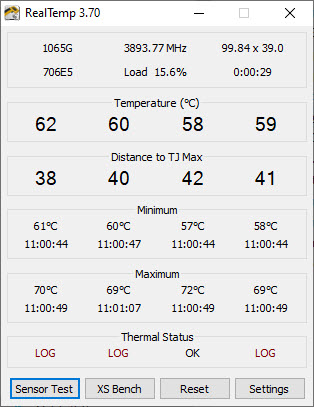
Any suggestions as to how to avoid this error are most welcome.
Regards,
Leigh
Zero AI Policy
We believe in human intelligence. Our moderation policy strictly prohibits the use of LLM content in our Q&A threads.


Also, in Europe we have high temperatures currently, so overheating would be expected in this area (although it seems you come from Australia where you have "Winter" now...).
There are cooling pads for laptops, they have large ventilators that are driven via USB...


EARN REWARDS FOR ASKING, ANSWERING, AND MORE.
Earn free swag for participating on the platform.
I've had this laptop since new, 2 years ago.
This was the first time I have had this issue.
It hasn't happened again in the last 48 hours.
I did check the intake vents - there is no sign of any blockage.
I have ordered a cooling pad, just in case I need it.
Regards,
Leigh
Windows OS
--
Questions
--
Followers
Top Experts
This topic area includes legacy versions of Windows prior to Windows 2000: Windows 3/3.1, Windows 95 and Windows 98, plus any other Windows-related versions including Windows Mobile.