
Images and Photos
--
Questions
--
Followers
Top Experts

I need to crop out a bit of picture in powerpoint but I cannot figure out how to do it with crop to shape. Is there a way you can crop with a free hand drawing tool or maybe there is a way that someone on EE knows. The picture is of a hand that has a bit on the top finger that I want smoothed out so it is not jagged. See attached image.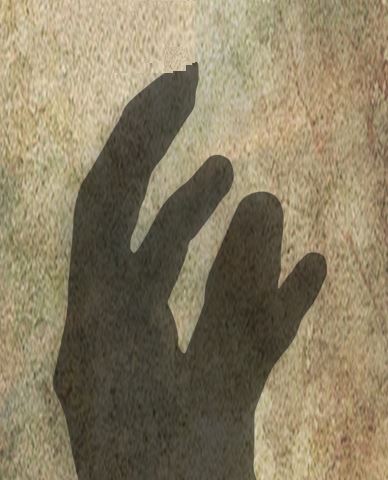
Zero AI Policy
We believe in human intelligence. Our moderation policy strictly prohibits the use of LLM content in our Q&A threads.

1. Use a freeform vector shape to create a mask and then the merge shapes tools to create an intersect.
Method 1
- From the Insert tab, create a mask by using the Freeform shape tool to click clicking around the perimeter of the area you want to keep:
 You can adjust each node after the freeform has been created by right-clicking and using Edit Points. Each node comprises three handles which represent the Bezier curve. You can also change the type of each node by right clicking the black handle and choosing from Smooth / Straight / Corner point.
- Then select the picture followed by the shape (use Shift+click to select both in that order).
- Click the Shape Format tab and use the Merge Shapes tool to create an Intersect:


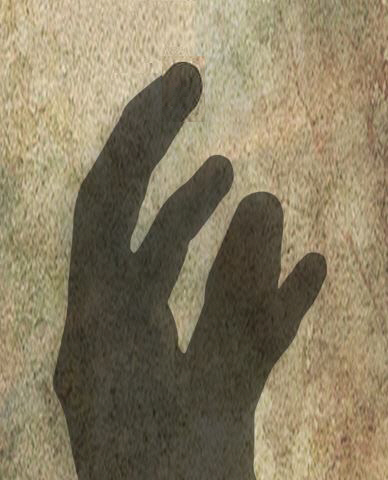
Regards, Joe
Sorry. I meant I will send the pic without the background
Picture3.png


EARN REWARDS FOR ASKING, ANSWERING, AND MORE.
Earn free swag for participating on the platform.

Get a FREE t-shirt when you ask your first question.
We believe in human intelligence. Our moderation policy strictly prohibits the use of LLM content in our Q&A threads.
Images and Photos
--
Questions
--
Followers
Top Experts
Photo and imaging software is used to edit and compose raster images; Adobe Photoshop, which dominates the market, has its own topic. Common actions include cropping, slicing, retouching, color replacement, masking and erasing. Other programs include Apple Photo, Corel PaintShop Pro, GIMP, Serif PhotoPlus, Pixlr, PhotoScape, Picasa and IrfanView.