

VBA
--
Questions
--
Followers
Top Experts

This is a Microsoft Powerpoint VBA question: I create a weekly .ppt finance report that varies in size (amount of slides). I would like to enter a project name in a text-box on slide 1, and have that project name in the text-box text be duplicated in a text-box on every slide in the presentation. The number of slides will vary from week to week.
Zero AI Policy
We believe in human intelligence. Our moderation policy strictly prohibits the use of LLM content in our Q&A threads.

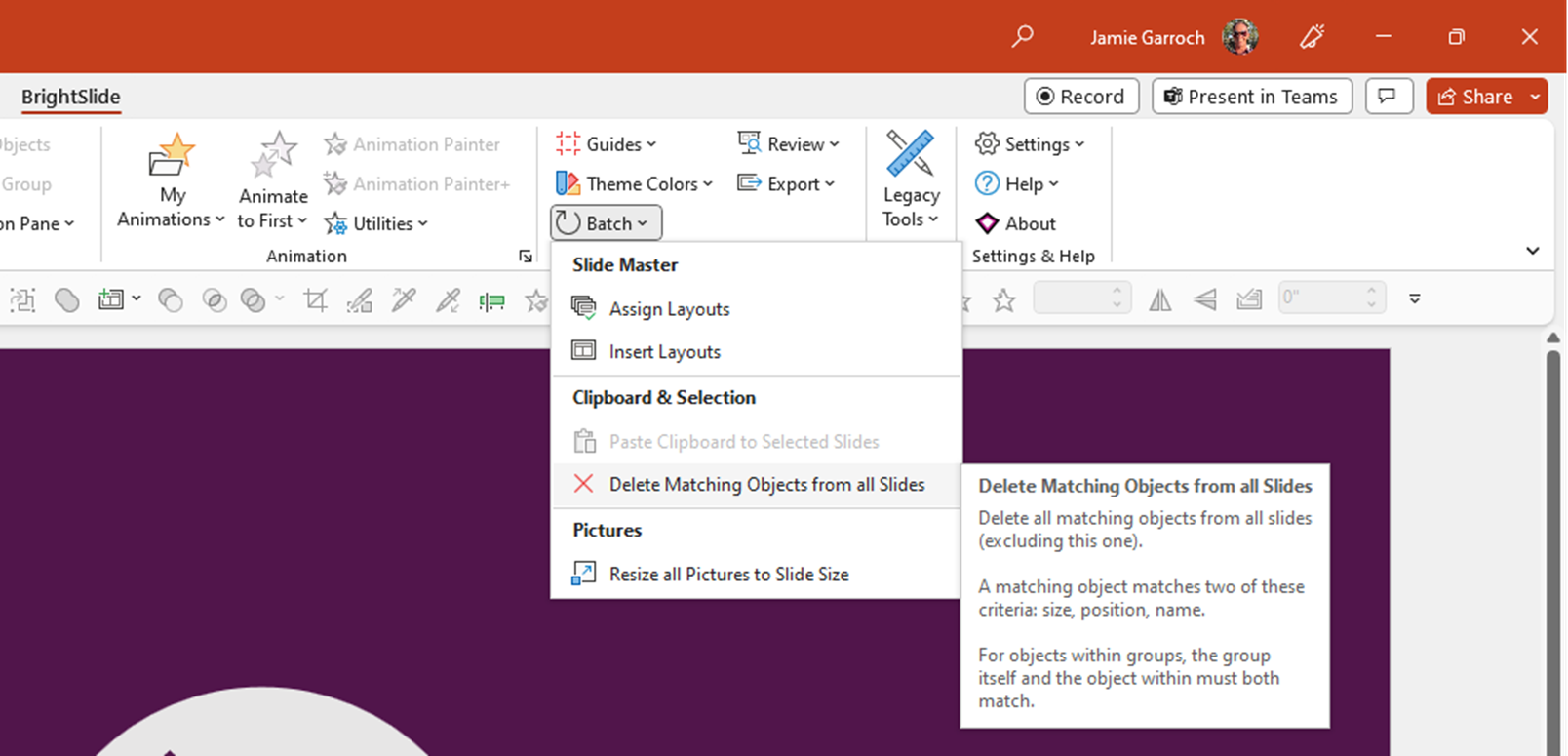
Do you need to do this with VBA or would you be happy to use an add-in.? The reason I ask is that the company I work for publishes a free add-in called BrightSlide and it has this feature to copy the selected object(s) and paste them to all selected slides. It can also delete all matching objects as in the screenshot below. So the combination would meet your need if I'm not wrong.
Hello, Jamie - This needs to be done w/ VBA

A low-tech solution is to use the Footer placeholder that exists by default in all new presentations. On the slide master and slide layouts, place the Footer placeholder where you want the text to appear. Then, in use, choose Insert>Header & Footer. Change the Footer text, then click on Apply to All. No programming required.


EARN REWARDS FOR ASKING, ANSWERING, AND MORE.
Earn free swag for participating on the platform.
So EE isn't a free code-writing service but the macro to do something like this could start as such:
Sub CopySelectedObjectToAllSlides()
   Dim oSld As Slide

   ActiveWindow.Selection.ShapeRange(1).Copy

   For Each oSld in ActivePresentation.Slides
      oSld.Shapes.Paste
   Next
End SubA commercial-grade solution will be much more complex because accessing the Windows clipboard multiple times in quick succession can generate errors due to timing problems, which vary from PC to PC.
VBA
--
Questions
--
Followers
Top Experts
Visual Basic for Applications (VBA) enables building user-defined functions (UDFs), automating processes and accessing Windows API and other low-level functionality through dynamic-link libraries (DLLs). VBA is closely related to Visual Basic and uses the Visual Basic Runtime Library, but it can normally only run code within a host application rather than as a standalone program. It can, however, be used to control one application from another via OLE Automation. VBA is built into most Microsoft Office applications.
Create your account and start contributing!