
Windows OS
--
Questions
--
Followers
Top Experts

Hello our DC is running Server 2016, we have a new requirement to make the minimum password length 15 characters. When I go to Computer Configuration > Security Settings > Account Policies > Password Policy and try to make this change the highest number it will accept is 14. How can we make it meet the new requirement of 15?
Zero AI Policy
We believe in human intelligence. Our moderation policy strictly prohibits the use of LLM content in our Q&A threads.


Make sure your DC(s) have their Central Store set up. Then, copy the current SYSVOL\PolicyDefinitions folder into a subfolder named something like 2022-12-14-GPOBackup.
Then, copy the PolicyDefinitions folder from the newest version Windows OS whether Win10 Professional or Win11 Professional to a local folder on the DC. From there, copy the contents of that PolicyDefinitions folder into same on the PDCe holder. Wait for replication to push the changes before making any further changes.
My EE Group Policy Article:
I downloaded the admx file from the below link installed, still have 14 character max.
https://www.microsoft.com/en-us/download/details.aspx?id=104677
Make sure to do a GPUpdate /Force on the PDCe then wait for replication.
Log off. Log back on, open GPMC and the change should be there.


EARN REWARDS FOR ASKING, ANSWERING, AND MORE.
Earn free swag for participating on the platform.
I ran gpupdate /force, & rebooted still max of 14.
I've also tried on my Win11 VM it also has a max character of 14

I downloaded the admx file from the below link installed, still have 14 character max.
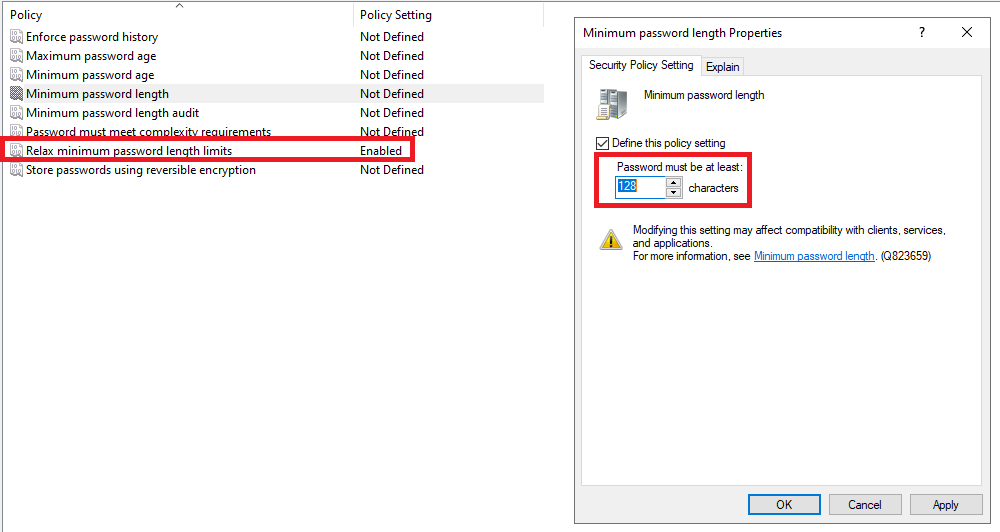
did you enable the relax length limits? if not, it will still be 14; otherwise it will increase to 128
Get a FREE t-shirt when you ask your first question.
We believe in human intelligence. Our moderation policy strictly prohibits the use of LLM content in our Q&A threads.
Great, thank you guys this worked wonderful.
Windows OS
--
Questions
--
Followers
Top Experts
This topic area includes legacy versions of Windows prior to Windows 2000: Windows 3/3.1, Windows 95 and Windows 98, plus any other Windows-related versions including Windows Mobile.