
Windows OS
--
Questions
--
Followers
Top Experts

I have a Windows 10 Enterprise LTSC Version 1809 laptop that won't boot into Windows 10. This OS is fully activated.
The Windows 10 bcdedit command hasn’t been able to fix this issue by running either one of these two commands from an elevated command prompt:
bootsect /nt60 all /force mbr When I run this command from an elevated command prompt I receive this message:
bootsect {/help|/nt60|/nt52} {SYS|ALL|<DriveLetter>:} [/force] [/mbr]
Boot sector restoration tool
Bootsect.exe updates the master boot code for hard disk partitions in order to
switch between BOOTMGR and NTLDR. You can use this tool to restore the boot
sector on your computer.
Run "bootsect /help" for detailed usage instructions.
C:\>
bcdboot c:\windowsWhen I run this command from an elevated command prompt I receive a message that says "Failure when attempting to copy boot files."
And I have tried the Visual BCD Editor utility which says that it has applied the necessary changes but then the laptop still isn't able to boot normally when it is rebooted.
Currently the only way that I’ve been able to get this Windows 10 OS to boot has been by using a bootable Strelic USB drive and then using the Search & Start Windows 7/8/8.1/10 (EFI x64) option. This option finds the Windows 10 OS on the C: drive and then successfully boots into Windows 10 on this laptop. I have included a picture of this boot option for this utility below.
Otherwise if I try to boot normally from Windows 10, the Windows 10 OS won’t boot. When using this Strelic boot option I’m not able to boot into any of the Windows 10 repair or safe mode options
What other command line, Powershell, options within Windows 10, or 3rd party utilities can I use to fix this issue so that Windows 10 on this Lenovo X1 will successfully boot?
This picture shows the option that I choose while booting from the Strelic bootable USB drive that allows me to successfully boot into Windows 10:
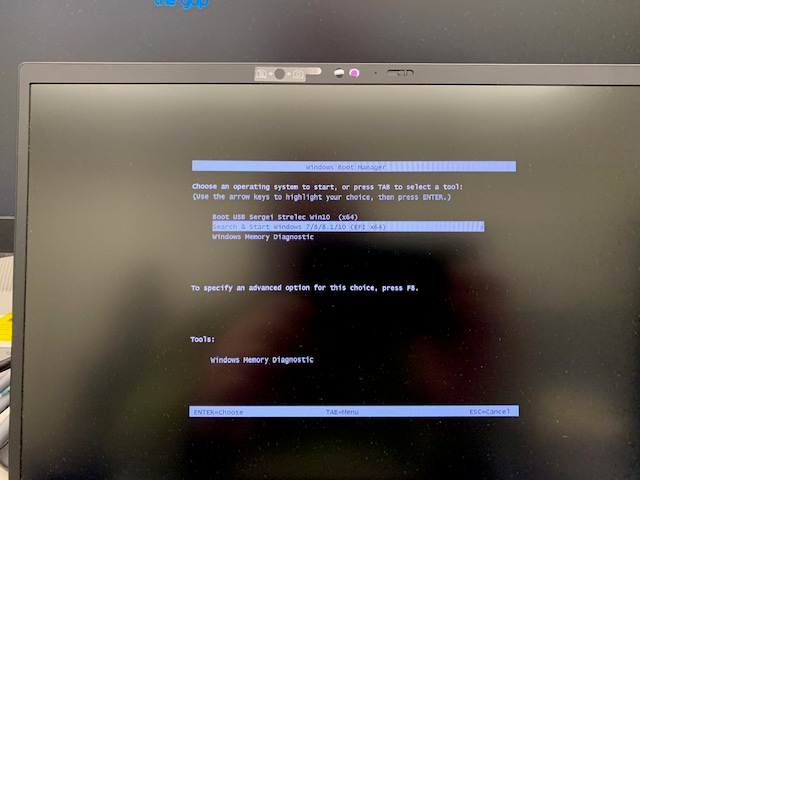
I have used this URL to download the Strelic bootable USB drive utility:
https://www.majorgeeks.com/files/details/sergei_strelecs_winpe.html
Zero AI Policy
We believe in human intelligence. Our moderation policy strictly prohibits the use of LLM content in our Q&A threads.

in the bios - is the proper disk or partition selected?


EARN REWARDS FOR ASKING, ANSWERING, AND MORE.
Earn free swag for participating on the platform.
Windows OS
--
Questions
--
Followers
Top Experts
This topic area includes legacy versions of Windows prior to Windows 2000: Windows 3/3.1, Windows 95 and Windows 98, plus any other Windows-related versions including Windows Mobile.