

Windows OS
--
Questions
--
Followers
Top Experts

Forgot my admin password on a machine i haven't used for ages, arghh.. its a win10 home OS and the account is a local one, so i dont have the option of using the 'reset password'.
I do have the Product Key however as it was updated from win7 so doesn't have any CD or similar to reload windows from, someone suggested i download onto a USB installation media which after some messing about i did manage to get it to boot from, but when i got to the menu i tried several ways, i entered the Product Key (does it need an internet connection to make this work?) but i got stuck at a point where it asks what drive to install it on, i saw 4 poss locations, there seems to be a partition for PQservice? on the drive, anyway i selected the one that looked correct but it pops an error message saying it cant use that drive, so i got stuck there,, maybe this option is for a empty hard drive?
So i attached the drive as another device on another win10 machine, to try the following idea out..
Then i found another idea, where you copy cmd.exe over utilman.exe in the windows System32 folder, and can then reset the password. Does this work? or was it something that has been disabled in current win10?
Got stuck here with ability to modify anything in this folder (probably no surprise to seasoned windows ppl !), i did manage to take ownership of the TrustedInstaller but again, the copy over utilman.exe failed and i couldnt find a way to restore the ownership afterward arghh!
(used "nt service \TrustedInstaller" and clicked 'find' but nothing came up)
so that didnt work as the link suggested it might,,,
I did try using net user administrator 'my new pw' which appeared to work,
however putting the drive back in its machine, and booting, apart from windows
doing some 'drive repair' stuff, got me back to the alternative password not working,
As you can see, im going round in circles here !! would prefer to not have to completely reinstall windows but even my attempt at that failed..
Zero AI Policy
We believe in human intelligence. Our moderation policy strictly prohibits the use of LLM content in our Q&A threads.

following screen
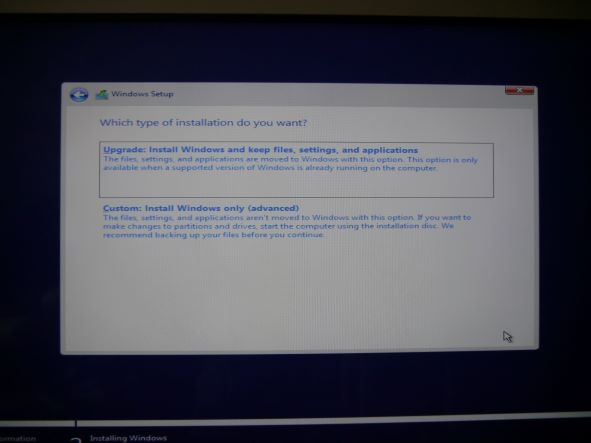 i chose the top one, then i get this screen
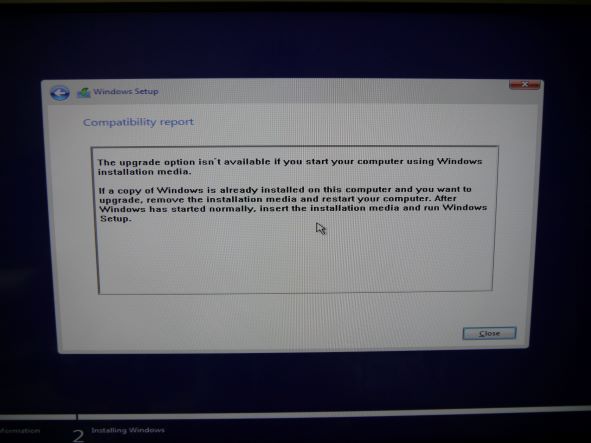 Is the only option to use the bottom choice? and not copy settings, and is the password part of 'settings' ? or does it mean to remove the usb & reboot without?
 I guess i cant run the installation usb as cant get past the login/password...


EARN REWARDS FOR ASKING, ANSWERING, AND MORE.
Earn free swag for participating on the platform.
If you have data on the disk you want to keep, & if that data was on the same partition as the OS, then I would connect the disk to another PC & copy it off.
I usually setup my systems with a separate partition or additional HD for the Data. That makes it much easier to reinstall the OS if required. It also makes it easier to backup the data, as you then don't also have to backup the OS, or deselect what you don't want to backup.
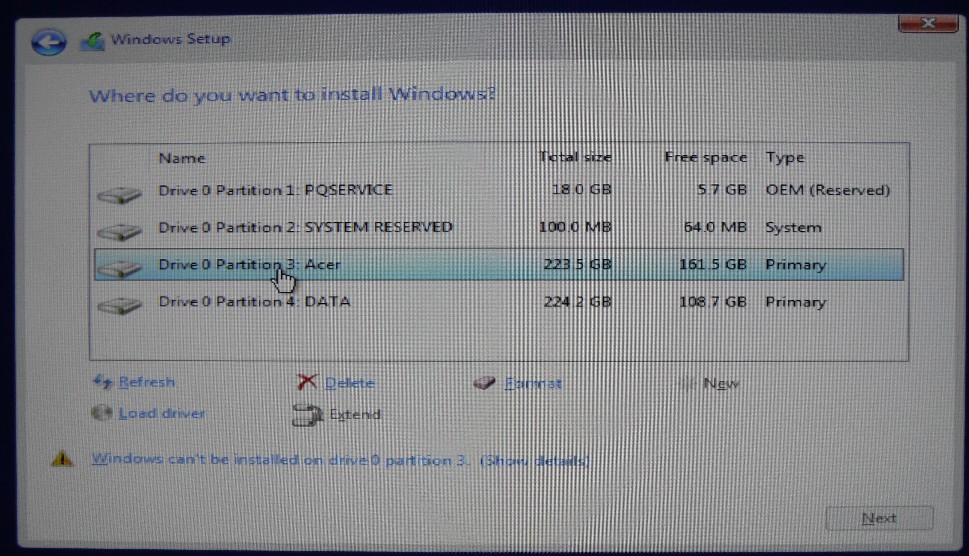 but it wouldnt let me install on the 3rd(acer) one, so i tried a format on this partition and tried again, and got this message..
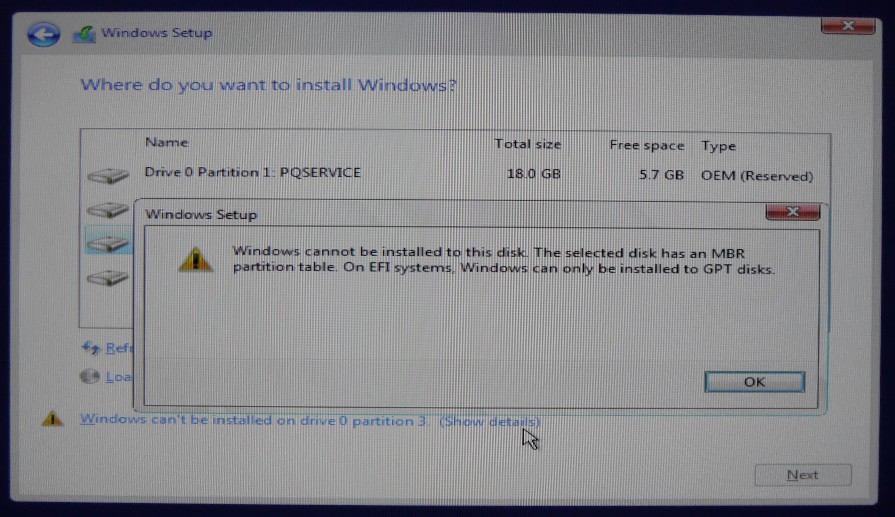 reloading windows is proving almost impossible !
You will need to enter the PC's BIOS, disable SecureBoot there, & also change the BIOS mode. What you have to change it to depends on the BIOS. Most versions call it something like "CSM", but it may just offer to to toggle UEFI off or something similar. After that you should be able to reinstall Windoze 10 without problems.
If you want to use UEFI, then you will have to initialize the HD to GPT rather then the current MBR, but then you will loose all the partitions, including your data, on it.
Get a FREE t-shirt when you ask your first question.
We believe in human intelligence. Our moderation policy strictly prohibits the use of LLM content in our Q&A threads.
It is a 10minute process to boot, adjust, reboot into safe mode.
Invoke utilman and either add a new admin account or update password on theexisting. noting. A password reset if encryption. is enabled those documents will be inaccessible.

You can also use this: https://pogostick.net/~pnh/ntpasswd/
Or did I misread/misinterpret what has gone on?
EARN REWARDS FOR ASKING, ANSWERING, AND MORE.
Earn free swag for participating on the platform.
I think you are correct. I missed the fact that a format had been done.
To start with, delete ALL partitions before reinstalling.
The BIOS is from 2011 and i cant see anything that looks like secure boot, i see
in advanced
Intel EIST, enabled
Intel AES-NI, disabled
Intel XD bit enabled
Intel VT enabled
but i think these are processor clocking adjustments
Only reference to UEFI is the USB on 1st boot device, i dont know if i could update the bios, or do i need to somehow format the whole drive? this certainly has been a journey of many twists n turns !, someone else mentioned delete all the partitions, how would i do that? is that from within the installer software?
Get a FREE t-shirt when you ask your first question.
We believe in human intelligence. Our moderation policy strictly prohibits the use of LLM content in our Q&A threads.
Yes, you can delete partitions when you install the OS, at the screen where you select the destination. But first you would need to check that out about UEFI. The Windoze installer would only come up with that message when your BIOS is set to UEFI mode.
note you have two primary large partitions 200GB + not sure whether you have an external drive attached.
With the data partiton seemingly has 100+GB of data.
If it is important to you, get the data off the system by using a live CD linux mint, etc. and copy it off.
But if you do not have data that you need to preserve, I'd start with the restore to factory default.
And proceed from there.

EARN REWARDS FOR ASKING, ANSWERING, AND MORE.
Earn free swag for participating on the platform.

See: https://lazesoft.com/
See: https://www.microsoft.com/en-us/software-download/windows10
Lazesoft will create a bootable USB/disk with all the tools on it.
Yes, another hard drive may boot up, but, if boots, you may have issues with the screen(resolution), network, sound or other devices. Its going to try to update drivers. If the network cards don't match up it can't get them. On the other hand mouse and keyboard should work and the screen should be readable, if not optimally sized.
Get a FREE t-shirt when you ask your first question.
We believe in human intelligence. Our moderation policy strictly prohibits the use of LLM content in our Q&A threads.
just check in device manager that you have all devices updated, and running without errors
EARN REWARDS FOR ASKING, ANSWERING, AND MORE.
Earn free swag for participating on the platform.
Get a FREE t-shirt when you ask your first question.
We believe in human intelligence. Our moderation policy strictly prohibits the use of LLM content in our Q&A threads.
You can get the current key using a tool called OEMKey. It works for hard and electonic keys.
See: https://neosmart.net/OemKey/
Anyway your thoughts helpful ppl ... or will the admin password issue remain because its stored on the 'problem' pcs motherboard?
-have a win 10 OS that works on the old pc - and you don't care about data?
-or have a win 7 OS that works on it...
EARN REWARDS FOR ASKING, ANSWERING, AND MORE.
Earn free swag for participating on the platform.
1) clone this HDD to an SSD and put ssd into the problematic system. Then run the upgrade to windows 10 which should work since windows 10 was on that system.
2) Fresh install of windows 10
a. create a windows 10 bootable USB (windows 10 media creation tool)
b Get the windows 10 Drivers (network, Graphics card, storage) from the System's Vendor site unzip and have it copied to the USB windows 10 install media.
c) boot the system via the USB.
There is an option to add drivers. (old reference F6)
Load the drivers, you saved and unzipped in Step B above.
You could delete all partitions, or leave the recovery, delete and reacreate the three remaining in a similar storage distribution.
Try the install again. WIth the added drivers, the install should complete..
Get a FREE t-shirt when you ask your first question.
We believe in human intelligence. Our moderation policy strictly prohibits the use of LLM content in our Q&A threads.
123456, etc.
First, as suggested above, make sure you know whether the BIOS is set for BIOS or UEFI booting. If you are not sure, try the BIOS method.
Download the Win 10 Media Creation Tool from the Download Now link at https://www.microsoft.com/en-us/software-download/windows10 .
Then run the tool. Select "Create installation media....", confirm the settings (64-bit Win 10), then select "ISO file" and save the ISO file somewhere you'll be able to find it.
Insert a USB stick (8G or larger) in your computer. The stick will get erased
Download Rufus 3.21 Portable from https://rufus.ie/en/ (you may have to close an ad)
When the Windows ISO download is done, run the Rufus file you downloaded
In Rufus, Click on "SELECT" and point to the Win 10 ISO file
Select MBR for the partition scheme
Click on START
When it is done creating the bootable Win 10 installer, close Rufus and eject the stick from Windows.
Boot from the USB stick on the computer where you want to install Windows 10. Be warned that it will erase everything from the drive.
(I'm going from memory on these steps): Tell it that you want to install Windows, that you don't have a license key, select the correct version of Windows (Pro or Home, whichever was installed on this computer before), and that you want to do a custom install (not an upgrade). When you get to the screen that shows the partitions, delete all of them, one at a time. Then tell it to install.
That should install Windows on the drive. When it reboots at the end, pull the USB stick so it doesn't boot from that again.
If Windows boots properly, you are all set to continue. If not, your system is likely set up for UEFI. Go back to your original computer connect the USB stick, run Rufus, select the ISO, but this time select GPT for the partition scheme. Click on START to recreate the Win 10 installer, this time with UEFI.
Once that is done, repeat the steps from above: eject the stick, boot it on the other computer, and install Windows.
One or the other of those should work!
EARN REWARDS FOR ASKING, ANSWERING, AND MORE.
Earn free swag for participating on the platform.
the problem PC is a H61H2-AD motherboard with AMIBIOS, the problem pc has BIOS ver P01-B2 08/11/2011
the other basic info below was from the other identical unit (which is working fine) it seems to have a slightly older bios version, got this using 'msinfo32'
Model Acer Aspire X3990
System Type x64-based PC
BIOS Version/Date American Megatrends Inc. P01-B0, 21/05/2011
SMBIOS Version 2.7
Embedded Controller Version 255.255
BIOS Mode Legacy
Im guessing from above its not UEFI more legacy BIOS mode, dont know if theres any point in updating the BIOS or if there is even a later version available..
The usb drive with the windows media creation tool? shows up as UEFI in the bios settings
https://www.manualslib.com/manual/232907/Acer-Aspire-X3990.html?page=30#manual
But I can't find such a setting in that manual. For some BIOS's you first have to set a BIOS supervisor password, then get into the BIOS again using that password, & then the extra features of your BIOS get unlocked & become available. Particularly Acers often have such a BIOS version.
how much ram does it have, and what disk model ? since both pc's are quite old, it may not be worth it ..., unless you install ram and SSD
Get a FREE t-shirt when you ask your first question.
We believe in human intelligence. Our moderation policy strictly prohibits the use of LLM content in our Q&A threads.
That was my reason for recommending Rufus to create the USB stick. You'll have the option of BIOS or UEFI (MBR or GPT). If one results in a non-booting installation, re-created the USB stick with the other setting and try again.
Nobus .. the hardware is fast enough for anything i use, 6GB ram, i5 3ghz 4 cores, for the moment ill try to get it working on a 1TB WD10EARX sata drive i have kicking around and then maybe update it to a smaller SSD,
Whats is curious, on the older BIOS machine you can choose EFI for one of the drive options, so im guessing it needs to have the 'drive' attached for you to see the EFI option?, on the 'problem' machine you see UEFI (maybe this is due to the bios being a bit newer on that one, also if i boot with the USB stick with the windows media on, that also shows up as a UEFI :USB option...(of just EFI Device with no usb stick attached)
So my question is does the drive have to be formatted in some way to get recognized as (U)EFI or is there something different about its formatting that does this?
Ventoy, the tool I mentioned earlier, creates such a FAT16 partition on which the Ventoy Boot Loader & EFI files are located. The other, large partition for the isos is ExFat to allow for files that are larger than 4GB, which is the limit on a FAT32 File-System.
To install Windoze on an UEFI enabled BIOS to an internal HD or SSD, that disk must use the GPT partition table, rather than the old MBR partition table. The OS installer then also creates a small FAT32 partition on that disk where the Windoze EFI file gets saved. The rest of the disk uses NTFS partitions where the OS is installed to.
EARN REWARDS FOR ASKING, ANSWERING, AND MORE.
Earn free swag for participating on the platform.
If you delete all the partitions while UEFI booted, the Installer will accordingly create the requisite partitions.
it is possible in your scenario, the boot instead of going BIOS USB, type, booted UEFI USB while the Disk in question is formatted not according to UEFI, upon selection of the existing master partition, the copy went through, but on reboot to perform the install this is what failed and caused issues.
The harddrive, WD10EARX is a green version, and a slow version at that, IMHO, you should not
Personally, It could take a few hours to complete the install. versus about 30-45 minutes with an SSD.
This way you still have access to the recovery partition from which you can access the Factory Image provided by Acer.
one installed, the bootup instead a minute and a half with HDD, will be less than 20 seconds.
Why do things twice unnecessarily?
Check the BIOS to see if it shows up there. The SATA port to which you have it connected may not be enabled.
" then maybe update it to a smaller SSD"
I agree with arnold about not doing this twice. A 480G Kingston A400 SSD runs $26US on Amazon. There are faster drives out there, but this would be a big improvement over your HDD.
Get a FREE t-shirt when you ask your first question.
We believe in human intelligence. Our moderation policy strictly prohibits the use of LLM content in our Q&A threads.
your issue may have been related to a preformated HD that was not in the correct operating mode based on the current Bios Setting that potentially caused your difficulty with the OS reinstall.
consider accessing Acer Downloads
To get the drivers, for the network primarily. others if you wish.
I tend as I noted in a prior comment, pre-load the essential Network, storage and possibly graphics drivers during the install. This way everything else can be updated after versus installing the os and then trying to locate the network drivers.
you can check and correct that with disk manager
EARN REWARDS FOR ASKING, ANSWERING, AND MORE.
Earn free swag for participating on the platform.
You may need the Disk Controller's driver if your destination disk isn't seen (but based on your previous tries, it is seen, so that also may not be needed, but downloading & extracting it so you have it ready is always a good idea.
You don't need the GPU driver, as that you can get later via Windoze Updates, Optional updates, there all your required drivers should be available.
You only need the driver for the NIC if after you have installed the OS & reconnected the LAN cable, there is no connection to the LAN.
If i want to partition the drive into 2 equal ish areas, do i need to use something like EaseUS Partition Master (think ive used in past) before using the usb media tool ? and what info to know?
Just checking, as so far this 'just reload win10' journey has been a road full of bends !
Get a FREE t-shirt when you ask your first question.
We believe in human intelligence. Our moderation policy strictly prohibits the use of LLM content in our Q&A threads.
Why do you want to partition the drive?
Once your done and have windows up and running and updated -- you need to run windows update and be sure to select the optional items and the drivers in there.
Then you can use a partition manager to shrink the main partition and add a second. Easeus works fine, there are many others too, like MiniTool Partition Wizard and the light weight Macrorit Partition Expert
just keep all your data in your profile
EARN REWARDS FOR ASKING, ANSWERING, AND MORE.
Earn free swag for participating on the platform.
If i plug the new ssd into another working pc, it recognizes the drive in the first splash screen you see but after its booted, you dont see it as an-other drive.. why so?
Another thing.. the original drive has a sector called "PQSERVICE" dates of files in there from 2011 i think its some kind of disc recovery thing, do i need to have this? and also could i make some kind of recovery sector incase of future windoze trubbles ?
it is a recovery partition
Get a FREE t-shirt when you ask your first question.
We believe in human intelligence. Our moderation policy strictly prohibits the use of LLM content in our Q&A threads.
The SSD likely has no usable partitions. It does not matter! The windows install is going to build working stuff on it.
You install the SSD into the target PC (where you want to load windows). Then you boot the target PC from the USB created by the media creation tool. Once you get to the partition selection screen in the install process, delete any/all the partitions on the SSD, then continue with the installation (a new SSD won't have any partitions). Windows creates and formats any partitions it needs.
EARN REWARDS FOR ASKING, ANSWERING, AND MORE.
Earn free swag for participating on the platform.
Windows OS
--
Questions
--
Followers
Top Experts
This topic area includes legacy versions of Windows prior to Windows 2000: Windows 3/3.1, Windows 95 and Windows 98, plus any other Windows-related versions including Windows Mobile.
Create your account and start contributing!