
Windows 10
--
Questions
--
Followers
Top Experts

Hello, All.
Today I finally purchased the Server 2016 Datacenter 16 core license.
I've successfully installed on the following VMs on our Dell r710 Server:
- 1 - 2016 Desktop Edition
- 5 - 2016 Core Editions
The following commands I use for installing the License on both Desktop and Core.
(Powershell (OR) CMD)
Desktop
dism /online /set-edition:ServerDatacenter /productkey:***** /accepteula
Core
dism /online /set-edition:ServerDatacenterCor /productkey:***** /accepteulaNow, on 1 Desktop and the rest of the Cores
I get the following message.
Deployment Image Servicing and Management tool
Version: 10.0.14393.4169
Image Version: 10.0.14393.4169
Error: 50
This Windows image cannot upgrade to the edition of Windows that was specified. The upgrade cannot proceed.
Run the /Get-TargetEditions option to see what edition of Windows you can upgrade to.
The DISM log file can be found at C:\Windows\Logs\DISM\dism.log
When I run
Dism /Online /Get-TargetEditions
I get the following output.
(The current edition cannot be upgraded to any target editions.)
On the other Desktop, I went through the
System - Activate Windows
And that worked, so now the other Desktop is Activated.
(Updated License VMs)
- 2 - 2016 Desktop Edition
- 5 - 2016 Core Editions
On the Core units, I tried "slui 3" and got "Windows cannot find C:\\\ChangePk.exe."
So I do not have the luxury of installing the License as I did with the Desktop.
What can I do for the remainder of the Server Cores?
They were all installed using the same ISO as the Successfully Activated Cores, so this issue should not exist.
I read that I would need to reinstall them and install the key during the installation.
I hope I do not have to do this, at least not right now.
Hopefully, someone has some advice for this issue.
Thank you.
Wayne
Zero AI Policy
We believe in human intelligence. Our moderation policy strictly prohibits the use of LLM content in our Q&A threads.

use the AVMA keys
slmgr /ipk:<AVMAKEY>
AVMA keys for Windows Server 2016
Datacenter TMJ3Y-NTRTM-FJYXT-T22BY-CWG3J
Standard C3RCX-M6NRP-6CXC9-TW2F2-4RHYD
Essentials B4YNW-62DX9-W8V6M-82649-MHBKQ
There's no such thing as windows server 2016 core. there is with or without desktop experience.
WHY are you trying to change the edition?
I was running Eval versions, and this is what I read a while back to use.
(I do not remember where I read it, that was a few years ago.)
Using the following command.
Dism /Online /Get-CurrentEditionRunning the command (I've tried several times this evening before posting this topic.)
slmgr /ipk KEYHERE
I get
I pasted slui.exe 0x2a 0xC004F069
---------------------------
Windows Script Host
---------------------------
Error: 0xC004F069 On a computer running Microsoft Windows non-core edition, run 'slui.exe 0x2a 0xC004F069' to display the error text.
---------------------------
OK
---------------------------
And I do not get the error.
(There's no such thing as Windows server 2016 core.)
I got the CORE name from Microsoft while researching setting up a Server Farm and wanted the best way to utilize Windows Server 2016, and I found out that using CORE was much better suited for lower overhead.
There was either the Desktop Experience or Core Edition (Non-Desktop Experience).
This is one of the articles from Microsoft where they specify
What is the Server Core installation option in Windows Server?.
So, I call it Windows Server Core 2016 (or) Windows Server 2016 Core.
there is no server 2016 core only standard, enterprise and essentials editions
so the target edition would be ServerDatacenter.. if you installed with Desktop Experience you can't change it to without desktop experience. That was one of the changes in 2016
you also can't add desktop experience.


EARN REWARDS FOR ASKING, ANSWERING, AND MORE.
Earn free swag for participating on the platform.
I never said I had installed Desktop Experience and wanted to change it to Core (Non-Desktop).
I have 2 Desktop Experience VMs on this Server.
And the rest are Non-Desktop.
You may not call it Server Core 2016, but that is what it is referred to by not only Microsoft but everywhere else.
A quick Google Search for What is Windows 2016 Server Core provides many results from Microsoft as well as other online magazines and videos.
I am not here to challenge anyone over the Name of Server Core.
I just need to know what I can do about the Activation of these Systems.
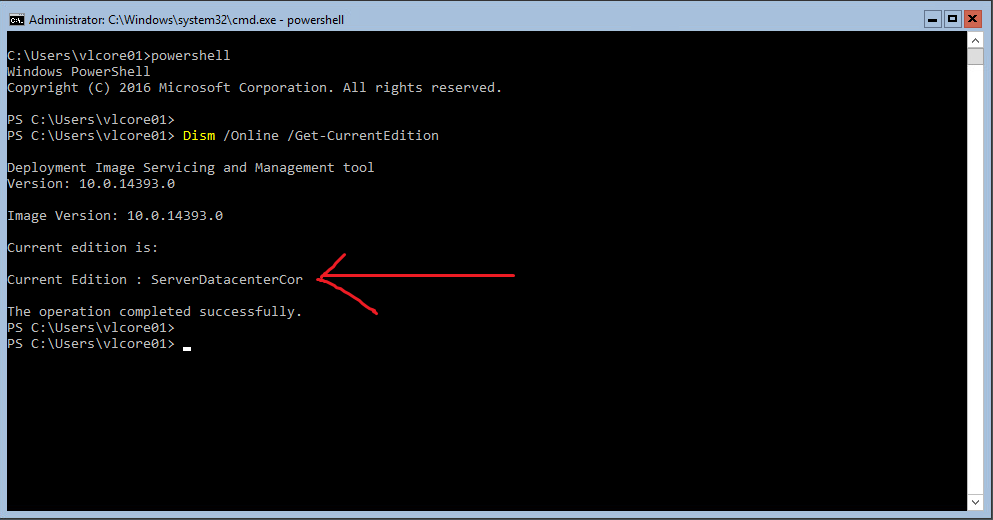
Here is the screenshot of one of the Servers which is already Activated.
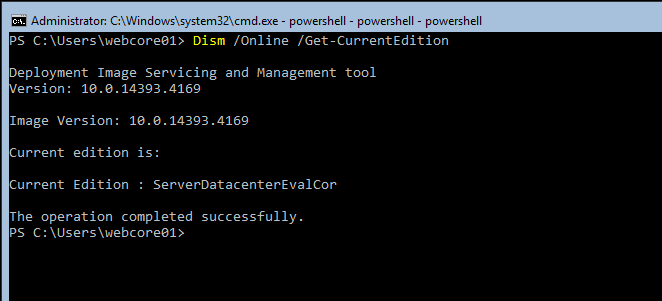
And this is a screenshot of the Evaluation Version of the Server Core.

Is this the version that was available via Software Assurance that was updated frequently and had something like an 18 month shelf life?
Get a FREE t-shirt when you ask your first question.
We believe in human intelligence. Our moderation policy strictly prohibits the use of LLM content in our Q&A threads.
When you install Windows Server using the setup wizard, you can choose between Server Core or Server with Desktop Experience install options.
it still is not an edition the editions are standard/datacenter/essentials. just change it to serverdatacenter
converting the trial version of Server Core is supported starting from the release of Windows Server 2016 14393.0.161119-1705.RS1_REFRESH).
Which is unfortunately a later version than on the evaluation page.
try this non eval download https://www.technig.com/free-download-windows-server-2016-iso-file/
As for using
serverdatacenter
That is not what the core is.
It has to be.
serverdatacentercor
As I showed above.
If you try to activate without the cor at the end you get an error saying it is the wrong version.
I will post later on the exact error that is received when trying without cor.
I will check to make sure that cores I have are up to date on patches and updates and try it again.
Phillip.
No it isn't.
EARN REWARDS FOR ASKING, ANSWERING, AND MORE.
Earn free swag for participating on the platform.

I could only successfully license 2 Eval Desktops and 5 Cores, so now I have to install the Retail copy 9 more times.
This will be a long ordeal, but the good thing is I have time to do it; I don't have to do it all in one shot.
Thanks for the download, David; that was very cool of you to do this for me.
Wayne
On my backup server, which I will be doing a license for within the coming weeks.
There are 6 VMs, and 4 can be upgraded, and 2 cannot be.
Checking the Build info using: Get-ComputerInfo.
The top is upgradeable, and the bottom is not.
WindowsBuildLabEx : 14393.693.amd64fre.rs1_release.16122 0-1747 (Upgradeable)
WindowsBuildLabEx : 14393.2248.amd64fre.rs1_release.1804 27-1804 (Not-Upgradeable)
Get a FREE t-shirt when you ask your first question.
We believe in human intelligence. Our moderation policy strictly prohibits the use of LLM content in our Q&A threads.
no idea kill the non-upgradable and just use the upgradeable. or the full source files provided
on the vm's use the AVMA keys I provided.
I placed the License Key inside the /Sources/PID.txt and recreated the ISO file.
And now, installing all these VMs is a lot simpler.
Your ISO was a lifesaver, to say the least.
Windows 10
--
Questions
--
Followers
Top Experts
Windows 10 is a personal computer operating system featuring the "universal application architecture" (UAP); apps can be designed to run across multiple devices with nearly identical code, including PCs, tablets, smartphones, embedded systems, Xbox One, Surface Hub and HoloLens. Windows 10 also includes a virtual desktop system, a window and desktop management feature called Task View, the Microsoft Edge web browser, support for fingerprint and face recognition login, voice-based search (Cortana), new security features for enterprise environments, and DirectX 12 and WDDM 2.0 to improve the operating system's graphics capabilities for games.