
Microsoft Access
--
Questions
--
Followers
Top Experts

I have an issue using web browser control for google map on a form.
In next environment: Runing MS Access from Microsoft 365 apps for business.
On pc with W10 64
Web browser Version 120.0.6099.130 (Official Build) (64-bit)
Microsoft Edge Version 120.0.2210.91 (Official build) (64-bit)
On a form( frmCustomer) in load event to suppress error msg I have this part of code :
Private Sub Form_Load()
Me.WB_Map.Object.Silent = True
End Sub
In a module I have a function ( fAppendString ) that doing append address string and is working without any issue:
On the form frmCustomer there are several text boxes with client address info and web browser control which I want to use to show google map on the form.
On form current event I have code below.
When I open form or move to next record on form code run and it shows properly google map in control and after a secund or two map disappeared and inside control shows another google screen, one I attached here.
Not sure what is happening I did adjust my registry entry to:
(HKey_Local_Machine\Software\Wow6432Node\Microsoft\Internet Explorer\Main\FeatureControl\FEATURE_BROWSER_EMULATION) to prowin.exe = 12001
(HKEY_CURRENT_USER\SOFTWARE\MICROSOFT\INTERNET EXPLORER\MAIN\FEATURECONTROL\FEATURE_BROWSER_EMULATION) = Msaccess.exe = 12001
but still showing the same result.
Private Sub Form_Current()
On Error GoTo Error_Handler
Dim sAddr As String
Dim sURL As String
sAddr = fAppendString(sAddr, Me.txtStreetNumber, "")
sAddr = fAppendString(sAddr, Me.txtStreet, " ")
sAddr = fAppendString(sAddr, Me.txtCity)
sAddr = fAppendString(sAddr, Me.txtProvince_State)
sAddr = fAppendString(sAddr, Replace(Nz(Me.txtPostal_Code_Zip, ""), " ", ""))
sAddr = fAppendString(sAddr, Me.txtCountry)
If sAddr <> vbNullString Then
sAddr = Replace(sAddr, " ", "+")
sURL = "https://maps.google.ca/maps?q="
sURL = sURL & sAddr & "&hl=en"
Me.URL = sURL
Me.WB_Map.ControlSource = "=""" & sURL & """"
DoEvents
Else
Me.WB_Map.ControlSource = "=""about:blank"""
End If
Error_Handler_Exit:
On Error Resume Next
Exit Sub
Error_Handler:
MsgBox "The following error has occurred." & vbCrLf & vbCrLf & _
"Error Number: " & Err.Number & vbCrLf & _
"Error Source: Form_Current" & vbCrLf & _
"Error Description: " & Err.Description, _
vbCritical, "An Error has Occurred!"
Resume Error_Handler_Exit
End Sub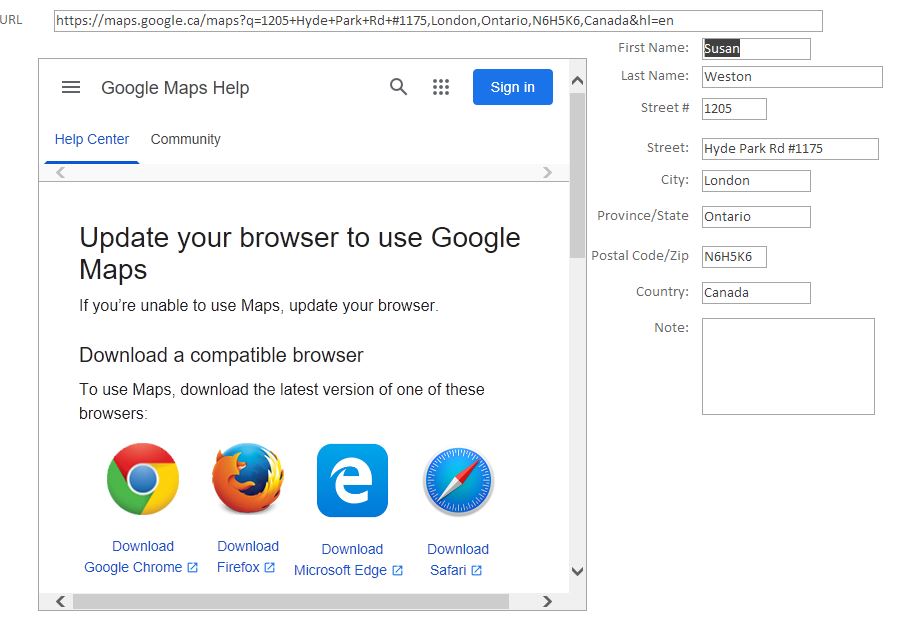
Zero AI Policy
We believe in human intelligence. Our moderation policy strictly prohibits the use of LLM content in our Q&A threads.

You need to be sure you are using the new Edge Browser Control. The new control is available to O365 subscribers who have version 16.0.16327.20214 and up.
The old browser control at this point will most likely not work as the latest emulation it offered was IE11 and as you can see from your screenshot, Google doesn't even mention IE anymore as Microsoft depreciated it and has since removed it from Windows.
Jim.
Hi Jim,
I tried with new Edge Browser control, the same code. It opens Google map but not in the Edge Browser control, it opens google map it in browser. I want map to be in forms control, not sure what I have to do to get it open in Edge Browser control?
And what will happend with old web controls that are created with MS Access 2010/13/...will they work now without IE.
With the new Edge Browser control, any redirect or link encountered will cause it to open in a regular browser outside of your app.
To prevent this, you need to add a Trusted Domain list as table (single column), then reference that in the Trusted Domain property of the control. Table can be named anything, as can the field.
Jim.


EARN REWARDS FOR ASKING, ANSWERING, AND MORE.
Earn free swag for participating on the platform.
Hi Jim you said.....Trusted Domain list as table(single column), then reference that in ......
Ok I understand, I will create separate table with one field. What is entered in that one field of Trusted Domain list?

Hi Jim it still not working, I attached here a test db file and you will se on the form "Frm_Contact_New_Control_Edge_Browser" it is not showing map in control.
I created a table and set value in control properties to reference table.
Thank you so much Jim for help, I will submit another question for last issue I mentioned.
Get a FREE t-shirt when you ask your first question.
We believe in human intelligence. Our moderation policy strictly prohibits the use of LLM content in our Q&A threads.
Sorry I didn't get back to this (not sure why you selected a solution). I don't have access to the edge browser control at the moment to test this. Had planned on switch my laptop to the current channel of Office so I could, but the end of the year has been pretty busy.
I'll try and get to this today.
Jim.
Hi JIm you helped me with TrustDomain issue, it moved solution close to finalization and I assume that somethin minor has to be solved to get this working. For that thank you so much.
Microsoft Access
--
Questions
--
Followers
Top Experts
Microsoft Access is a rapid application development (RAD) relational database tool. Access can be used for both desktop and web-based applications, and uses VBA (Visual Basic for Applications) as its coding language.