
Windows OS
--
Questions
--
Followers
Top Experts

I'm unable to log in to a XP VM running on VMware ESXi version 7.0 update 2.
Running XP Pro, I'm unable to login locally or through the Network account.
I just took over this system and there is no documentation for this so I don't know local admin account info.
When I try to log in using the Server Admin or any other AD account I created to test this, it says 'Windows cannot connect to the Domain, either because the domain controller is down or otherwise unavailable."
It's trying to authenticate to our old domain controller, which is still running.
The new domain is running fine (DC, RDS) and all clients are Win 10/11. It's running on Server 2022 Hyper V though.
We have this old system (Server 2019 DC and RDS) for reference for old programs that do not run in the new environment.
I tried downloading a PW removal tool, and directed the XP VM to boot off the ISO, but it crashed hard, didn't make it very far.
I reset the computer account on the Old DC, made no difference.
Sometimes I get the following error:
‘The System could not log you on. Make sure your Username and Domain are correct, then type your password again. Letters in passwords must be typed using the correct case.’
When I first looked at this issue, it struck me as odd because the domain was in the user name.
Username: olddomain\username
and the Log on to was the local computer, I'd never seen that format before.
Does anyone have any suggestions on what I could try?
Zero AI Policy
We believe in human intelligence. Our moderation policy strictly prohibits the use of LLM content in our Q&A threads.

Do you have a local Administrator account ?
It could be that XP is so old, it does not support a modern Domain Controller, but without logging in, difficult to troubleshoot.
Why do you need to login ?
Do you need to access the data ?

I have to agree. XP will NOT connect to a modern AD server as all the protocols XP supports are disabled as security flaws…
If you don't have a local account, there are several rescue boot disks that would allow you to enable or even add a local account…
HI, no access to any local accounts, other than built in administrator I'm not sure what they would be called anyways.
Need to run older accounting programs to verify data in older accounts.
I rebooted the DC thinking maybe an issue there, but no luck.
I also enabled SMB1 Protocols, as they were all Disabled:



EARN REWARDS FOR ASKING, ANSWERING, AND MORE.
Earn free swag for participating on the platform.
Okay rather than screwing up your DCs, let’s concentrate on access the VM!
Rather than causing more issues could be anything why it’s not domain joined etc
The simplest method of resetting a password is this
https://www.spgedwards.com/2015/03/password-reset-accessibility-hack.html?m=1
Only works on old Windows OS end of life
It isn't just SMB1, it is also all the encryption algorithms used by kerberos and other essential login utilities… You will NOT be able to get XP to connect to any DC older than MAYBE 2012, (and NOT 2012R2)
I don't think it is approved for us to give links to utilities that allow “hacking” accounts, but you should be able to google search for them…
Well this is our old Domain, but yes, I'd rather not screw it up lol.
I'm trying to figure out if I can boot into a Dos mode, without Admin access, and some how either check to make sure the computer is using the right DNS, or look at some settings.
Get a FREE t-shirt when you ask your first question.
We believe in human intelligence. Our moderation policy strictly prohibits the use of LLM content in our Q&A threads.
See the link it’s easy!
Hi Scott, I hear what you are saying but this was working just fine up to about a few months ago, when our staff last used it/ logged in, it was working then.
Anything can happen!
Login as Administrator after password change
But that may not help if it was a domain user that logged in to run this software because it may be linked to their profile but it will give you access to try domain troubleshooting
EARN REWARDS FOR ASKING, ANSWERING, AND MORE.
Earn free swag for participating on the platform.

As luck would have it, I had to do something like this last week. Couldn't figure out why it wasn't working until I found the computer account was disabled.
Machine was XP and DC is Server 2012R2, but domain level is 2003.
(Edited to update)
Andrew, thank you for the link.
So that's a commercial program for about $500, $750 since I'm in Canada, also there is nothing on there that says it will work with a Virtual Machine.
I tried one recommended Password utility, and it didn't even finish booting, most of these utilities assume you are logging into a physical box.
Hi Brian,
I checked on the status of the computer and it was ‘enabled’. So I disabled/enabled it and made no difference. Thank you for the tip though!
Get a FREE t-shirt when you ask your first question.
We believe in human intelligence. Our moderation policy strictly prohibits the use of LLM content in our Q&A threads.
I’m not sure what link you clicked!
There’s no difference between physical and virtual - the procedure is the same BUT these tools are now old, not maintained etc
Windows XP went EOL years ago
You need nothing more than a Windows XP CD-ROM to boot from and select Repair
Or any other Windows bootable iso just to boot the system to access the partition!
thanks! I'll double check.

Check the C:\Users folder for the usernames therein.
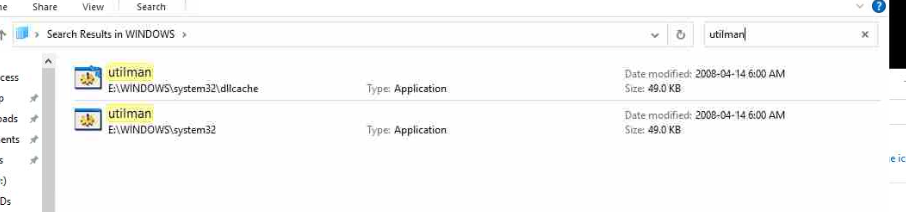
If it's Administrator then use the Utilman.EXE process to reset that user's password.
Since this is a VM, you can boot using any Windows .ISO to the optical drive, and jump into the Windows XP OS to reset the password.
Don't forget to copy the Utilman.EXE back over top. ;-)
EDIT: Once you've reset the local admin password you can reset the Secure Channel password to resync the machine password with the DC.
EARN REWARDS FOR ASKING, ANSWERING, AND MORE.
Earn free swag for participating on the platform.

The notice about missing domain could be an issue related to a loss of trust.
On the console with the VM's network disabled, if you can login using old credentials, you could re-enable the network connection. And rejoin the domain.
Issue with winxp is that it does not support smbv2 and higher.
That could present a problem
As smbv1 has many vulnerabilities and commonly is disabled in newer systems.
There are different guides on how to regain access to a system where the password has been lost.
Local admin account and then rejoin the system to a domain. Potentially, you would need to run an old win server version as a VM and have the XP use it as a DNS, possibly set it in an OU in hopes of limiting, concentrating it's interactions with the only DC where sMBv1 might be left enabled for the netlogin sysvol access.
Only works on old Windows OS end of life
No, this works with Windows 10 and 11 as well
any live cd will let you access the files. or you can ever work with the vmdk. i do not recommend either course of action.
reset passwords tools that work with xp are common. you can also grab a registry editor and set autoadminlogon which is imho the simplest way. and it allows to crack the password should you need it for other reasons.
it seems weird to me that you would want a virtual xp machine in a domain… any chance it can simply be disjoined ?
logon should work if you enable old security protocols which afaik are disabled but still supported. chances are some update changed the dc settings.
Get a FREE t-shirt when you ask your first question.
We believe in human intelligence. Our moderation policy strictly prohibits the use of LLM content in our Q&A threads.
The nice thing about it being a VM is you can just make a copy or snapshot and try various things, or just mount the virtual drive on to another machine if you need to access the data or modify the OS to recover the password.
That said, I'd also suggest booting (a copy of) the VM off an XP CD and repair.
Alternatively maybe you can get the database or whatever data off the machine, install the software on a new machine and move the database over.
(Edited for clarification)
He needs to run the Accounting Tools program in Windows XP !
Update:
So I decided to boot off of a Windows XP PRO SP3 CD ISO.
That went well, but then realized it couldn't repair the OS since it couldn't find any partitions.
So I found a vmware floppy SCSI image link from Youtube, and redid the install.
It found the virtual floppy drive and the image.
But when it hit ‘R’ for repair it locked up. I let it sit for about a half hour but wasn't responsive.
So I manually shut off the XP VM I was trying to repair, and of course, it popped up saying the system may become unstable, but thought it was referring to that VM only.
Nope, crashed the whole server, including the two Server VMs, the old DC and RDP/RDS server. LOL
I got kicked out of the VMware Dashboard and I'm unable to ping anything.
So…I'll reboot….
EARN REWARDS FOR ASKING, ANSWERING, AND MORE.
Earn free swag for participating on the platform.
So I manually shut off the XP VM I was trying to repair, and of course, it popped up saying the system may become unstable, but thought it was referring to that VM only.
It is the CDROM, Software has no knowledge it's running in a VM on a Hypervisor.
Your ESXi version is out of date, and also it's running Unsupported Guest OS - so anything could happen!
Hopefully you have a backup of the VM.
With a situation as you described, potentially loss of trust to the domain, or the domain DC can not be located on the network, the solution is fairly straight forward:
1) regain login access to the system as a local user
a) there is a failrly straight forward option use any windows bootable media windows10, server etc. you only need the ability to view the filesystem.
once you make the requisite adjustments reboot the system and triger the tool. add new local administrative account. confirm the new local administrative account is working.
repeat this section, to adjust the item back.
2) rejoin the computer into the domain
3) confirm login using domain credentials.
fix whatever else is an issue.
After a Hard shut down, every thing came back up, so that's good.
Arnold, I can upload a Win10 ISO or I can use a Server 2019 ISO already on this system, so just boot off of that instead? What adjustments are you referring to?
Get a FREE t-shirt when you ask your first question.
We believe in human intelligence. Our moderation policy strictly prohibits the use of LLM content in our Q&A threads.
Yes! Of course!
you always enter the repair console mode.
Is utilman.exe present on Windows XP ?
EARN REWARDS FOR ASKING, ANSWERING, AND MORE.
Earn free swag for participating on the platform.
Ok, no problem. I booted off of a S2019 Standard/Core ISO.
I selected Repair from the Menu, it brings up the DOS screen, and I have a D: and an X:
I assume the D: is the DVD since that is the label. X: can't be local HD since dual Program Files dirs didn't exist until Windows Vista I think.
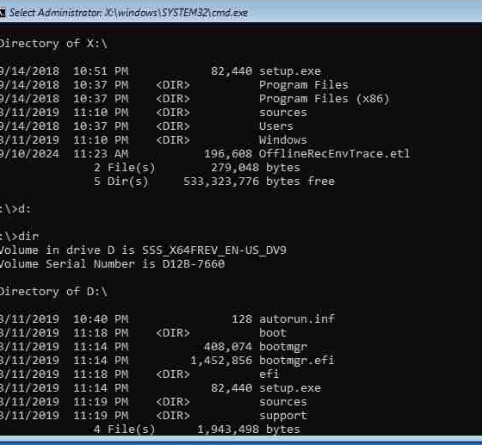
I don't see the local HD, do I need to install the drivers for vmware?
Does it switch to c:?
cd windows\system32
rename utilman.exe utilman.bak
cp cmd.exe utilman.exe
reboot
on the login screen, look for the ease of access, or windows key +U might also do the trick.
net user /add newusername *
net localgroup /add administrators newusername
see if you can login using the newusersname on the login prompt. (make sure to use local account not domain)
Get a FREE t-shirt when you ask your first question.
We believe in human intelligence. Our moderation policy strictly prohibits the use of LLM content in our Q&A threads.
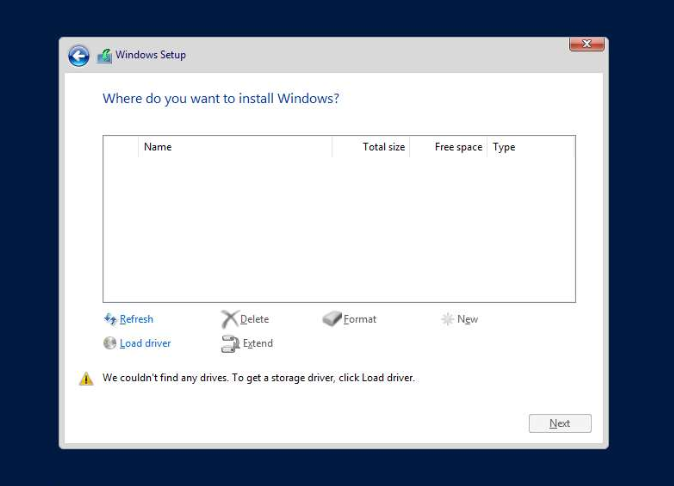
There is no C:, says the system cannot find the drive specified.
Also I ran the setup for Server, and it can't find the drive either, likely without a driver:
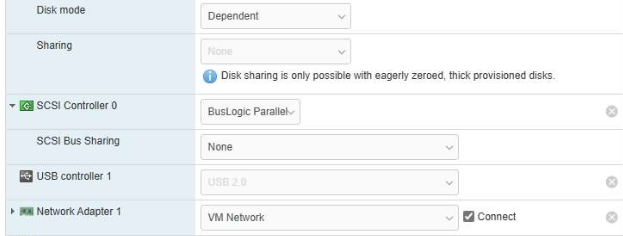
Yupp, SCSI Buslogic
EARN REWARDS FOR ASKING, ANSWERING, AND MORE.
Earn free swag for participating on the platform.
Are you using the windows 10 or server 2019 iso to boot?
Buslogic controller - it was very common in the early days to use this controller - this driver is end of life
You’ll need to convert machine to LSI
I would clone the VM and experiment with the clone then change the controller to a supported controller by the OS you are booting from
All gets complicated because after making changes to the controller you’ll have to change back to boot XP otherwise you’ll get a BSOD
The winxp system was converted using vmware converter.
https://knowledge.broadcom.com/external/article/306809/troubleshooting-a-windows-xp-guest-warni.html#:
Get a FREE t-shirt when you ask your first question.
We believe in human intelligence. Our moderation policy strictly prohibits the use of LLM content in our Q&A threads.
I can try loading the driver, but not sure I have any faith in the driver from the Youtube link. I notice the driver version is the same though, 1.2.0.4.flp.
I'm getting lots of dead ends on Broadcom's site trying to find the file.

I don't have a login for their site if that is what they want.
I have to convert to LSI? I noticed in one Broadcom link they have a driver for LSI for W98, but it timed out. So not sure which drive to add. I don't want to try the file I downloaded from the link in YouTube, since it already likely contributed to the crashing of the whole server.
XP is old, wasting your time I’m afraid trying to dig up and end of life driver for a modern OS !
Swap the hardware!

Yes, the XP is still booting, and other than unable to log in, seems to be doing fine.
I'll take a snapshot of the VM and try to attach it, maybe I'll attach it directly to the DC.
EARN REWARDS FOR ASKING, ANSWERING, AND MORE.
Earn free swag for participating on the platform.
Did you try one of the many linux rescue disks out that clain to be able to access and reset user passwords?
Just for the heck of it, I decided to try and create a new XP VM, and of course… no issues detecting the Storage that I assigned when I created the test (4GB RAM\50GB HD)
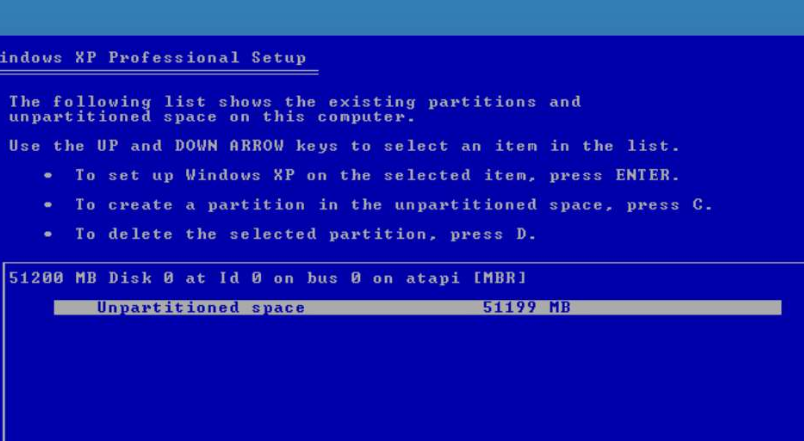
I didn't even have to load a driver or anything, I started the VM and it ran right through, just formatting and copying files right now.
Because Windows XP has the drivers required - if you picked the vSphere Template - change the SCSI controller to LSI - it will fail to find the HDD
Modern OS does not have the drivers embedded in the installer! Why would 2019 include a defunct legacy driver from 18 years ago!
There’s 18 years between XP and Server 2019
Get a FREE t-shirt when you ask your first question.
We believe in human intelligence. Our moderation policy strictly prohibits the use of LLM content in our Q&A threads.
Ok then why when I booted from the XP Setup CD was it unable to find the Virtual HD?
Compare the VM settings
The virtual hardware in your broken cannot login Windows XP needs to match the iso you use - must include the drivers - use a modern OS to boot but it will need the storage controller buslogic - however this does not exist for a modern OS !
Chicken and egg - so change the VM hardware to match the iso - or see other methods above
This is the problem with legacy hardware and old virtual machines
Create a backup of the VM. A snapshot could add complications if trying to attach the disk to another VM.
Look at using veeam or hornet security. Both have a community/LOWER COST VERsions, small foot print option.
EARN REWARDS FOR ASKING, ANSWERING, AND MORE.
Earn free swag for participating on the platform.
A simple “backup” Right Click CLONE - experiment with the clone!
use a regular rescue cd ! preferrably linux based. the simplest safest and most reliable method by far is offline registry edition and set autoadminlogon.
do not download some old windows clone from the web. chances it does not come with malware are close to zero.
you may also reflect on the host crashing. this should definitely not happen under such circumstances unless there is some hardware issue or a malware that specifically targetted esx. in this case i believe the former to be likelier but i have no idea what “SCSI floppy” you downloaded should that even mean something.
the guest system is entirely irrelevant to the host crash. esx is not expected to crash whatever the host does including when the guest is not supported.
repairing or reinstalling the system is bound to fail or at least cause issues even if you have the correct disk drivers unless the cd is the same service pack level. on xp chances that you find a “final” version with everything. even then, it still requires a little luck both to get the os to boot properly and your progs to run. that course of action is not your best bet.
resetting passwords using a windows cd is bound to be at best a painful operation. as you probably know by know. ms has never made any effort whatsoever at providing rescue tools and even the ones you can find on technet or mdn are usually third parties. and quite awful rompared to any of the well known simple methods featured by linux based live cds. actually said cds also usually contain dos based tools but those are not the ones you want in this context. anyway it is a simple 3 clicks operation.
most linux systems have chntpw in their packages. at least debian based ones all do. the ubuntu live cd has it builtin as far as i remember. it allows to simply change the password offline.
i kinda remember rescatux and lazesoft come with offline registry editors that can be used for autoadminlogon but there are tons of others which hopefully google remembers.
So I was able to convert to VHD and import to another Server where I Opened the VHD in Windows.
I can now access the whole drive, so I just need to rename utilman.exe to whatever and cmd.exe to utilman.exe and then boot?
Will it bypass the login completely? or ?
Get a FREE t-shirt when you ask your first question.
We believe in human intelligence. Our moderation policy strictly prohibits the use of LLM content in our Q&A threads.
no it will not boot and login
There is a procedure which has been posted above in this thread
Ok, no problem, but does not do anything.
There is no icon in the logon screen and pressing Ctrl-Windows-U didn't do anything.
Went back and changed permissions on the new exes so everyone has full control and rebooted, made no diff.
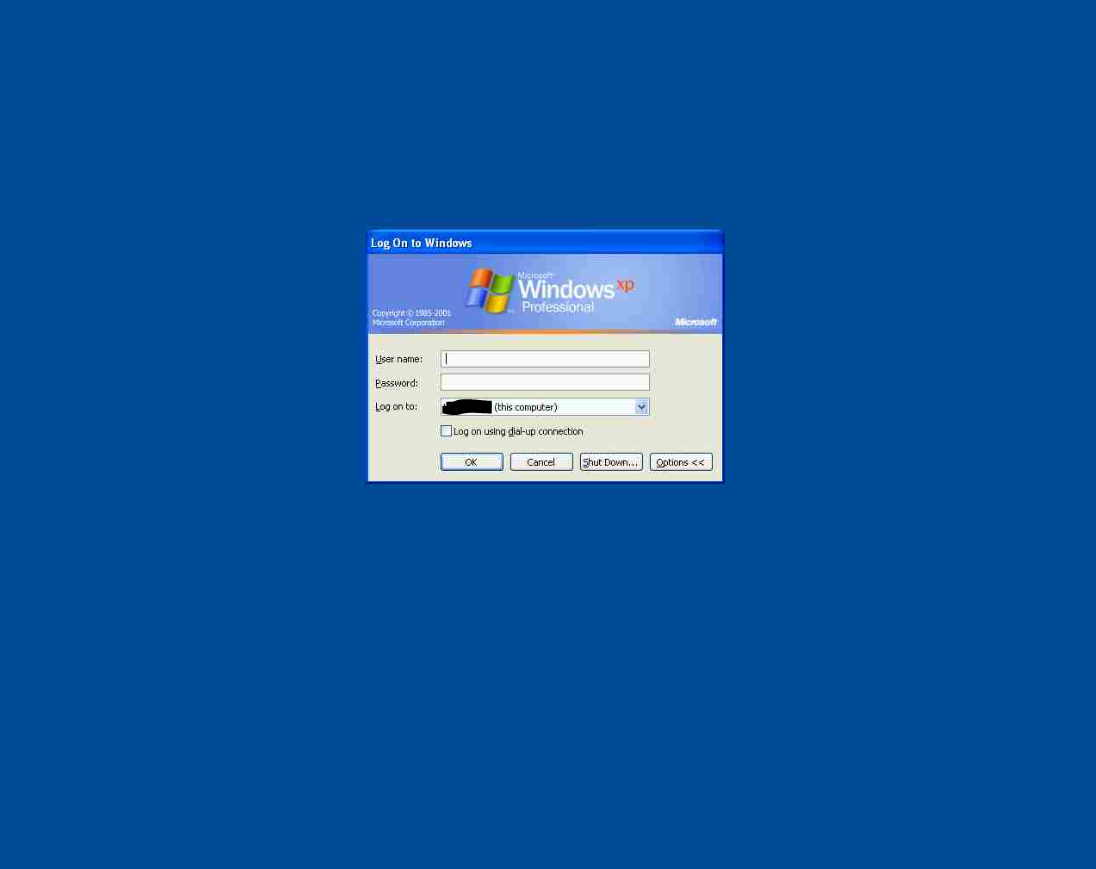
On boot, it will be in the login waiting mode.
Using the easy access option will open a command window where you get you access deals with creating an account with which you can login, and rejoin the computer jnto the domain.
Is this not what you need?
EARN REWARDS FOR ASKING, ANSWERING, AND MORE.
Earn free swag for participating on the platform.
It is what I need, but not sure how to invoke? On boot it takes about 2 seconds to get to the Welcome login, that includes displaying the Windows XP Logo.
On that login screen, what happens if you click “cancel”?
When I click cancel, it reverts back to the ‘Press Ctrl-Alt-Delete to Begin.’ message in the Welcome screen.
Get a FREE t-shirt when you ask your first question.
We believe in human intelligence. Our moderation policy strictly prohibits the use of LLM content in our Q&A threads.
No, not that I can see, just the logon Window.
Try [WINDOWS] + “U”. No [CTRL]
I did try just Win + U, and it brought up a window on my Windows 10 Laptop.
EARN REWARDS FOR ASKING, ANSWERING, AND MORE.
Earn free swag for participating on the platform.
Sorry, I forgot its vmware… Its left ctrl windows U I believe… Not the right side CTRL
I can get into the boot menu just fine, but all options want a local account authentication, except for the obvious.
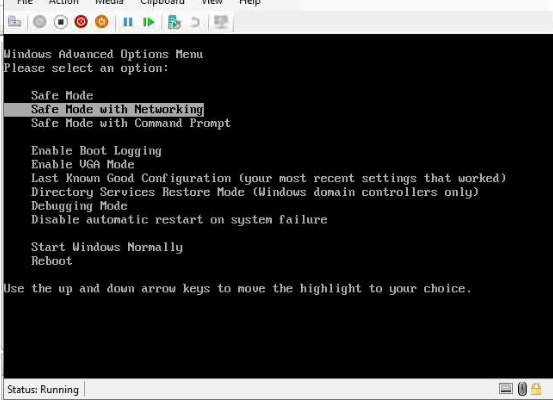
I imported the VM into Hyper V actually… was only way I can edit the Drive.
Get a FREE t-shirt when you ask your first question.
We believe in human intelligence. Our moderation policy strictly prohibits the use of LLM content in our Q&A threads.
The point is since you substituted utilman.exe with a cmd.exe
When you hit windows + U on the XP, that is what you should see a black command window running under system privileges.
When you hit cancel.
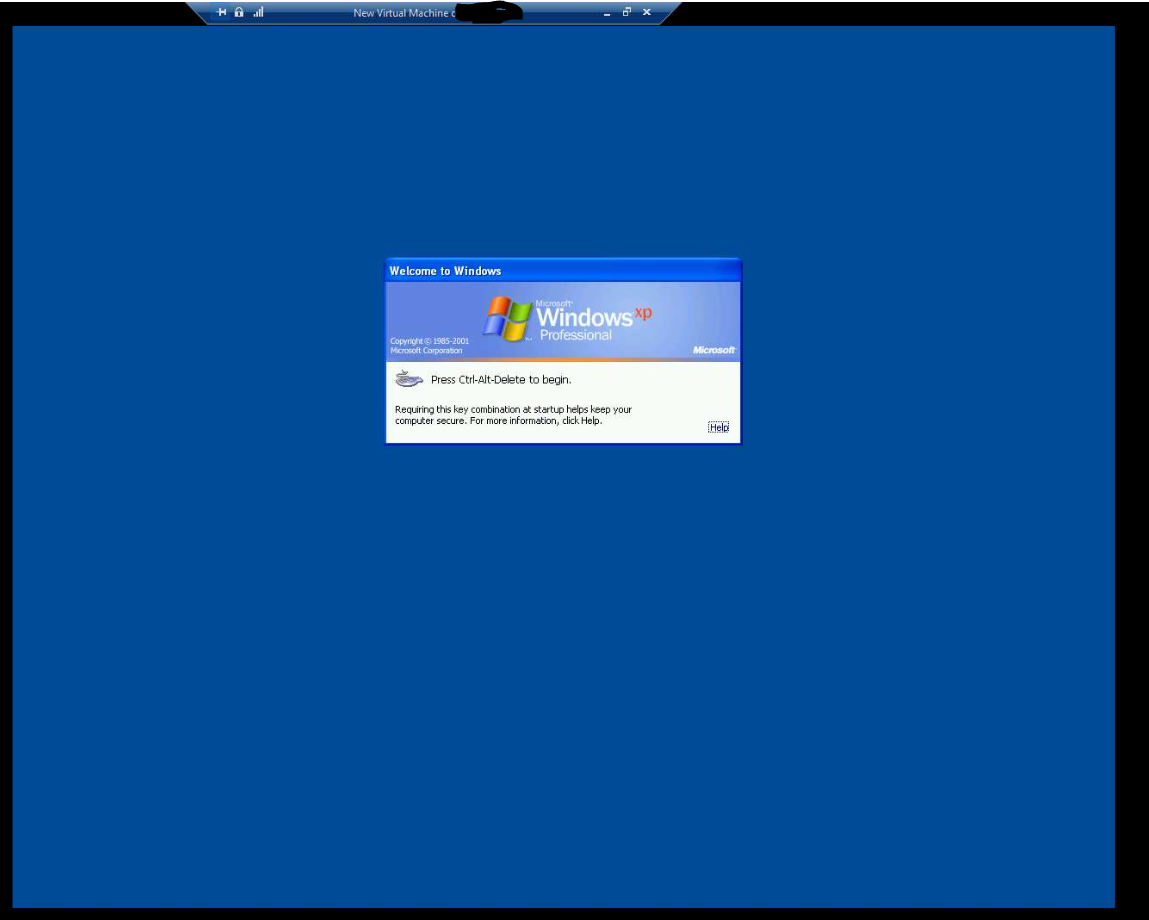
Bottom right or left do you see a semi circle if clicked invokes, triggers something? Post an image, bottom of the screen is of interest before you hit ctrl-alt-del.
The system needs to be in normal mode.
Ok, no problem, here is a full screen capture:
EARN REWARDS FOR ASKING, ANSWERING, AND MORE.
Earn free swag for participating on the platform.
FYI for everyone on this thread!
I tried this over the weekend - and it didn’t work for Windows XP !
Are there any reports it does work for XP?
Always wondered why this method does not seem to be listed at the time Windows XP was current!
And oddly before replacing with cmd.exe it does bring up accessibility settings but does not do the thing like on some versions of Windows 10
Ok good to know…thanks!
Yeah… I booted an old Xp joined machine I have in Virtualbox and I don't think a domain joined machine gets the same login screens.
If you are running in Hyper V you need to see which key combinations lets you force keys into the virtual machine… I don't use Hyper V so I can't help you there.
Get a FREE t-shirt when you ask your first question.
We believe in human intelligence. Our moderation policy strictly prohibits the use of LLM content in our Q&A threads.
Unless someone else has tested and confirmed?
My test machine is not domain joined
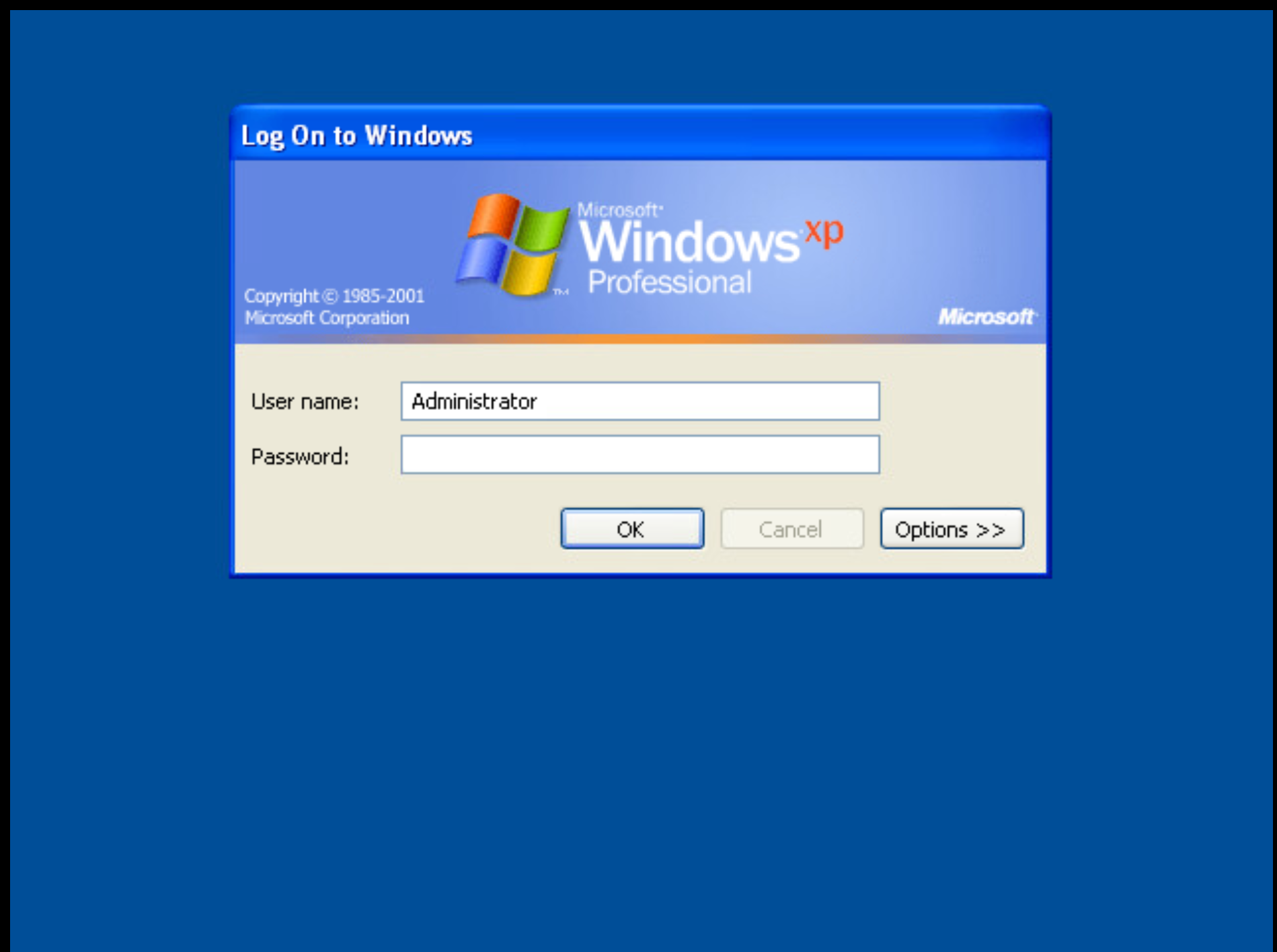
I believe Hirens-PE is now allowed to be mentioned in 2024 !
EARN REWARDS FOR ASKING, ANSWERING, AND MORE.
Earn free swag for participating on the platform.
This just seems like it should be much simpler than the OP is running into…
I have reset Windows accounts for a couple of decades…
Hi, so interestingly enough Hirens-PE worked fine in Hyper V guest VM, I ran it and reset local admin, and was able to login no problem. Perfect!
However, when I downloaded it and booted Hirens-PE in the VMware, it crashed hard:
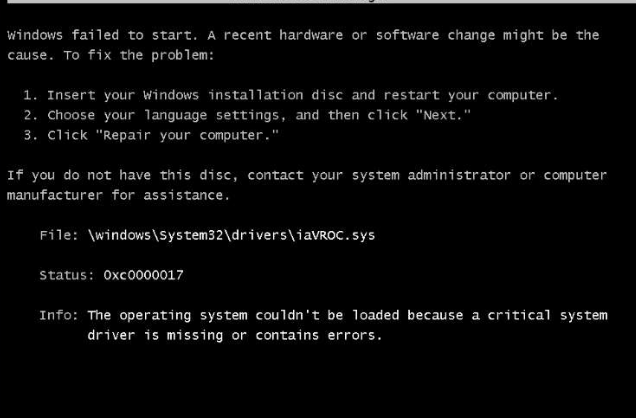
Maybe a setting in the VM? I'll have to see what the iaVROC.sys driver is.
So I'll just live with XP on my Server 2022 hyperV environment rather than my 2019 Vmware. I'm done. I'm tired.
Thanks to everyone for their help on this I'll mark the solution tomorrow or next day, just in case I have a question or two…which is likely.
Thank you again esp Arnold, Andrew and Scott!
I think this refers to the storage
Double check the VM settings hard-drive config.
Get a FREE t-shirt when you ask your first question.
We believe in human intelligence. Our moderation policy strictly prohibits the use of LLM content in our Q&A threads.
i can confirm the regular rescue disk methods involving changing the password offline and setting autoadminlogon both work on XP and were routine operations for admins back in the day XP was still a thing.
if you are into overcomplex ways of failing to achieve a trivial 3 clicks operation, you can also write your own gina dll in dotnet.
what you are trying is much more likely to end up breaking the system beyond repair.
here is yet another tool.
http://pogostick.net/%7Epnh/ntpasswd/
i googled for that one and although i do vaguely remember the name, i cannot remember whether i actuall used it or whether it works though i am pretty sure it does.
the site contains documentations and particularly how to deal with issues caused by dirty filesystem due to previous unclean shutdown which is very likely to happen given how much the system was toyed with in the past days.
on xp, the utilman trick will probably work if you replace utilman with for example a regedit command that sets autoadminlogon. the machine will crash (or maybe just stay up but with no ui and unusable) after the operation is completed unless you execute the actual utilman immediately after. a 2 lines batch script and a .reg should do but i really do not see the point.

https://medium.com/@aggarwaldeepak/resetting-the-windows-password-6b42cf7b7b2a
to set a new local admin password
Windows OS
--
Questions
--
Followers
Top Experts
This topic area includes legacy versions of Windows prior to Windows 2000: Windows 3/3.1, Windows 95 and Windows 98, plus any other Windows-related versions including Windows Mobile.