
Outlook
--
Questions
--
Followers
Top Experts

Howdy,
I'm struggling with OneDrive. I recently learned that OD is embedded in Windows 11, turned on by default, and has a default setting to remove ALL of my computer's data files up to its cloud. That's outrageous. Microsoft only explained that, "We told you so." So I've been trying to back out gracefully without data loss and get back to a computer with my files on it, without OneDrive changes to my directory structure and File Explorer settings. If someone has advice on the steps to do this, I'd appreciate it! I'm sure I'm not alone.
Working with OneDrive Support, I have managed to:
Get all of my files back from the OneDrive cloud
Make a copy of my "local" OneDrive folders to my External USB drive
Turn off OneDrive synching
Turn off OneDrive as a startup application
Change back some (but not all) file Save locations for Outlook apps to point to my PC's directories and not to cloud OneDrive
Challenges:
(I am resigned to put my files onto Windows' directories called Desktop, Documents, Pictures, Music, and Videos, since I'd have to replace the OS to anything else.)
What I would like to do next with OneDrive is:
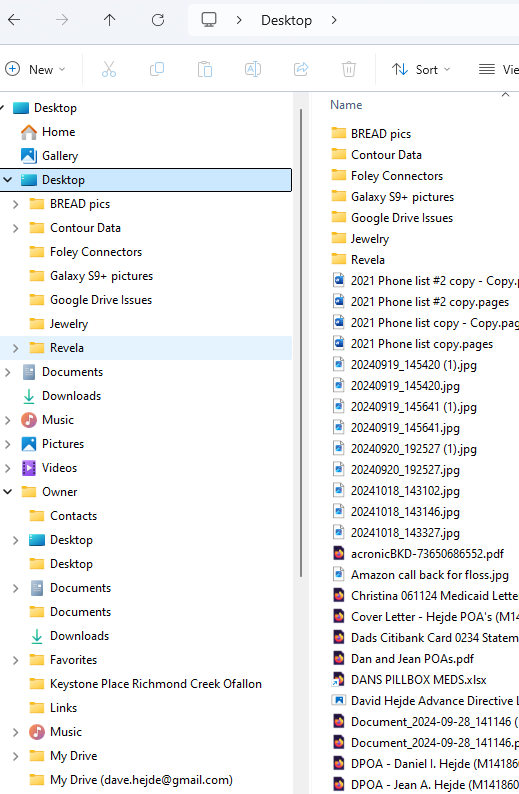
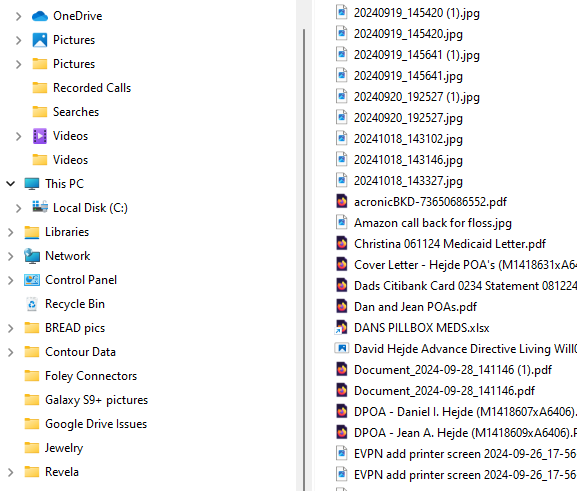
Get OneDrive out of my File Explorer as much as possible. Remove alias and duplicate folder names in File Explorer that all point to the same place without "breaking" Windows 11
Delete all of the data on my PC under these folders and replace it with a "clean" set of files that I have established on my external USB drive.
Suggestions, etc., GREATLY appreciated, but please do not send me links into Microsoft's OneDrive help articles or communities.
Here is what my File Explorer looks like now
Thanks,
Dave
------------------------------------------
Environment: In retirement, my home setup is very simple:
Microsoft Surface Pro 8 x64 computer
Windows 11 Pro OS
Connected to internet by Ethernet from router
1 TB External Seagate drive
external 27" HP monitor
Logitech HD Pro Webcam C920
Spectrum cable modem connected by Ethernet to
ASUS AX5700 Dual-Band Wi-Fi 6 RT-AX86U Pro router
Samsung Galaxy S23 Ultra cell phone with Android 14
2 MS accounts on Outlook.com (one used to sign in to computer)
4 Google accounts on Gmail.com
I try to keep all updates and patches applied. No hacks or jailbreaks.
Key software:
Microsoft Windows 11 Pro OS 10.0.22631 Build 22631 (purchased)
Microsoft Office Home and Business 2021 client (purchased), including
Microsoft Outlook 2021 MSO (Version 2410 Build 16.0.18129.20100) 64-bit
Microsoft OneDrive
Microsoft 365 subscription (forced-to get for 1TB OneDrive cloud storage)
Browsers:
Firefox (main)
Google Chrome
Microsoft Edge (don't use it)
LastPass for Windows Desktop password manager (for now)
SnagIt 13 picture capture and edit
Generally speaking, I've been trying to avoid AI and avoid relying on the internet/cloud. Not a gamer.
Zero AI Policy
We believe in human intelligence. Our moderation policy strictly prohibits the use of LLM content in our Q&A threads.


you missed the bottom part.. the important part..
restoring the original locations fixes the desktop..ini (hidden/system file) you then move again to where ever you want.. this removes the duplicate personal folders in c:\users\owner
i.e. on my machine
document => H:\documents
downloads → H:\downloads
music → Q:\music
music library has q:\music AND F:\Audiobooks
Videos → e:\videos
onedrive personal folder is → H:\Onedrive
onedrive work → Q:\onedrive - techsupport4me
select move and restore original location and let it move the files then you can move them elsewhere but better to start from an initial state
in explorer you can right click folders in the view and unpin each folder you don't want.

Thank you both for pitching in! There is hope after OneDrive.
I'm a little confused by David J's comment (https://www.experts-exchange.com/questions/29278540#a43635786). What is “the bottom part”? And what are is the reference to .ini files? I don't know anything about those. Did I miss another comment?
Thanks again!


EARN REWARDS FOR ASKING, ANSWERING, AND MORE.
Earn free swag for participating on the platform.
Outlook
--
Questions
--
Followers
Top Experts
Microsoft Outlook is a personal information manager from Microsoft, available as a part of the Microsoft Office suite. Although often used mainly as an email application, it also includes a calendar, task manager, contact manager, note-taker, journal, and web browser.