
Windows 11
--
Questions
--
Followers
Top Experts

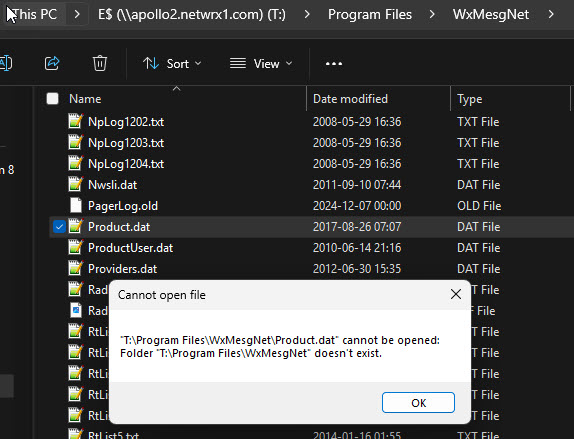
I upgraded from 23H2 to 24H2, and now the mapped drives show up and are even browsable, but you can't open anything else on them, like open them, copy files, etc. As far as I know, I've not changed anything, but it broke after the upgrade. Should I revert to 23H2, and if so, how do I do that correctly?
Zero AI Policy
We believe in human intelligence. Our moderation policy strictly prohibits the use of LLM content in our Q&A threads.

Confirm share/permission settings.
Make sure smbv2/3 is supported by the server sharing it and the same on the client.
It might be an smb version mismatch.

24H2 in Win 11 now blocks Insecure Logins by default so the fix is either to change your shares to provide login credentials or to disable this feature in GPO.
https://www.wintips.org/fix-windows-11-24h2-cannot-access-network-shares-0x80070035/
Arnold:
The source of the mapped drives is the Windows 2012R2 Server - soon to be upgraded to the 2022 Server Client is a Winmdows-11 Pro system. I can see all the shares and browse through them, but I just can't open anything. Before the update, I had no issues. The Win 11 client is fully patched and up to date. How would I check the systems for the SMB V2/3 version?
MASQ:
The shares are all built with Logins and Passwords. If I can help it, I'd rather not turn off security. Will the upgrade to Windows Server 2022 solve this issue?


EARN REWARDS FOR ASKING, ANSWERING, AND MORE.
Earn free swag for participating on the platform.

OK. I checked both the server and the notebook SMB Versions:
Server and Notebook had SMB Versions 1,2, and three active on both systems.
I disabled Version-1 on both, ensured that 2 and 3 were active, and rebooted both systems.
Once they came back up, I could browse, open, and edit files on the server without any issues, just like it worked before the upgrade.
Thank you very much
Windows 11
--
Questions
--
Followers
Top Experts
Windows 11 is a major version of the Windows NT operating system developed by Microsoft that was announced on June 24, 2021, and is the successor to Windows 10, which was released in 2015. Windows 11 was released to the public on October 5, 2021, as a free upgrade via Windows Update and Windows 11 Installation Assistant on eligible devices running Windows 10. Windows 11 features major changes to the Windows shell influenced by the canceled Windows 10X, including a redesigned Start menu, the replacement of its "live tiles" with a separate "Widgets" panel on the taskbar, the ability to create tiled sets of windows that can be minimized and restored from the taskbar as a group, Microsoft Teams being integrated into the taskbar, and new gaming technologies inherited from Xbox Series X and Series S such as Auto HDR and DirectStorage on compatible hardware. Internet Explorer (IE) has been replaced by the Blink engine-based Microsoft Edge, while IE's core is retained for Edge's IE mode, and Microsoft Teams is integrated into the Windows shell. Microsoft also announced plans to allow more flexibility in software that can be distributed via Microsoft Store.