
Windows OS
--
Questions
--
Followers
Top Experts

Morning,
We have a laptop where a few times a week soon as you sign in the device is in a very slow state. It shows a black screen as soon as you enter a password and takes about 20 minutes from there for it to become usable again. It slowly loads desktop, desktop icons, Taskbar, System Tray etc.
Troubleshooting Attempts:
- Commands like DISM, SFC, DSKCHK
- SFC and DISM found errors and were able to be corrected
- OS Updates, Driver/Firmware updates
- Event logs show errors displaying from this time are:
- 4x Group Policy errors failing to install Printer Drivers from Domain Controller but this is expected since this user is working remotely
- 5x NHi errors with Error code: 0x12D, Sub error code: 0x75
- Typical errors when there is no internet connection.
- Provided new Laptop Windows 11 22H2 Laptop, last laptop was Windows 10 22H2.
- We use 22H2 as the new features causes issues with some of the software and scanners we use.
- Lenovo Model Numbers are different between Old (T580) and new (T590)
The new Laptop is now having the same issue.
Notebook is set to not connect to wireless internet automatically per user's preference.
We did not copy any files between laptops to rule out file corruptions.
Applied available OS and Firmware/driver updates.
Replication (Lenovo T590):
I was able to replicate this issue on a spare Laptop.
- Connect to either Office Network or VPN.
- Make sure to disable connecting to wireless networks automatically
- After 3-4 days turn on laptop and sign in.
- Same errors regarding the NHi are displayed.
- Group Policy errors do not say “Failed to install printer drivers from DC” but there are still errors.
- Again, I feel like these are expected
- Realized MS 365 CoPilot app was installed on device the same day issue occurred.
- Users are not local admins on their devices typically but able to replicate it both ways
Changes made to User's notebook and waiting to see if it changes the situation for the user:
- Set to connect to home wireless automatically
- Uninstalled MS365 CoPilot App (Not installed by IT or user)
Event Log Errors:
Group Policy Error for failing to install Printer Drivers from Domain Controller
Log Name: Microsoft-Windows-PrintService/Admin
Source: Microsoft-Windows-PrintService
Date: 2/10/2025 3:32:37 PM
Event ID: 513
Task Category: Routing print spooler command(s)
Level: Error
Keywords: Router,Classic Spooler Event
User: DOMAIN\username
Computer: notebook.DOMAIN.org
Description:
Group Policy was unable to add per computer connection \\[DC]\[PrinterModel] Error code 0x6BA. This can occur if the name of the printer connection is incorrect, or if the print spooler cannot contact the print server.NHi Error
Log Name: System
Source: nhi
Date: 2/10/2025 3:24:44 PM
Event ID: 9006
Task Category: None
Level: Error
Keywords: Classic
User: N/A
Computer: notebook.DOMAIN.org
Description:
An error was detected.
Error message: Error code: 0x12D, Sub error code: 0x75
Any suggestions would be much appreciated!
Zero AI Policy
We believe in human intelligence. Our moderation policy strictly prohibits the use of LLM content in our Q&A threads.

A quick question, if you create a local user account and try to login in under it - does it login faster?

Sounds like a network resource access is timing out and your system is waiting for it to resolve.
@noxcho
I will have to give that a go next time the issue comes about, thank you.
@serialband
I am getting the same impression as well, I am hoping that enabling the connection to their home internet resolves this.


EARN REWARDS FOR ASKING, ANSWERING, AND MORE.
Earn free swag for participating on the platform.

Open Windows Explorer.
Go down to This PC/My Computer in the left hand column. Click on it.
In the right pain is/are there mapped drive letters that are showing a red X?
Is the user disconnected from the network when this happens?
What does the user's computer say in the following Event Log location for errors/warnings:
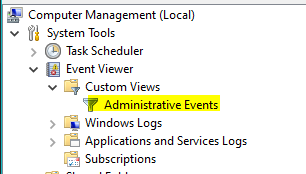

I agree with serialband, sounds like accessing a network resource.
Does the user have any Cloud based file storage, like MS's OneDrive? Our company uses that and it connect as a folder under our home directory. So every time you logon it attempts to sync files. If you access your OneDrive from another source and do a lot of updates, it could take awhile to sync.
If you could get a command window open, you could issue “netstat -n” to see if there are any TCP connections in the SYN_SENT status and then try and chase down what the target host is. But from the sounds of it, by the time you can issue the command, the problem is over.
Can you get task manager up while it seems to be hung (CNTL+SHIFT+ESC). If so you might be able to select FILE → RUN → CMD and try netstat or even look at task manager to see if there is a task that is using a lot of CPU.
UPDATE
User has been able to sign in without issues so far.
Recent Changes: Enable Connect to home wireless automatically at startup & uninstalled MS365 Copilot
@Phillip Elder
Event errors and warnings are in the question submitted.
Yes, user is not connected to the VPN yet and the mapped drives show disconnected because user is not connected to the VPN when the issue occurs.
@giltjr
We do not use any kind of cloud storage; we have OneDrive disabled as per GPO as well as OneDrive is uninstalled from their machines.
Unfortunately, by the time I am able to run Task Manager the issue has subsided and the same with command prompt. If the issue occurs again, I can run netstat to see if there are any findings since I have not tried it yet.
Thanks!
Get a FREE t-shirt when you ask your first question.
We believe in human intelligence. Our moderation policy strictly prohibits the use of LLM content in our Q&A threads.
Ok, it means that sign in with a local user works without a problem. Definitely network issue.
Connection to wireless can take sometimes a while. I would test it by disabling this recent change. Then you have your root of cause.
UPDATE
A Few users have encountered the issue and told us after their notebooks have recovered. All of which were not connected to the internet automatically and all have the MS365 CoPilot installed with today's date of installation on it.
Can you check on the affected machines if other MS updates were installed? Do these machines constantly have this problem now?
EARN REWARDS FOR ASKING, ANSWERING, AND MORE.
Earn free swag for participating on the platform.
UPDATE
User is still having issues at home.
- Confirmed Notebook is connecting to Home Wireless automatically
Replicated issue in Office on a different laptop having it set to not connect to any Wireless Access points Automatically. Issue occurs on the local admin account
@noxcho
No MS Updates have been applied since the beginning of the month and this issue started before February Patches were rolled out.
Task Manager shows minimal resources being used when I was finally to get it to open.
Only Anti-Virus are listed in Startup Applications.
Two tries would be nice to do:
- Disable all network adapters on the machine where you can reproduce it with local system account. Check if the logon goes faster.
- Can you deactivate antivirus from startup or uninstall it and see if the login works faster?

the first error refers to a printspooler problem - here cleaning the registry was needed :
Solved: Windows Event 513 PrintService - HP Support Community - 6162167
Get a FREE t-shirt when you ask your first question.
We believe in human intelligence. Our moderation policy strictly prohibits the use of LLM content in our Q&A threads.
Update
@noxcho
Disabling the Network Adapters did not change anything
On the Testing device Removing the AV agent seems to do the trick, Able to install the agent again and the issue is no longer occurring.
Just finished uninstalling and reinstalling the AV agent on the user with this issue and hopefully it all works out.
Thank you everyone for the comments!
Update
Able to Replicate issue on laptop again with the AV agent installed.
Unsure why this would affect some user machines and not others.
Seems to be something with the AV and the WiFi even after the reinstall of the agent there was no change.
Could be AV Agent starts longer or performs scan at startup. Maybe you change the AV or request the AV-provider for known issues report.
EARN REWARDS FOR ASKING, ANSWERING, AND MORE.
Earn free swag for participating on the platform.

Windows OS
--
Questions
--
Followers
Top Experts
This topic area includes legacy versions of Windows prior to Windows 2000: Windows 3/3.1, Windows 95 and Windows 98, plus any other Windows-related versions including Windows Mobile.