
Windows OS
--
Questions
--
Followers
Top Experts

Hi,
In OBS how to get at least 720P video resolution. I recorded one video seems video quality resolution does not meet 720p criteria to upload to one website. What resolutions are better for viewing online. Any best practices around this. Any other things other than video resolution i need to consider. How to get best audio quality. I am using windows 10 laptop. Please advise
Zero AI Policy
We believe in human intelligence. Our moderation policy strictly prohibits the use of LLM content in our Q&A threads.

i found this :
For 720p video at 60 frames per second, the recommended bitrate range is 2,500 to 5,000 kbps. The Canvas Resolution should be the size of the window you want to capture. The Scaled Resolution should be 1280 × 720 for a 720p stream or video.
more info on OBS: The Best OBS Recording Settings in 2025 – Movavi

>>Any other things other than video resolution i need to consider
Yes, look at the source, how did you record it? It is better to record in a higher resolution/quality than using tools to try and increase those. Your audio for example, you will probably not get it much better. The video resolution you can increase, rendering will take time, depending on the length of the video.
Btw. expert comment above is not in line with EE guidelines and should be reported.
Gerwin, what do you mean? i'm unaware of anything wrong


EARN REWARDS FOR ASKING, ANSWERING, AND MORE.
Earn free swag for participating on the platform.
>> what do you mean?
Because it looks like you are using a search engine such as Google to post your comments, copying content from another site, without sharing personal experience. That is not what EE is about, the community guidelines have a paragraph about it here.
Share your honest opinions, insights, and advice based on your personal experience. The knowledge and experience that we share is the best thing we have to offer.


well if one cannot use the net to find info, haw can we get to EE at all?
and it does not say that you may not do that imo
i would have to agree with nobus on this...
he said i found thisi sent you a PM in EE
"For 720p video at 60 frames per second...", then posted a link where it was found
Get a FREE t-shirt when you ask your first question.
We believe in human intelligence. Our moderation policy strictly prohibits the use of LLM content in our Q&A threads.
tx Paul
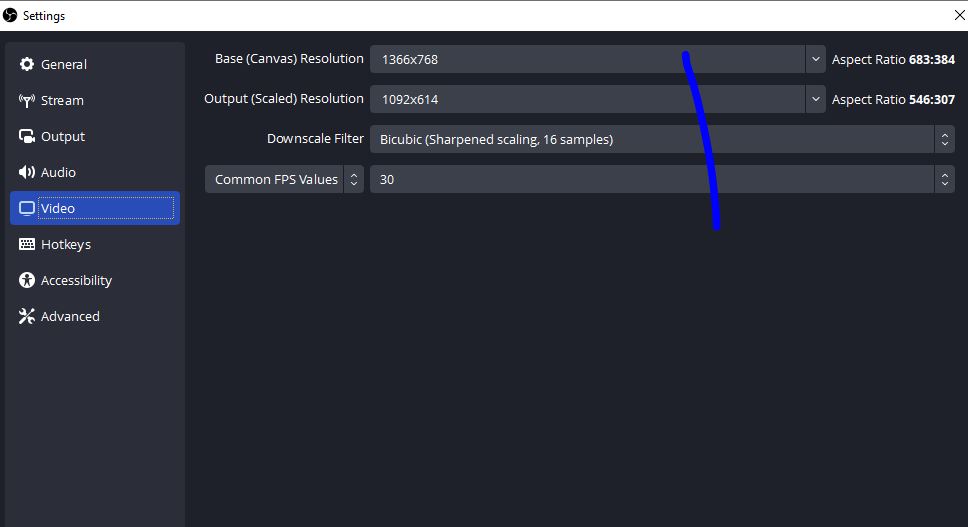
Thank you all for your feedback. As attached I do not see below in drop down of output (scaled) resolution
>>The Scaled Resolution should be 1280 × 720 for a 720p stream or video.
How output (scaled) resolution different from Base (scaled) resolution
I select entire windows 10 laptop screen for recording not recording specific part of the screen

EARN REWARDS FOR ASKING, ANSWERING, AND MORE.
Earn free swag for participating on the platform.
>>i would set the both input & output to1280 x 720.
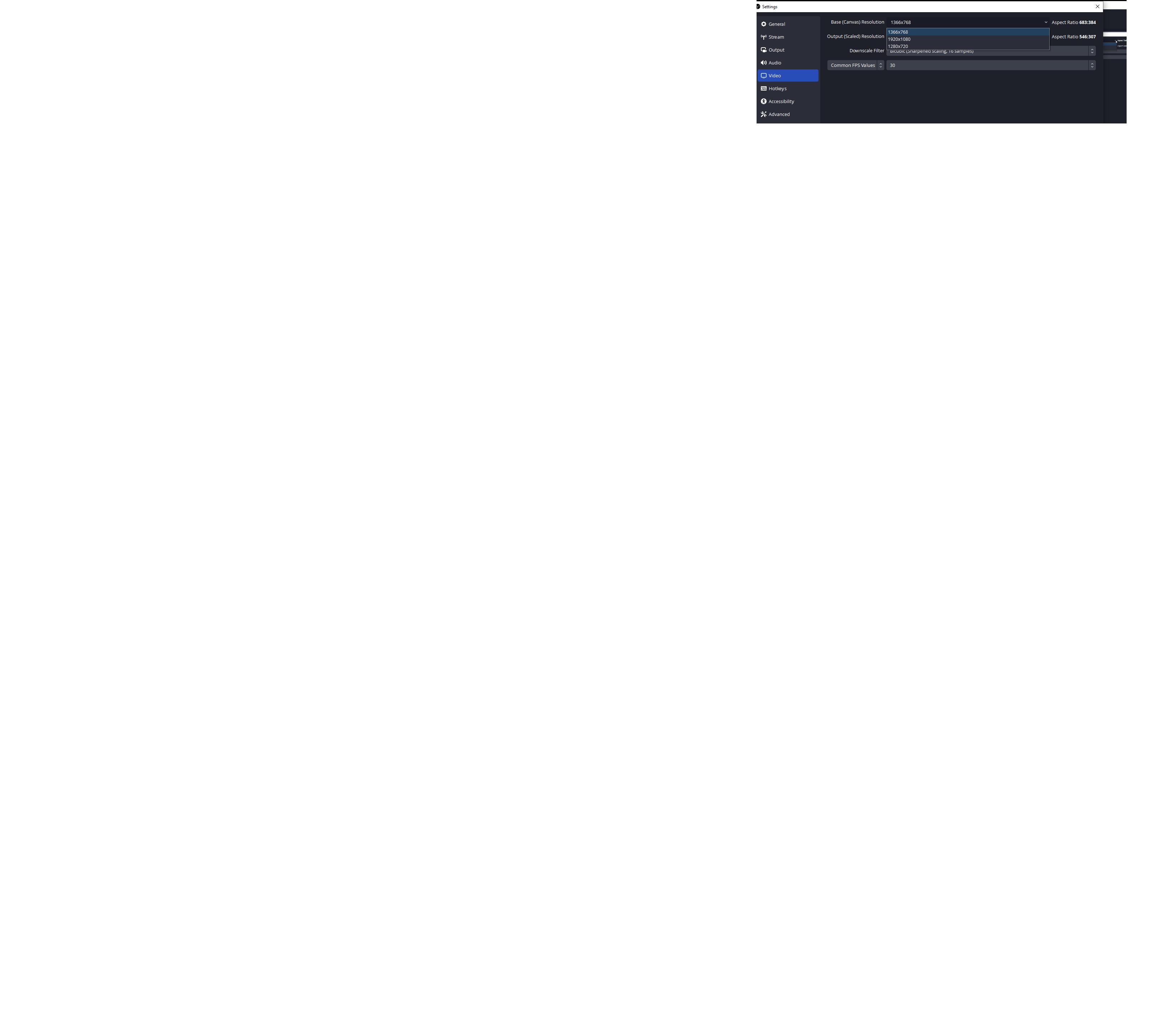
input meaning Base (scaled) resolution where I do not see 1280 * 720 as in screenshot 2 but I see 1364 * 768 as closer higher value which I can use?
>>Now when zooming in on your screenshot 3 - the output you can select is 1280x720 which is 720p - that is what you want right?
That is right. I will use that for output (scaled) resolution as in screenshot 3 and test in that website uploading to see if that error is resolved
Base (scaled) resolution I see 1280 * 720 also
Output(scaled) resolution 1280 * 720 once I upgrade to latest 31.0.3 version of OBS now
Get a FREE t-shirt when you ask your first question.
We believe in human intelligence. Our moderation policy strictly prohibits the use of LLM content in our Q&A threads.
>> I will use that for output (scaled) resolution as in screenshot 3 and test in that website uploading to see if that error is resolved
What was the result?
What do you mean with your last comment, I don't get it.
I am good now. Thank you
Windows OS
--
Questions
--
Followers
Top Experts
This topic area includes legacy versions of Windows prior to Windows 2000: Windows 3/3.1, Windows 95 and Windows 98, plus any other Windows-related versions including Windows Mobile.