Prevent users sending external e-mails with Transport Rules


Published:
Browse All Articles > Prevent users sending external e-mails with Transport Rules
A question that often comes up is how to prevent users from sending mail externally without affecting their ability to email each other.
In previous versions of Exchange there was no sure fire, clean way to achieve this. With Exchange 2007 and 2010 we can use Transport rules to give us a very fine grained approach to managing this scenario.
in the action pane on the right hand side click New Transport rule this will start the Transport Rule wizard with the screen below.
![transport-rule-01]() Give the rule a name and enter a description then click next.
Give the rule a name and enter a description then click next.
![transport-rule-02]() On the conditions page select from user inside or outside the organisation and sent to users inside or outside the organisation. In the bottom window of this screen click the blue link on from user inside the organisation and make sure inside is selected. Then on the sent to users inside the organisation click the blue inside link and change it to outside. Once you have made these changes click next.
On the conditions page select from user inside or outside the organisation and sent to users inside or outside the organisation. In the bottom window of this screen click the blue link on from user inside the organisation and make sure inside is selected. Then on the sent to users inside the organisation click the blue inside link and change it to outside. Once you have made these changes click next.
![transport-rule-03]() This screen allows us to specify an action that is taken if the conditions on the previous screen are met. From the list select either send bounce message to sender with enhanced status code or silently drop the message. The bounce back option will inform the user that their attempt to send a message has failed; the silent option will simply drop the message with no notification. You may also want to consider the log an event with message option so that you can keep track of how many messages have been dropped. Click next when you are happy with your selection.
This screen allows us to specify an action that is taken if the conditions on the previous screen are met. From the list select either send bounce message to sender with enhanced status code or silently drop the message. The bounce back option will inform the user that their attempt to send a message has failed; the silent option will simply drop the message with no notification. You may also want to consider the log an event with message option so that you can keep track of how many messages have been dropped. Click next when you are happy with your selection.
![transport-rule-04]() If you want certain people to be able to send external e-mail then on the following screen select except when the message is from people and click the blue link people and ensure that you select the users you want to be able to bypass this rule. Click next and then new to complete the creation of the transport rule.
If you want certain people to be able to send external e-mail then on the following screen select except when the message is from people and click the blue link people and ensure that you select the users you want to be able to bypass this rule. Click next and then new to complete the creation of the transport rule.
In previous versions of Exchange there was no sure fire, clean way to achieve this. With Exchange 2007 and 2010 we can use Transport rules to give us a very fine grained approach to managing this scenario.
Solution
Using the Exchange Management console, navigate to Organisation Configuration > Hub Transportin the action pane on the right hand side click New Transport rule this will start the Transport Rule wizard with the screen below.
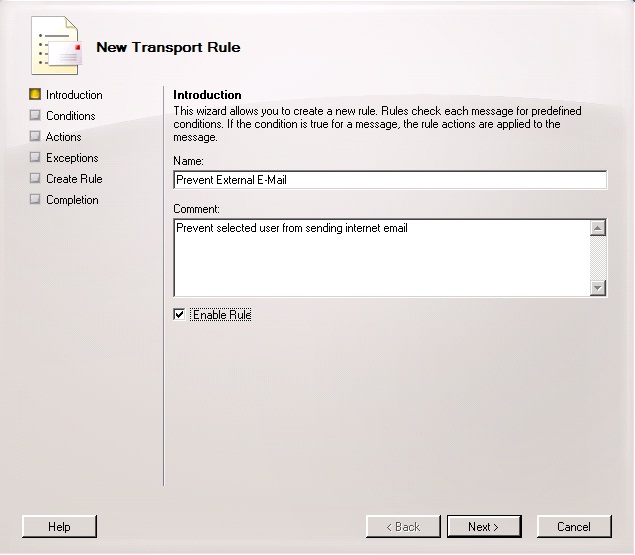 Give the rule a name and enter a description then click next.
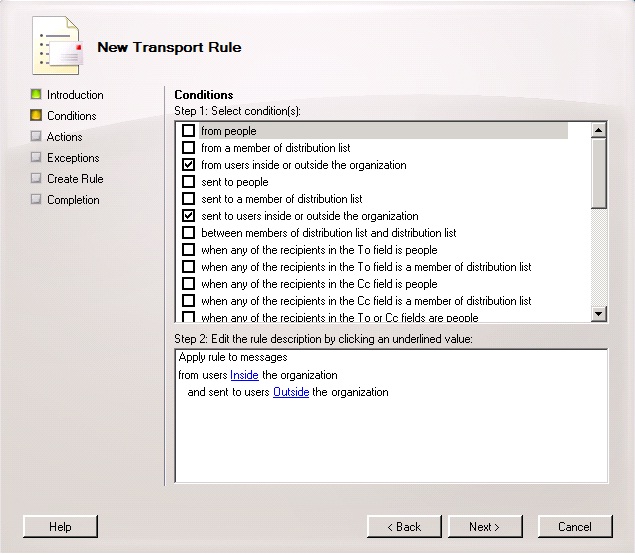 On the conditions page select from user inside or outside the organisation and sent to users inside or outside the organisation. In the bottom window of this screen click the blue link on from user inside the organisation and make sure inside is selected. Then on the sent to users inside the organisation click the blue inside link and change it to outside. Once you have made these changes click next.
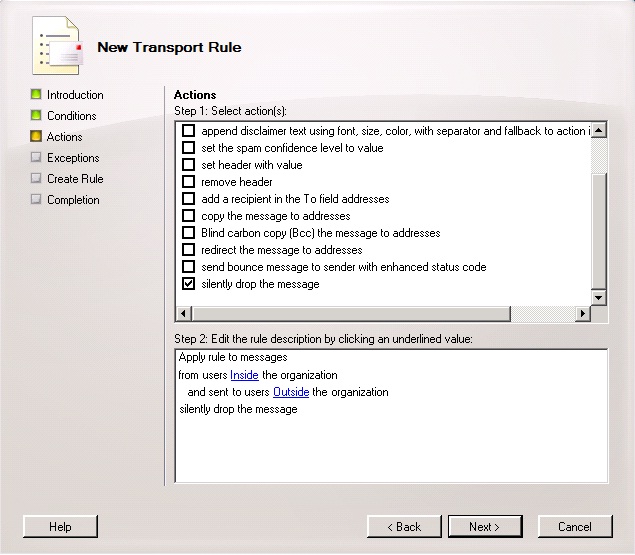 This screen allows us to specify an action that is taken if the conditions on the previous screen are met. From the list select either send bounce message to sender with enhanced status code or silently drop the message. The bounce back option will inform the user that their attempt to send a message has failed; the silent option will simply drop the message with no notification. You may also want to consider the log an event with message option so that you can keep track of how many messages have been dropped. Click next when you are happy with your selection.
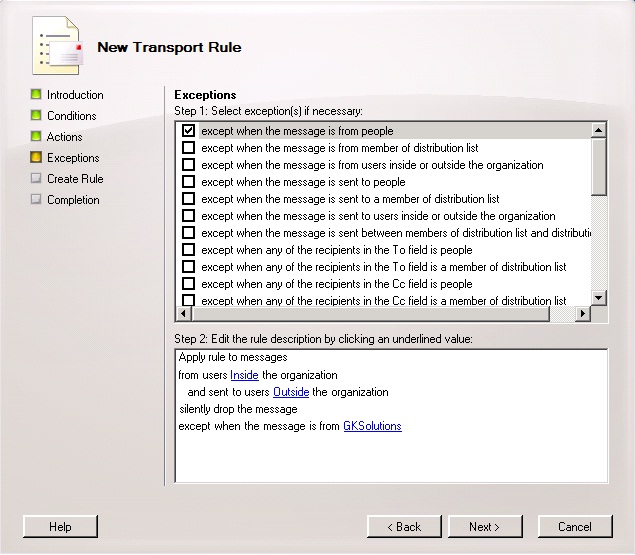 If you want certain people to be able to send external e-mail then on the following screen select except when the message is from people and click the blue link people and ensure that you select the users you want to be able to bypass this rule. Click next and then new to complete the creation of the transport rule.
Summary
Transport rules in Exchange 2007 and 2010 provide us with a nice tidy way of performing tasks that were tedious and very difficult to manage in previous versions of Exchange. For more information on Transport Rules please see: http://technet.microsoft.com/en-us/library/dd351127.aspxHave a question about something in this article? You can receive help directly from the article author. Sign up for a free trial to get started.
Comments (1)
Commented:
You are a life saver!!!