
Components
--
Questions
--
Followers
Top Experts

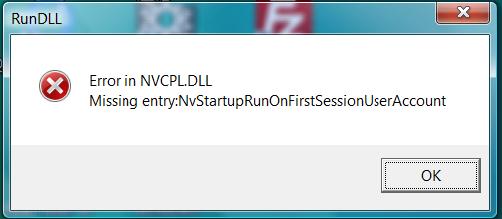
I rolled the driver back successfully but I now get the following message on startup:
Error In NVCPL.DLL
Missing Entry: NvStartupRunOnFirstSession
I understand that NVCPL.DLL is NVidia control panel and whilst it loads it is all grayed out, in other words,useless.
I downloaded (another) driver from Nvidia site which installed, seemingly successfully but the error still persists, restoring the (original) driver using HP built-in facility did not work; removing Nvidia from the startup (with msconfig) did not do the trick either.
My guess is that there is a missing entry in the registry but I cannot find trustful advice as to how to restore it, if indeed it is the problem.
Does anyone here has a solution to this problem? I am trying to avoid a clean-install of Windows which is at least two day work bringing my computer back to its currect state.
Specs:
Windows Vista Home Premium 64bits fully patched
Processor: Intel(R) Core(TM)2 Quad CPU Q8200 @ 2.33GHz, 2336 Mhz, 4 Core(s), 4 Logical Processor(s)
BIOS Version/Date: American Megatrends Inc. 5.05, 04/06/09
SMBIOS Version: 2.5
Display Card: Nvidia GeoForce GT 220
Thanks in advance
Jacob
Zero AI Policy
We believe in human intelligence. Our moderation policy strictly prohibits the use of LLM content in our Q&A threads.


I am still at it so this is just a progress report; Autorun did not do the trick - I followed the instructions on the Nvidia forum using DriverSweeper, still no luck - what appears to happen is that the newer version of the driver, the one that does not like my BIOS, is attempting to install and failing taking me back to square one.
I will revert shortly.
Jacob
No luck!
I uninstalled the driver and used DriverSweeper in safe mode a number of times to no avail. As soon as I restart windows, it installs the driver that does not like my Bios, I reinstall the original driver manually and I am back to square one, EXCEPT that Nvidia control panel is now working OK.
Any more suggestions?


EARN REWARDS FOR ASKING, ANSWERING, AND MORE.
Earn free swag for participating on the platform.
http://www.nvidia.com/Download/Find.aspx?lang=en-us
I had already done that to no avail - this is the "(another) driver from Nvidia site" that I mention in my original post. In fact it is the one that asks me to upgrade my BIOS although I had already done that too.
Jacob
Get a FREE t-shirt when you ask your first question.
We believe in human intelligence. Our moderation policy strictly prohibits the use of LLM content in our Q&A threads.
Although the problem appeared after a failure of a driver to install, subsequent successful installs do not resolve it. It seems that removing-cleaning-reinstal
I shall leave this question open for another few days to see whether a solution emerges, failing which I will, in all probability, clean-reinstall Windows, something that I usually do once a year in any event; this computer is due for a clean up around mid November which is not too far off.
"I would go to Add/Remove programs and remove any Nvidia software then restart."
As soon as I reboot, Windows try to install the driver that fails to install thus I manually re-install the original driver (that came with the computer) after the failure, but that of course it is too late, once a driver fail to install the error that is causing the message is re-introduced, assuming that the cleanup was effective, something that I am not sure about either.
If there is a way to stop Windows from automatically installing hardware drivers on reboot, or changing the driver that is installed by default, I might be there with a chance, but I don't know of way to stop it or whether it can be done at all.
EARN REWARDS FOR ASKING, ANSWERING, AND MORE.
Earn free swag for participating on the platform.
I am not quite sure what exactly did the trick; as you suggested, I removed the driver and the control panel in "add/Remove programs" and also something called "Nvidia Phyx" (or similar name), I then restarted in safe mode which (of course!!!) did not automatically installed the offending driver.
I used DriverSweeper to clean Nvidia leftover of the driver and then went into the registry and whilst there was no NVCPL.DLL in the registry, there were quite a few other NVidia entries; I removed them all except those in ClassID's. Amogst the entries I removed, there was one which pointed to the location of the "bad" driver (the one that fail the install).
I also noticed that uninstalling Nvidia left its directory in "Program Files (x86)" with quite a bit of stuff in it -- I deleted it.
I then re-boot, again in safe mode, and manually installed the original driver (that came with the computer) and ... bingo!
I noticed that "Nvidia Physx" did not return to "Add/Remove Programs", I guess that was put there by the newer driver that failed to install; it may or may not be the cause for the problem.
I really appreciate your tenacity Edbedb, I had practically decided to clean- reinstall Windows in the next few days, which I can put off now. Had it not be your persistence, I would have probably gone that way.
Thank you very much for your help
Best regards
Jacob
Get a FREE t-shirt when you ask your first question.
We believe in human intelligence. Our moderation policy strictly prohibits the use of LLM content in our Q&A threads.
Components
--
Questions
--
Followers
Top Experts
Components are those devices that are internal to a computer -- the PC boards, the central processor (CPU), the memory (RAM), disk and video controllers and so on.