
Microsoft Access
--
Questions
--
Followers
Top Experts

On a site I found a nice piece of code to change the cursor from an arrow to a hand while moving over the button. (http://www.access-programmers.co.uk/forums/archive/index.php/t-15232.html)
What puzzles me is what the Ampersand character (&) is doing behind the numbers.
An example: Public Const IDC_HAND = 32649&
Why is this sign there? What's the use?
An explanation is welcome.
Nico.
Zero AI Policy
We believe in human intelligence. Our moderation policy strictly prohibits the use of LLM content in our Q&A threads.

mx
Capture1.gif
Capture2.gif

What puzzles me is what the empercent-sign (&) is doing behind the numbers.
The correct word is ampersand :)
Option Compare Database
Option Explicit
'This code for Cursors was originally written by Terry Kreft.
'Also, SSF_DsplyMouseCursor and SSF_DsplyIcon (both modified by ADI)
Declare Function adiSWA_LoadCursorByNum Lib "user32" Alias "LoadCursorA" _
(ByVal hInstance As Long, ByVal lpCursorName As Long) As Long
Declare Function adiSWA_LoadCursorFromFile Lib "user32" Alias _
"LoadCursorFromFileA" (ByVal lpFileName As String) As Long
Declare Function adiSWA_adiSetCursor Lib "user32" Alias "SetCursor" _
(ByVal hCursor As Long) As Long
Function SSF_DsplyMouseCursor(sCurs
'-------------------------
' Action(s) : Changes the mouse cursor to the type indicated by sCursorType.
' Comments : Typically called from an object's MouseMove event
' Protocol : =SSF_DsplyMouseCursor("Han
'-------------------------
' Argument Description
' -------- -----------
' sCursorType Cursor type desired, as specified below
'Hand
'AppStarting
'No
'Wait
'Arrow
'Cross
'SizeAll
'SizeNESW
'SizeNS
'SizeNWSE
'SizeWE
'UpArrow
'-------------------------
Dim sCursors As String
Dim iCursorPos As Integer
Dim lCursorType As Long
sCursors = "Hand32649AppStarting32650
iCursorPos = InStr(1, sCursors, sCursorType)
lCursorType = Mid(sCursors, iCursorPos + Len(sCursorType), 5)
Call adiSWA_adiSetCursor(adiSWA
End Function
Then, call this Function from the MouseMove event of any Control you want the Hand - see Image.
mx
Capture1.gif


EARN REWARDS FOR ASKING, ANSWERING, AND MORE.
Earn free swag for participating on the platform.


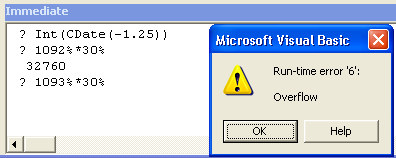
In the Immediate Pane I typed two multiplication and took a snapshot after the error message from the second multiplication
mx
Get a FREE t-shirt when you ask your first question.
We believe in human intelligence. Our moderation policy strictly prohibits the use of LLM content in our Q&A threads.

Public Const IDC_HAND As Long = 32649

x = CLng(32649)EARN REWARDS FOR ASKING, ANSWERING, AND MORE.
Earn free swag for participating on the platform.
Great to see the enthusiasm with which this question was taken on.
To Papertrip and Aikimark: thanks for correcting me on the correct name of the sign. That's probably why I couldn't find an answer to the question on Google :-)
GRayL: Although DatabaseMX definitely gave the most extensive answers, I have to agree with you that you gave the answer to the question. Therefore, I will accept your solution.
DatabaseMX: the code on the page that I was referring to also originates from Terry Kreft. I will compare the two versions to see the differences. Anyway, I learned some new things from your posts. For instance, the comment on the hyperlinks is something that I was not aware of. In the business environment I am currently working in, they are still using Access 2003. Not sure if this option is already present there.
All,
Thanks very much for your answers.
Nico.
Microsoft Access
--
Questions
--
Followers
Top Experts
Microsoft Access is a rapid application development (RAD) relational database tool. Access can be used for both desktop and web-based applications, and uses VBA (Visual Basic for Applications) as its coding language.