
Microsoft Access
--
Questions
--
Followers
Top Experts

?len(Currentdb.OpenRecordset("Select distinctrow'" & string(400,"?") & "' as X from [Stability Sum]")(0))
 400
?len(Currentdb.OpenRecordset("Select distinct   '" & string(400,"?") & "' as X from [Stability Sum]")(0))
255 Zero AI Policy
We believe in human intelligence. Our moderation policy strictly prohibits the use of LLM content in our Q&A threads.

DISTINCT
DISTINCT checks only the fields listed in the SQL string and then eliminates the duplicate rows. Results of DISTINCT queries are not updateable. They are a snapshot of the data.
DISTINCT queries are similar to Summary or Totals queries (queries using a GROUP BY clause).
DISTINCTROW
DISTINCTROW, on the other hand, checks all fields in the table that is being queried, and eliminates duplicates based on the entire record (not just the selected fields). Results of DISTINCTROW queries are updateable.

DistinctRow does not do that.


EARN REWARDS FOR ASKING, ANSWERING, AND MORE.
Earn free swag for participating on the platform.

Fine.

1
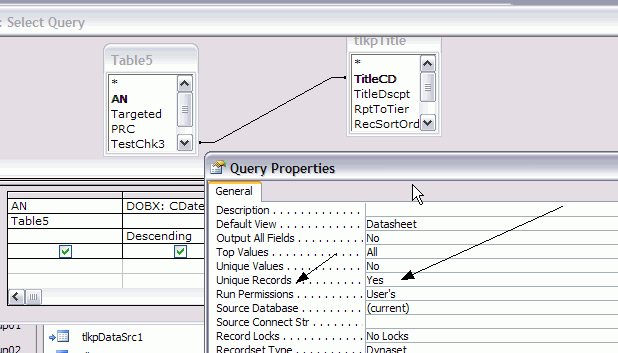
"The DISTINCTROW predicate corresponds to the UniqueRecords property setting" (see image)
2
"The UniqueRecords property has an effect only when you use more than one table in the query and select fields from the tables used in the query. The UniqueRecords property is ignored if the query includes only one table."
3
"The UniqueRecords property applies only to append and make-table action queries and select queries."
Crosstab Queries, Summary Queries, Union Queries, and Queries that use Distinct or DistinctRow will all truncate a memo field to 255 characters so Access can perform the required functionality of eliminating duplicates.
Also, if you have specified a format in the field's Format property, this will often truncate the data as well. If Unique Value Property is set to Yes, Access has to compare the values and therefore Memo Field values are truncated.
Get a FREE t-shirt when you ask your first question.
We believe in human intelligence. Our moderation policy strictly prohibits the use of LLM content in our Q&A threads.
Interesting that that article indicates that DistinctRow will also truncate memo fields. Wonder if the reason the OP is getting away with it in the example is that what is being used is a text string of 400 characters, not actually a memo field.
I've rarely found a good reason to use DistinctRow, and for speed purposes, I generally avoid DISTINCT in favor of a GROUP BY clause.
>>Queries that use Distinct or DistinctRow will all truncate a memo field to 255 charactersThis does not seem to be the case for my example in my initial question....And there is nothing about Memo type and Field object.
Dale ... have you ever run a test on the two, say with a ~2M records, one field ?
EARN REWARDS FOR ASKING, ANSWERING, AND MORE.
Earn free swag for participating on the platform.
mx
Get a FREE t-shirt when you ask your first question.
We believe in human intelligence. Our moderation policy strictly prohibits the use of LLM content in our Q&A threads.

Most of the info in the help file is also in MS's online KB, which is linkable. It is better to go that route for purposes of citing the original source.
Initially, I forgot to include the Help file source.
EARN REWARDS FOR ASKING, ANSWERING, AND MORE.
Earn free swag for participating on the platform.
With all due respect, the MS (Access) KB articles are no more or less accurate than the Microsoft Office Access Help File that comes with the product, and from which I have been posting content for the last six years. In fact, it was Miriam herself that reminded (years ago) that I should mention the content was from the Help File, which I have always done since.
Further, as I noted previously, I am not going to waste my extremely valuable time - much of which I have donated free to EE over the last six years - attempting to get the same content from a MS KB online, a very tedious process at best (try it yourself), when I can get it in seconds from the Help File.
And finally ... re "safest bets" ... whereas I would not question the reliability of trusted sites like FMS and Allen Browne (which I frequently post links from), I certainly would question such sites as http://bytes.com/topic/access/answers/887735-memo-field-gets-truncated-query-results ... sorry, but you just can't believe everything you read on the internet.
mx
And whenever I post a link, I almost always include a 'title' above the link ... and possibly (likely) why I am posting said link, depending on the context of sorts.
mx
the concern now that we didn't have way back when is that sites like EE now get penalized by
Google for copy/pasted content. For this reason we should be using KB links versus copying content, and I personally have not found that they take much more time to come up with.
Anyhow if you would like to discuss it further, you know how to do so (offline)
Get a FREE t-shirt when you ask your first question.
We believe in human intelligence. Our moderation policy strictly prohibits the use of LLM content in our Q&A threads.
Microsoft Access
--
Questions
--
Followers
Top Experts
Microsoft Access is a rapid application development (RAD) relational database tool. Access can be used for both desktop and web-based applications, and uses VBA (Visual Basic for Applications) as its coding language.