
Microsoft Legacy OS
--
Questions
--
Followers
Top Experts

Problem is, I cannot remote into it, because of how the network is set up for that vlan. This is a pain going locally to the machine every time to go to the manager tool.
There is no other NICs available, so I was thinking about plugging in a wireless card, so I can remote into the PC from my laptop on our local wireless network.
However, that NIC on the machine HAS to stay connected to that lan at all times so our phone system does not go down. So I can't just unplug the LAN when I need to use the WLAN. I need them to run together harmoniously.
Can I somehow make it so I can use the LAN and WLAN run at the same time? After Googling for it, I've come across a bunch of keywords such as Multi homing, and other items. But I'm not familiar with any of this persay, but I'm a quick learner.
Let's imagine the NIC is on 192.168.0.1
Let's imagine the WLAN needs to be on 10.0.0.1
How do I get this to work? =]
Zero AI Policy
We believe in human intelligence. Our moderation policy strictly prohibits the use of LLM content in our Q&A threads.


If you intend the wifi to be a fixed IP, then just go ahead and let it connect to the access point or router. If it's a dynamic IP, make sure the AP or router has been setup in the correct subnet.
Windows will route the correct traffic through the correct interface, you don't need to setup anything else (assuming the internet facing device has the gateway filled it, and the internal one not).

if its too difficult then use something like VNC or even logmein or teamviewer which are not ideal as you will be going out and coming back in


EARN REWARDS FOR ASKING, ANSWERING, AND MORE.
Earn free swag for participating on the platform.


LAN1
INT. 11
10.170.12.183 /24
Gateway: 10.170.12.254
WLAN (This is the new one I just installed so I can connect)
INT. 18
192.168.90.177 /24
Gateway: 192.168.90.99
I'm assuming I leave the gateway blank for the WLAN in the IPv4 settings though.
Picture, just in case I got the interfaces wrong:

What would be the command for adding a static based off my IP settings?
Thanks!

route -p add 192.168.90.0 MASK 255.255.255.0 192.168.90.99 IF 18
The static route above says any traffic going out 192.168.90.0 subnet use 192.168.90.99 on Interface 18.
Will.
The problem with fixing remote desktop on the wireless network, is they block all traffic other the phone traffic. They're pretty picky about it, whereas I'm hoping with this method, for just one computer it would be a lot easier. Where do you see if RRAS is enabled? I certainly don't want that to happen. Is that on the computer itself or router or what? This particular computer is not part of a domain, though is does use our DNS server that's about it.
Get a FREE t-shirt when you ask your first question.
We believe in human intelligence. Our moderation policy strictly prohibits the use of LLM content in our Q&A threads.
Will.
I tried the command and it stated it was OK, but I'm not able to ping anything on the 192.168.90.0 /24 network still. Is there something I'm missing?
This is how the IP settings are set up
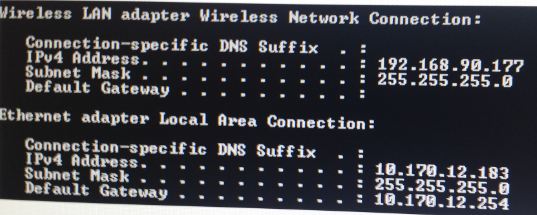
I left the 192.168.90.99 gateway out as I understood as you can see.
@ChiefIT
Sadly the machine does not have a serial connection, that was one of the first things I looked for as well. And thanks for the tip, I double-checked that the service remained off.
EARN REWARDS FOR ASKING, ANSWERING, AND MORE.
Earn free swag for participating on the platform.
Will.
Here's the routing table and ping examples:
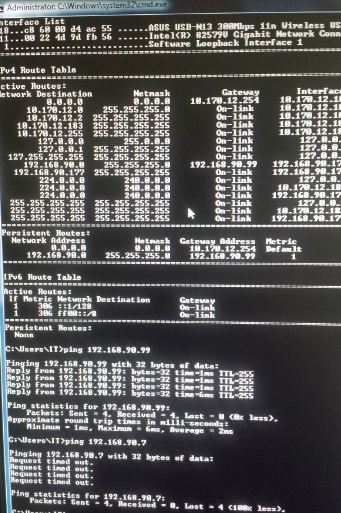
Create a route directly to your workstation from the dual homed VLAN machine.
which would be the following...
route -p add 192.168.90.(your IP) mask 255.255.255.0 192.168.90.99 IF 18
Also on your workstation create a static route to the other workstation IP.
route -p add 192.168.90.177 mask 255.255.255.255 192.168.90.99 IF (whatever your IF # is)
Will.
Get a FREE t-shirt when you ask your first question.
We believe in human intelligence. Our moderation policy strictly prohibits the use of LLM content in our Q&A threads.
It's very odd, it still doesn't seem to be working for some reason still.
My laptop in my office has a IP of 192.168.90.32
Here is the routing table on my laptop that's connected to the same wireless vlan right now. It's able to ping everything besides 192.168.90.177 (the workstation)
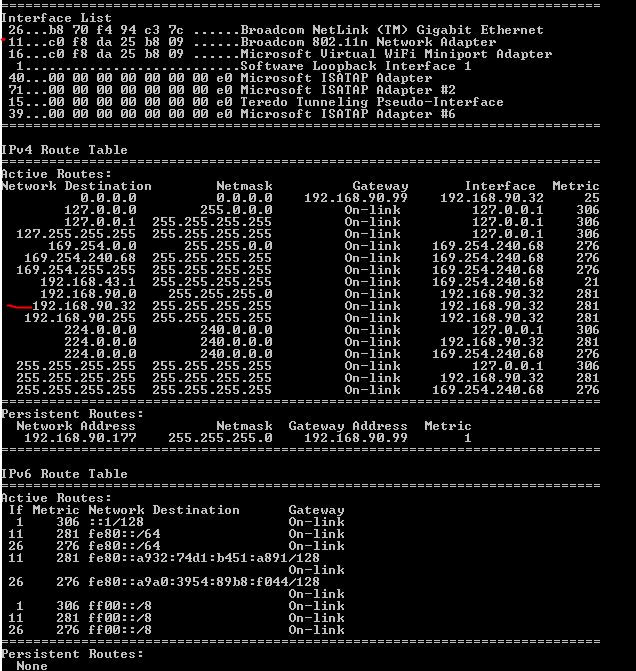
The only thing 192.168.90.177 (the work station) can ping is our gateway 192.168.90.99
Workstation Table:

What am I missing?
@ChiefIT
It literally only has one RJ45 jack that is being hogged for the phone network right now. It needs to be on that network, because the workstation also is used for the voicemail etc.
If I can use the second NIC I can either remote into the PC, or use the webtools as well probably over remoting in. So I've also thought about it, but the dang box doesn't have enough ports for anything :(
Will.
EARN REWARDS FOR ASKING, ANSWERING, AND MORE.
Earn free swag for participating on the platform.
Also on your workstation create a static route to the other workstation IP.
route -p add 192.168.90.177 mask 255.255.255.255 192.168.90.99 IF (whatever your IF # is)
The wireless on the workstation has a caution sign on it though (says something is wrong with it) it's because I'm leaving the gateway out. But that's intended. Don't know what else would be prohibiting the pings, unless the router is not recognizing the traffic somehow. But everything on the same network should be able to communicate anyways.

vlans don't cross talk that's what they're for, so same copper can broadcast on different subnets and not drag down bandwidth.
I would suggest adding an entry in the router to allow vlan(x) to talk to vlan(y) for ip ipaddress(z) only.
What type of router do you have installed?
Get a FREE t-shirt when you ask your first question.
We believe in human intelligence. Our moderation policy strictly prohibits the use of LLM content in our Q&A threads.
I deleted all routes and only put in one route from my laptop:
route -p add 192.168.90.177 mask 255.255.255.255 192.168.90.99 IF 11
And that got it to go. Having both routes in it seemed to break it or put it in some type of loop maybe.
I'm now able to remote into the machine perfectly =]
Thanks for all the help
Microsoft Legacy OS
--
Questions
--
Followers
Top Experts
The Microsoft Legacy Operating System topic includes legacy versions of Microsoft operating systems prior to Windows 2000: All versions of MS-DOS and other versions developed for specific manufacturers and Windows 3/3.1, Windows 95 and Windows 98, plus any other Windows-related versions, and Windows Mobile.