
Windows 10
--
Questions
--
Followers
Top Experts

I am running Windows 10 Home and tried to use local group policy to change some settings concerning device installation.
I managed to install group policy editor and change desired settings.
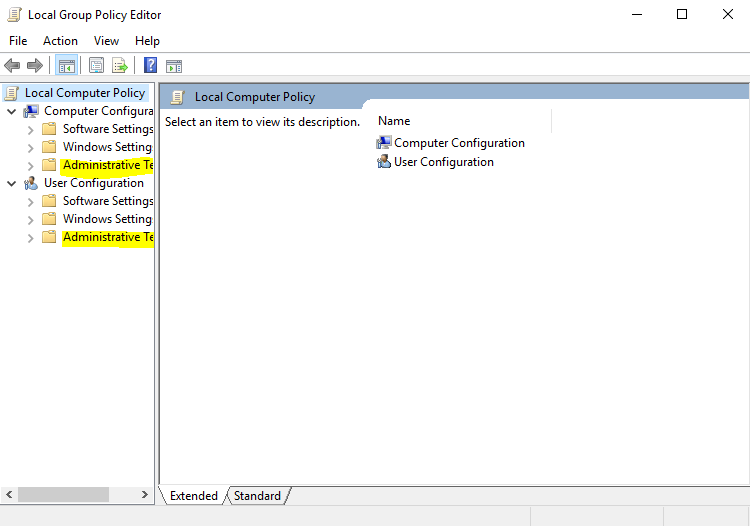
In Local Group Policy Editor I am able to see Administrative Templates under both Computer/User Configuration:
However Administrative Templates are missing in rsop.msc (Resultant Set Of Policy):
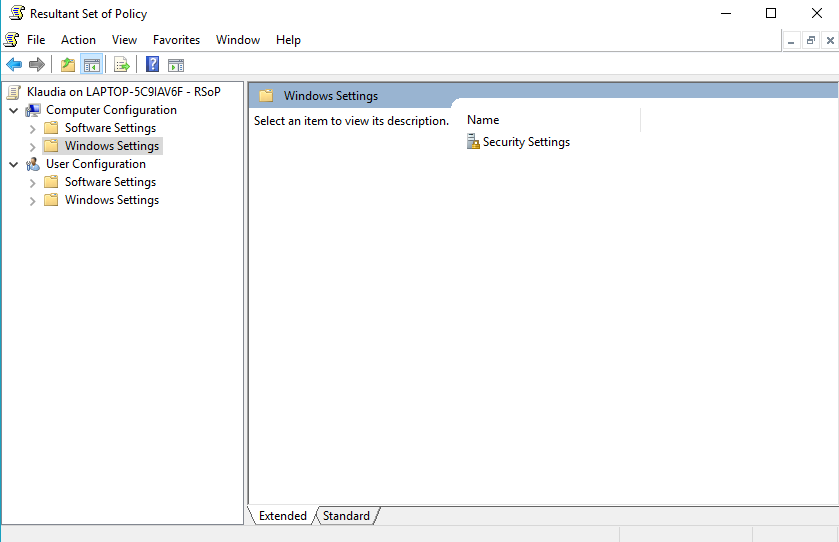
My policy settings changes are not applied, even after system restart and are not visible when running
gpresult /vThanks for help!
P.S. I have administrative templates files (.admx and .adml) stored under C:\Windows\PolicyDefinitio
P.S. Problem does not seem to appear in Win10 Pro.
Zero AI Policy
We believe in human intelligence. Our moderation policy strictly prohibits the use of LLM content in our Q&A threads.


Actually I am editing registry in my solution and setting registry values works properly.
The problem is that despite having values set and proper Registry.pol file generated the group policy settings does not take effect!
I used gpedit.msc just to check if registry values were set properly (and they were).
My problem is how to make RSOP acknowledge my changes (it seems to be somehow unaware of Administrative Templates as in the example).

I have recommended this question be closed as follows:
Accept: 'McKnife' (https:#a42760971)
If you feel this question should be closed differently, post an objection and the moderators will review all objections and close it as they feel fit. If no one objects, this question will be closed automatically the way described above.
seth2740
Experts-Exchange Cleanup Volunteer


EARN REWARDS FOR ASKING, ANSWERING, AND MORE.
Earn free swag for participating on the platform.
Windows 10
--
Questions
--
Followers
Top Experts
Windows 10 is a personal computer operating system featuring the "universal application architecture" (UAP); apps can be designed to run across multiple devices with nearly identical code, including PCs, tablets, smartphones, embedded systems, Xbox One, Surface Hub and HoloLens. Windows 10 also includes a virtual desktop system, a window and desktop management feature called Task View, the Microsoft Edge web browser, support for fingerprint and face recognition login, voice-based search (Cortana), new security features for enterprise environments, and DirectX 12 and WDDM 2.0 to improve the operating system's graphics capabilities for games.