
Microsoft Access
--
Questions
--
Followers
Top Experts

How to convert Hex text in Ms Access VBA to Binary code
Dear All;
I need help to convert some Hex text to binary code using Ms Access VBA, see below:
Header1 : 0X1A
Header2 : OX5D
CmdID: (0x01,0x02 & 0x03)
Length : ( Content to big-endian)
I have tried to convert the above string using the online convertor, see the screen shoot below, for example
(1) 0x01 = 00110000 01111000 00110000 00110001
The objective here is send a command string to the serial port in the recommended format below:
<Header1><Header2><CmdID><
Both the content & CRC is already done , the problem is the four ( Header1 to Length)
Simple VBA code:

I need help to convert some Hex text to binary code using Ms Access VBA, see below:
Header1 : 0X1A
Header2 : OX5D
CmdID: (0x01,0x02 & 0x03)
Length : ( Content to big-endian)
I have tried to convert the above string using the online convertor, see the screen shoot below, for example
(1) 0x01 = 00110000 01111000 00110000 00110001
The objective here is send a command string to the serial port in the recommended format below:
<Header1><Header2><CmdID><
Both the content & CRC is already done , the problem is the four ( Header1 to Length)
Simple VBA code:
Dim Header1 as string, Header2 as string , CmdID as string, length as string, Content as string , CRC as string
Dim intPortID As Integer ' Ex. 1, 2, 3, 4 for COM1 - COM4
Dim lngStatus As Long
Dim strError  As String
Dim strData   As String

Header1 = XXXX (converted to binary code)
Header2 = XXXX (converted to binary code)
CmdID = XXXX (converted to binary code)
Length = XXXX (converted to binary code)
Content =????? (converted to binary code all in Json)
CRC = XXXX (converted to binary code)
strData = <Header1><Header2><CmdID><Length><Content><CRC>
  ' Initialize Communications
    lngStatus = CommOpen(intPortID, "COM" & CStr(intPortID), _
        "baud=9600 parity=N data=8 stop=1")

    If lngStatus <> 0 Then
	' Handle error.
        lngStatus = CommGetError(strError)
	MsgBox "COM Error: " & strError
    End If


    ' Set modem control lines.
    lngStatus = CommSetLine(intPortID, LINE_RTS, True)
    lngStatus = CommSetLine(intPortID, LINE_DTR, True)

    ' Write data to serial port.
    lngSize = Len(strData)
    lngStatus = CommWrite(intPortID, strData)
    If lngStatus <> lngSize Then
    ' Handle error.
    End If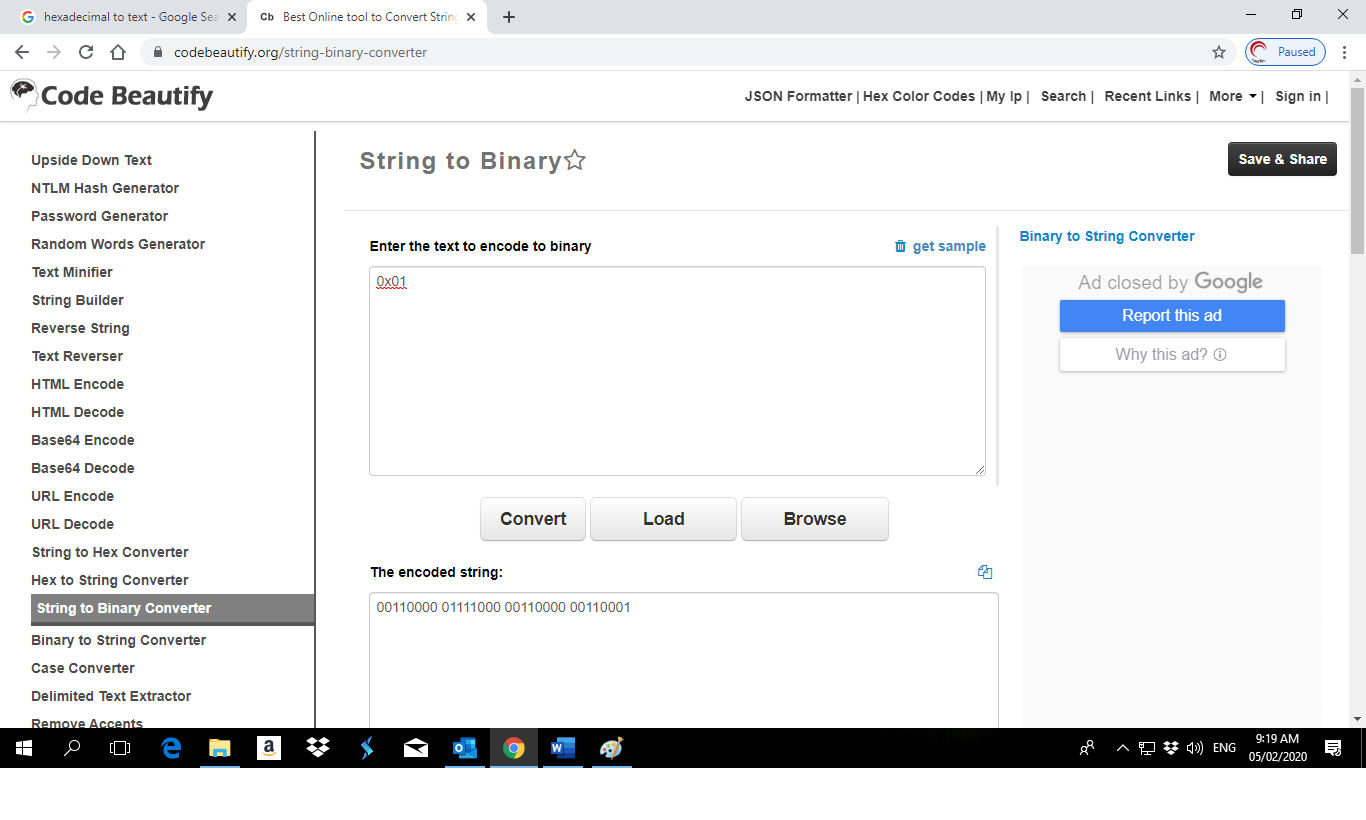
Zero AI Policy
We believe in human intelligence. Our moderation policy strictly prohibits the use of LLM content in our Q&A threads.

You can check this thread here : http://www.vbaexpress.com/forum/showthread.php?45350-Solved-Hex-to-Binary-conversion-not-using-HEX2BIN
Essentially they are converting hexadecimal to decimal and then decimal to bin
Essentially they are converting hexadecimal to decimal and then decimal to bin
ASKER CERTIFIED SOLUTION


membership
Log in or create a free account to see answer.
Signing up is free and takes 30 seconds. No credit card required.
Thank you so much Gustav Brock!
Just one more issue , I tested the code its okay , I'm just asking whether its possible also to factor the following Byte length:
Header1 = 1 Length(Byte)
Header2 = 1 Length(Byte)
CmdID = 1 Length(Byte)
How to I get values at one go instead of calculating one by one , see the VBA code below ( Example Header1,Header2 & CmdID):
Just one more issue , I tested the code its okay , I'm just asking whether its possible also to factor the following Byte length:
Header1 = 1 Length(Byte)
Header2 = 1 Length(Byte)
CmdID = 1 Length(Byte)
How to I get values at one go instead of calculating one by one , see the VBA code below ( Example Header1,Header2 & CmdID):
Private Sub CmdWhext_Click()
DecimalValue = &H1A
BinaryValue = DecToBin(DecimalValue, 8)
Debug.Print DecToBin(DecimalValue, 8)
End Sub
DecimalValue = &H1A
BinaryValue = DecToBin(DecimalValue, 8)
Debug.Print DecToBin(DecimalValue, 8)
End Sub
Option Compare Database
Option Explicit
Public Function DecToBin(ByVal lngNumber As Long, Optional bytLength As Byte) As String
' Returns string that represents the binary expression for lngNumber.
'
' If bytLength is specified, returned string will be filled with
' leading zeroes up to this length.
Dim strBin As String
While lngNumber > 0
strBin = (lngNumber Mod 2) & strBin
lngNumber = lngNumber \ 2
Wend
If bytLength > 0 Then
strBin = Right(String(bytLength, "0") & strBin, bytLength)
End If
DecToBin = strBin
End Function
Option Explicit
Public Function DecToBin(ByVal lngNumber As Long, Optional bytLength As Byte) As String
' Returns string that represents the binary expression for lngNumber.
'
' If bytLength is specified, returned string will be filled with
' leading zeroes up to this length.
Dim strBin As String
While lngNumber > 0
strBin = (lngNumber Mod 2) & strBin
lngNumber = lngNumber \ 2
Wend
If bytLength > 0 Then
strBin = Right(String(bytLength, "0") & strBin, bytLength)
End If
DecToBin = strBin
End Function
I would convert each part to the desired length, then simply concatenate the converted parts - to have the complete and full text string of bits.


EARN REWARDS FOR ASKING, ANSWERING, AND MORE.
Earn free swag for participating on the platform.
Okay thank so much for the help.
Regards
Chris.
Regards
Chris.
Microsoft Access
--
Questions
--
Followers
Top Experts
Microsoft Access is a rapid application development (RAD) relational database tool. Access can be used for both desktop and web-based applications, and uses VBA (Visual Basic for Applications) as its coding language.