
Windows OS
--
Questions
--
Followers
Top Experts

"C:\...\nircmdc.exe" elevate "C:\...\Script.bat" C:\Test.txt
This does not:
"C:\...\nircmdc.exe" elevate "C:\...\Script.bat" "C:\Test.txt"
How can I pass a quoted parameter to NirCmd elevate?
Zero AI Policy
We believe in human intelligence. Our moderation policy strictly prohibits the use of LLM content in our Q&A threads.

"C:\...\nircmdc.exe" elevate "C:\...\Script.bat" 'C:\Test.txt'
C:\Utility\NIRSoft\NirSoft\nircmd.exe elevate "notepad.exe" 'C:\temp\1.txt'it works fine...
what does your bat file look like...
C:\Utility\NIRSoft\NirSoft\nircmd.exe elevate "notepad.exe" 'C:\temp\1.txt'

C:\Utility\NIRSoft\NirSoft\nircmd.exe elevate "notepad.exe" """C:\temp\2.txt"""


EARN REWARDS FOR ASKING, ANSWERING, AND MORE.
Earn free swag for participating on the platform.
"C:\...\nircmdc.exe" elevate "C:\...\Script.bat" 'C:\Test File.txt'
C:\Utility\NIRSoft\NirSoft\nircmd.exe elevate "notepad.exe" """C:\temp\1 - Test.txt"""C:\Utility\NIRSoft\NirSoft\nircmd.exe elevate "notepad.exe" 'C:\temp\1 - Test.txt'Get a FREE t-shirt when you ask your first question.
We believe in human intelligence. Our moderation policy strictly prohibits the use of LLM content in our Q&A threads.
what do you have in bat file?
Script.bat

Zorbek Does you nircmd path contain spaces?
Can you put your nircmd somewhere without spaces or add its location to your PATH variable?
like
notepad.exe %1
>>>
notepad.exe "%1"
EARN REWARDS FOR ASKING, ANSWERING, AND MORE.
Earn free swag for participating on the platform.
My first script "Test Script 1.bat":
SET FilePath=C:\Users\Kevin Jones\Desktop\Test\Test File.txt
"C:\Users\Kevin Jones\Desktop\Test\nircmdc.exe" elevate "C:\Users\Kevin Jones\Desktop\Test\Test Script 2.bat" '%FilePath%'
PAUSEMy second script "Test Script 2.bat"
ECHO %1%
PAUSEI'm not sure why but your notepad example with double quotes works. But when I use double quotes on the file path parameter in my script, the second script is never called.
now what are you doing, how do you call and which one
and what should happen and what is not working...
just use %1
also double quotes are the correct way, try instead using them around your
SET "FilePath=C:\Users\Kevin Jones\Desktop\Test\Test File.txt"
there is something else I believe is happening, but need to test first
Get a FREE t-shirt when you ask your first question.
We believe in human intelligence. Our moderation policy strictly prohibits the use of LLM content in our Q&A threads.
EARN REWARDS FOR ASKING, ANSWERING, AND MORE.
Earn free swag for participating on the platform.
When a double quote is passed to nircmd after the first parameter (the script name) it fails to invoke the second script.
When single quotes are used, the second script is called but the file path is broken up by any embedded spaces and only part of the path is received as the first parameter.
Test Script 1.bat
SET FilePath=C:\temp\Test File.txt
SET cmd="C:\temp\Test Script 2.bat" "%FilePath%"
echo %cmd%
"C:\Utility\NIRSoft\NirSoft\nircmd.exe" elevate %cmd%
PAUSE script 1...ECHO %1%
notepad %1%
PAUSE script 2..."Test Script 1.bat"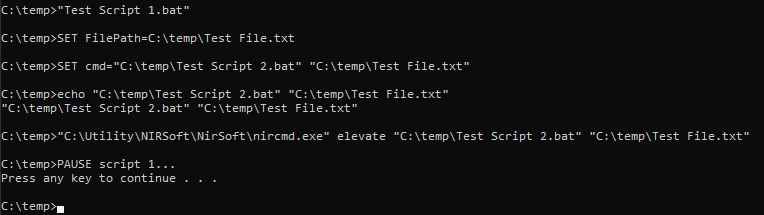
SET FilePath=C:\temp\Test File.txt
SET cmd="C:\temp\Test Script 2.bat" "%FilePath%"
SET cmd="notepad.exe" "%FilePath%"
echo %cmd%
"C:\Utility\NIRSoft\NirSoft\nircmd.exe" elevate %cmd%
PAUSE script 1...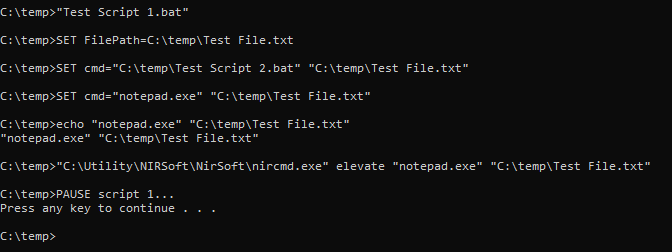
Get a FREE t-shirt when you ask your first question.
We believe in human intelligence. Our moderation policy strictly prohibits the use of LLM content in our Q&A threads.
SET cmd="C:\Program Files\Windows NT\Accessories\wordpad.exe" "%FilePath%"REM This calls the .bat script but the system breaks apart the path into multiple parameters
SET FilePath=C:\Windows\System32\Test File.txt
SET Command="C:\Windows\System32\Test Script.bat" '%FilePath%'
"C:\Windows\System32\nircmdc.exe" elevate %Command%
REM This does not call the .bat script at all
SET FilePath=C:\Windows\System32\Test File.txt
SET Command="C:\Windows\System32\Test Script.bat" "%FilePath%"
"C:\Windows\System32\nircmdc.exe" elevate %Command%
REM This runs Notepad and the file is opened
SET FilePath=C:\Windows\System32\Test File.txt
SET Command="C:\Windows\System32\Notepad.exe" '%FilePath%'
"C:\Windows\System32\nircmdc.exe" elevate %Command%
REM This runs Notepad and the file is opened
SET FilePath=C:\Windows\System32\Test File.txt
SET Command="C:\Windows\System32\Notepad.exe" "%FilePath%"
"C:\Windows\System32\nircmdc.exe" elevate %Command%My conclusion is that, for whatever reason, nircmd's elevate function has problems with .bat files that it does not have with .exe files. If the file path parameter is enclosed in double quotes, or ay double quote used after the .bat file reference, the .bat is not called at all. If the file path parameter is enclosed in single quotes or no quotes are used, the .bat file is called but the file path parameter is parsed into multiple parameters split by spaces.
One workaround is to use single quotes or no quotes and use the %* parameter reference in the invoked .bat file but that only allows for one parameter.
elevate bat file with nircmd does not work...
any other executabble works...
either we need to check `run-as` or find another utility (I guess all others will do the same thing -v will not work with bat)
or you need to use some other logic...
maybe create a tiny exe instead of bat file
EARN REWARDS FOR ASKING, ANSWERING, AND MORE.
Earn free swag for participating on the platform.

Windows OS
--
Questions
--
Followers
Top Experts
This topic area includes legacy versions of Windows prior to Windows 2000: Windows 3/3.1, Windows 95 and Windows 98, plus any other Windows-related versions including Windows Mobile.