

Exchange
--
Questions
--
Followers
Top Experts

I have been tearing my hair out with this problem for 2 weeks. Any help would be welcome
My name is Sam. I made the support request.
I have a similar problem
I work for an IT service company.
Our customer is trying to migrate mailboxes on his local Exchange server 2019 CU 14 (Exchange On-Prem) environment to M365.
A few minutes after launching the migration he has this error message:
1- We are unable to create a new endpoint. When creating the point we have the following error:
- Failed to create migration endpoint.Looks like you do not have permission.
2 - We are unable to update the password of the existing endpoint. When we try to update this endpoint we have this error message:
- Failed to update migration endpoint. The connection to the server "remote" coud not be complete
3- when we do the migration we have this error message:
Erreur: MrsHttpUnauthorizedException: The Mailbox Replication Service was unable to connect to the remote server using the credentials provided.
Please check the credentials and try again. The call to 'https://webmail.domain.fr/EWS/mrsproxy.svc' failed.
Error details: The HTTP request is unauthorized with client authentication scheme 'Negotiate'.
The authentication header received from the server was 'Negotiate,NTLM,Basic realm="webmail.domain.fr"'.
--> The remote server returned an error: (401) Unauthorized.. --> The HTTP request is unauthorized with client authentication scheme 'Negotiate'.
The authentication header received from the server was 'Negotiate,NTLM,Basic realm="webmail.domain.fr"'. --> The remote server returned an error: (401) Unauthorized.
--> The call to 'https://webmail.domain.fr/EWS/mrsproxy.svc' failed. Error details: The HTTP request is unauthorized with client authentication scheme 'Negotiate'.
The authentication header received from the server was 'Negotiate,NTLM,Basic realm="webmail.domain.fr"'. --> The remote server returned an error: (401) Unauthorized..
--> The HTTP request is unauthorized with client authentication scheme 'Negotiate'. The authentication header received from the server was 'Negotiate,NTLM,Basic realm="webmail.domain.fr"'.
--> The remote server returned an error: (401) Unauthorized.
Sorry If this is not very clear to you please clarify as I had to use google translate
I specify that the MRSProxy service is activated from the EWS virtual directory. Integrated Windows authentication is activated and basic authentication.
Thanks in advance
Zero AI Policy
We believe in human intelligence. Our moderation policy strictly prohibits the use of LLM content in our Q&A threads.

It seems a credentials issue.
Please verify your cred are correct and make sure the permissions are correct for the user.

Are you initiating the migration from O365 or from on-prem? Does the user have org admin in both places? Do you know the password used by the endpoint user when the endpoint was created? (If so, set it back to that password!)

Assiming it isn't a simple credentials issue…. There can be issues using Exchange Server Extended Protection turned on. Try turning Extended Protection off in IIS (EWS). It can be done via script also. More info here: https://practical365.com/exchange-server-extended-protection/
For further checks:
1. Open Office 365 Exchange Portal – Recipients- Migration – Click on Migration endpoints. Update the Migration Endpoint Password – which has access to On-Prem Mailboxes. Then rerun the migration.
2. Use the Test-MigrationServerAvailability command to see what messages you get, and then troubleshoot according to the link on the Exchange team blog about solving this issue. You could refer to "Option 3: Test-MigrationServerAvailability fails with 401 Unauthorized, Access Denied, or Invalid Credentials section.
Some other steps to try are listed, here: https://www.alitajran.com/mailbox-replication-service-was-unable-to-connect-to-the-remote-server/


EARN REWARDS FOR ASKING, ANSWERING, AND MORE.
Earn free swag for participating on the platform.
Hello MA
Hello Michael B. Smith
FYI We are performing the migration from the Exchaneg Online interface to migrate the 15 mailboxes that remain on the Exchange On-prem.
The user on the local Exchange side is a member of the organization management group. On the Office 365 side he is the general administrator of the tenant. The problem is that I am unable to update the password or change the user name from the endpoint. When I try to change the password from the endpoint I get the following error message:
It cannot communicate with the local Exchange.
When I contacted Microsoft support located in a country that I don't want to name, the guys made me launch the connectivity test tool and then they asked me to point the autodiscover record to Office 365 while there are still mailboxes to migrate. It's a bit surprising
So it's still at the same point, it's impossible to create an endpoint or update the existing one.
Thinking that it is the Exchange online interface that presents a problem, I tried to create the ExchangeRemoteMove endpoint in powershell I have this as an error:
PS C:\Windows\system32> New-MigrationEndpoint -Name Endpoint2 -ExchangeRemoteMove -RemoteServer webmail.domain.fr -Credentials (Get-Credential domainLocal\Svc_Migration)
Write-ErrorMessage : |Microsoft.Exchange.Migration.MigrationServerConnectionFailedException|The connection to the server "webmail.domain.fr" could not be established.
At character C:\Users\USERNAME\AppData\Local\Temp\tmpEXO_guch1ilm.sgl\tmpEXO_guch1ilm.sgl.psm1:1204: 13 + Write-ErrorMessage $ErrorObject + ~~~~~~~~~~~~~~~~~~~~~~~~~~~~~ + CategoryInfo: NotSpecified: (:) [New-MigrationEndpoint], MigrationServerConnectionFailedException + FullyQualifiedErrorId: [Server=MR1P264MB4051,RequestId=8f66cbf3-167e-a3a1-0602-bc38dce26e23,TimeStamp=Fri, 02 Aug 2024 11:02:03 GMT],Write-ErrorMessage
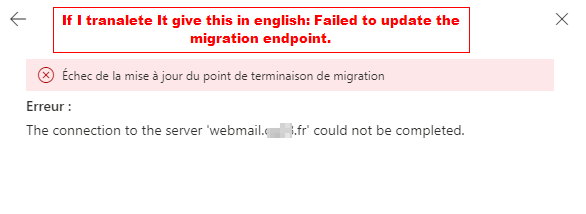
Failed to update migration endpoint. See screenshot
Same I can't create another endpoint I have this error message
Failed to create migration endpoint.Looks like you do not have permission.
Hi Mike Lazarus
I had seen in forums where they said that extended protection can cause this problem. I disabled extended protection two days ago by following your link then did IISRESET it did not work.
1. when I try to update the password from the endpoint, I have the error message that I already mentioned above:
- Failed to update the migration endpoint. The connection to the "remote" server could not be completed.
2. Same I can not create an ExchangeRemoteMove endpoint either to do, the error message is a bit identical:
- Failed to create the migration endpoint. It seems that you do not have the authorization.
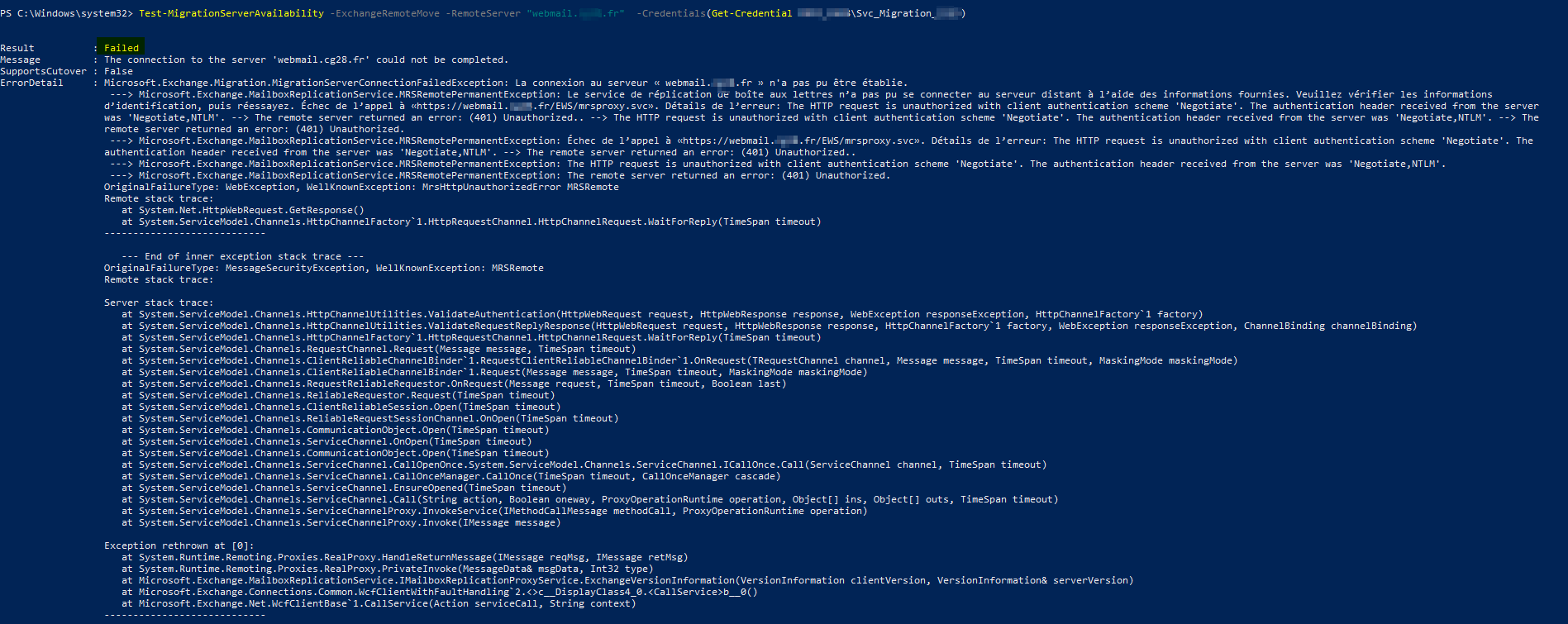
3. I had already followed this link except that I cannot update the password. it's like Office 365 can't communicate with the remote server with this address webmail.domain.fr
https://www.alitajran.com/mailbox-replication-service-was-unable-to-connect-to-the-remote-server/
Below is the result of the test-MigrationServerAvailability:
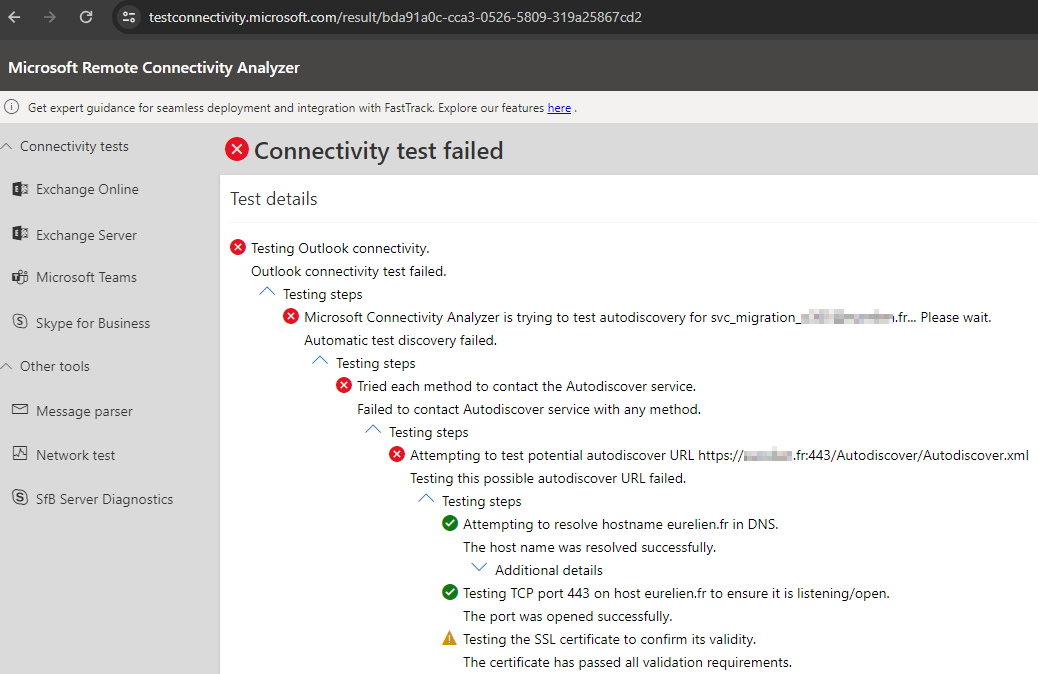
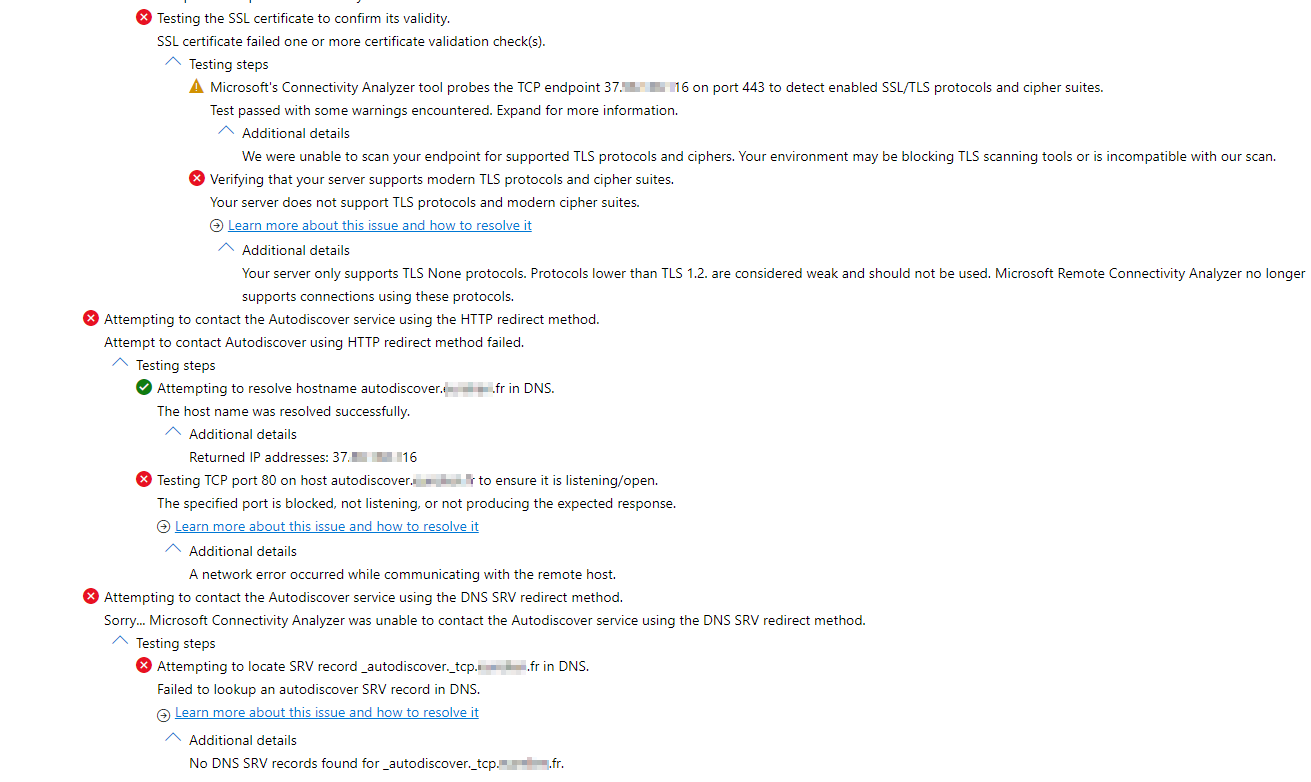
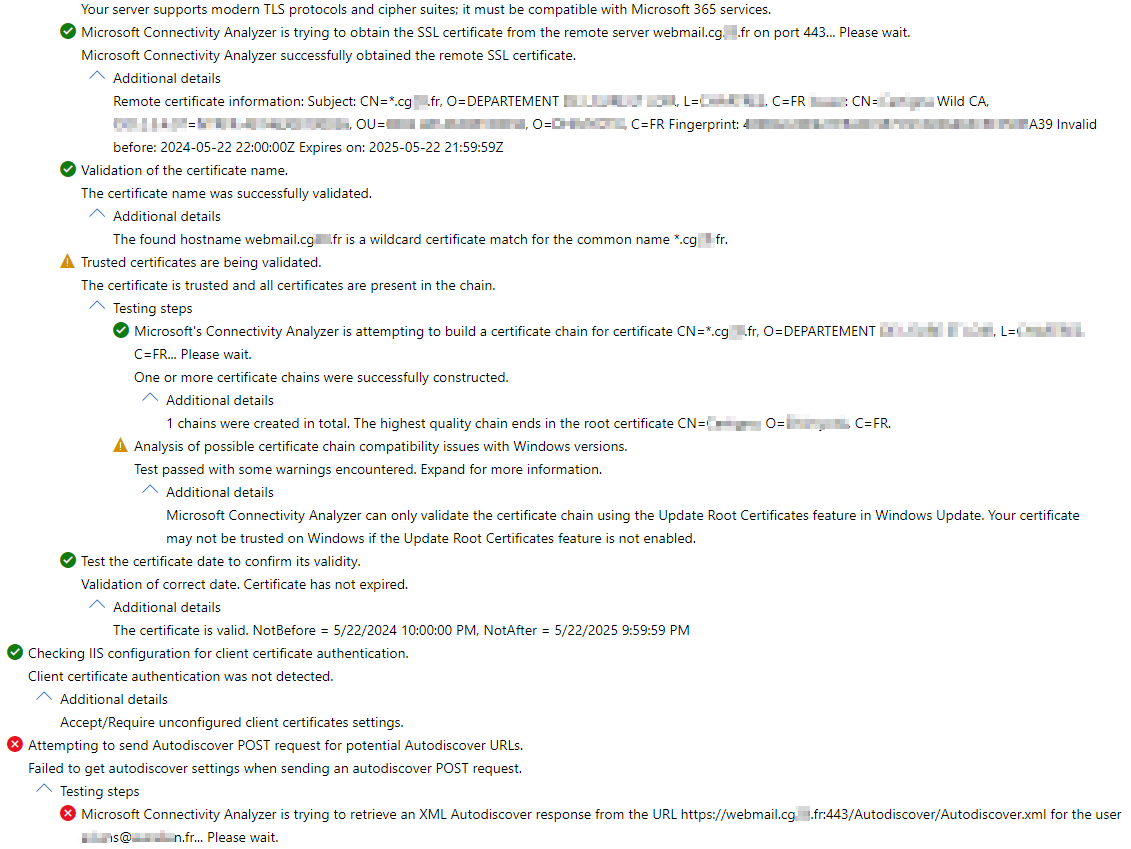
When I do the OUtlook connectivity test,
I have these errors below in screenshot.
When I try to configure a mailbox that is on the Exchange on-prem from Outlook, it does not find the autodiscover either

Get a FREE t-shirt when you ask your first question.
We believe in human intelligence. Our moderation policy strictly prohibits the use of LLM content in our Q&A threads.
what happens when you attempt the migration from the on-prem server? or attempt to update the endpoint from the on-prem server?
The connectivity tests seem to show you have an issue with autodiscover and/or the TLS. I'd look at getting that working first
Michael B. Smith It didn't seem to me that we could start the migration of On-Prem mailboxes to Office 365 from the Exchange On-Prem server.
our customer is on vacation so my access to the server has been temporarily disabled.
EARN REWARDS FOR ASKING, ANSWERING, AND MORE.
Earn free swag for participating on the platform.

Looking at the screenshots, please fix your Autodiscover issue first then we can move onto the next part.
Hello, I apologize I have not come back to you since because our client had closed the last two weeks of August for the holidays.
My problem is still current.
I had the autodiscover record recreated by the provider who manages the DNS part.
But the problem is still there.
I have a domain called for example company.fr and the webmail address is https://webmail.CGxx.fr/ecp or https://webmail.CGxx.fr/owa
The autodiscover that the exchange server returns is https://webmail.CGxx.fr/Autodiscover/Autodiscover.xml,
which corresponds to the name of the webmail.cgxx.fr and not to the name of the domain company.fr. Does this make sense to you? Or should I also have an autodiscover that responds to the name of toto.fr too?
As a consultant for this client, I asked different questions to understand why the migration stopped working overnight when it worked before.
The client told me that there had been changes at their place:
1- they changed their Firewall
2- they have a reverse proxy WAF and most of the flows were put back with more restrictions. Only IPs in France and Microsoft are allowed to access https://webmail.cgxx.fr
3- There were two old Exchange servers that were turned off that I decommissioned and that were replaced by the new Exchange 2019 server.
Below you will find the autodiscover record that I asked to create with the service provider who manages this part.
Is all this ok according to you?
What would you advise me to do:
Record Type | TTL | DNS Name | Priority | Value |
CNAME | 3600 | autodiscover |
| webmail.cgxx.fr. |
Hi all, my problem is still there if I can have some help, your expertise would help me a lot, thank you in advance.
I had a DNS autodiscover record SRV type recreated
Record type: SRV
Domain: domain.fr
Service: _autodiscover
Protocol: _tcp
Priority: 0
Weight: 0
Port number: 443
Host: webmail.CGxx.fr
TTL: 1 hour
here are the new elements that appear when I do the connectivity test
How can I correct this error at the autodiscover level please?
An "HTTP 401 - Unauthorized" response was received from the remote server Unknown. This response is usually caused by an incorrect user name or password. If you are trying to sign in to the Microsoft 365 service, make sure to use the correct User Principal Name (UPN). HTTP response headers: Strict-Transport-Security: max-age=3600; includeSubDomains; preload request-id: 7b875688-af67-4d5a-9e6e-e3fc866d569c Authenticate: Basic realm="webmail.cg28.fr"
Get a FREE t-shirt when you ask your first question.
We believe in human intelligence. Our moderation policy strictly prohibits the use of LLM content in our Q&A threads.
see image below
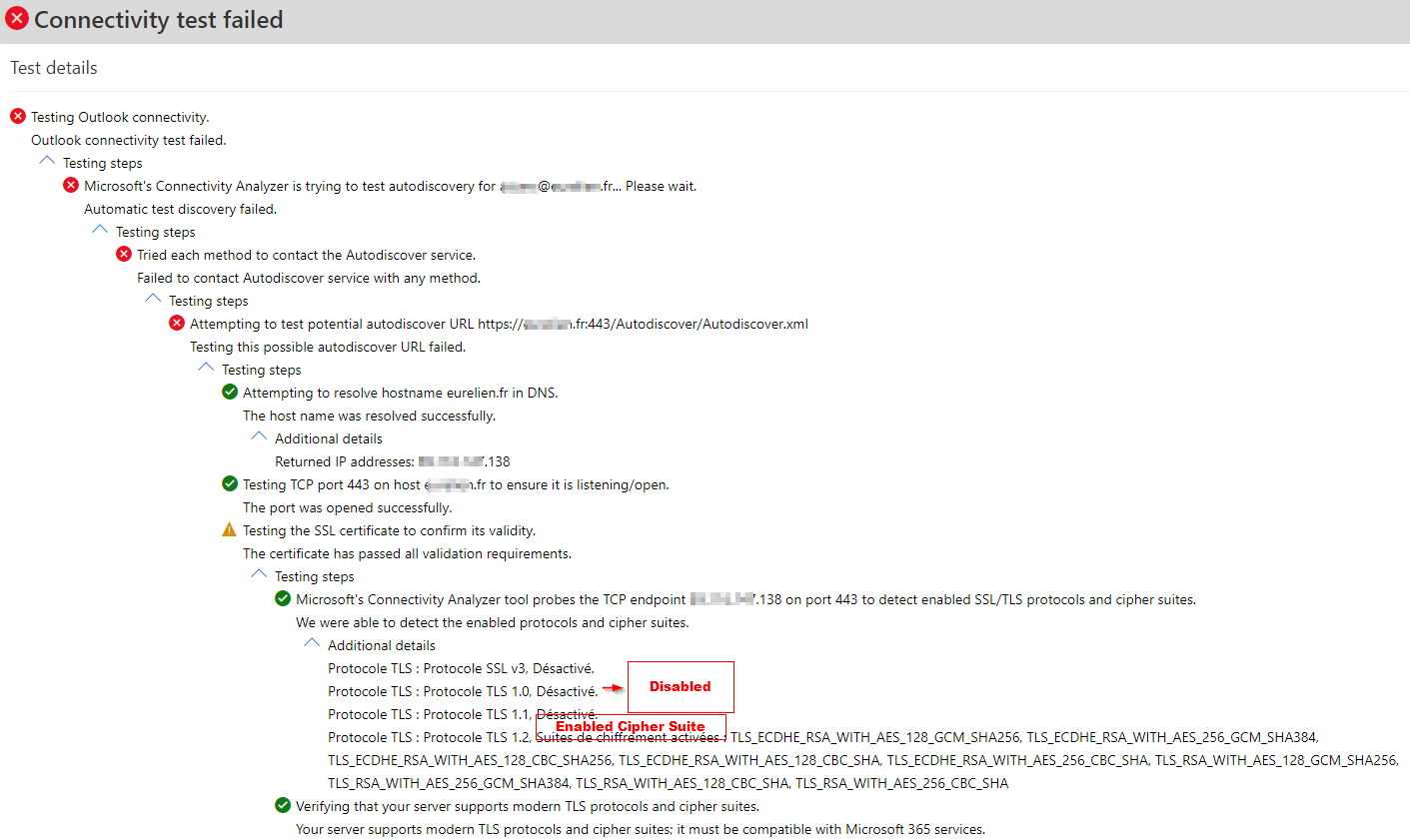
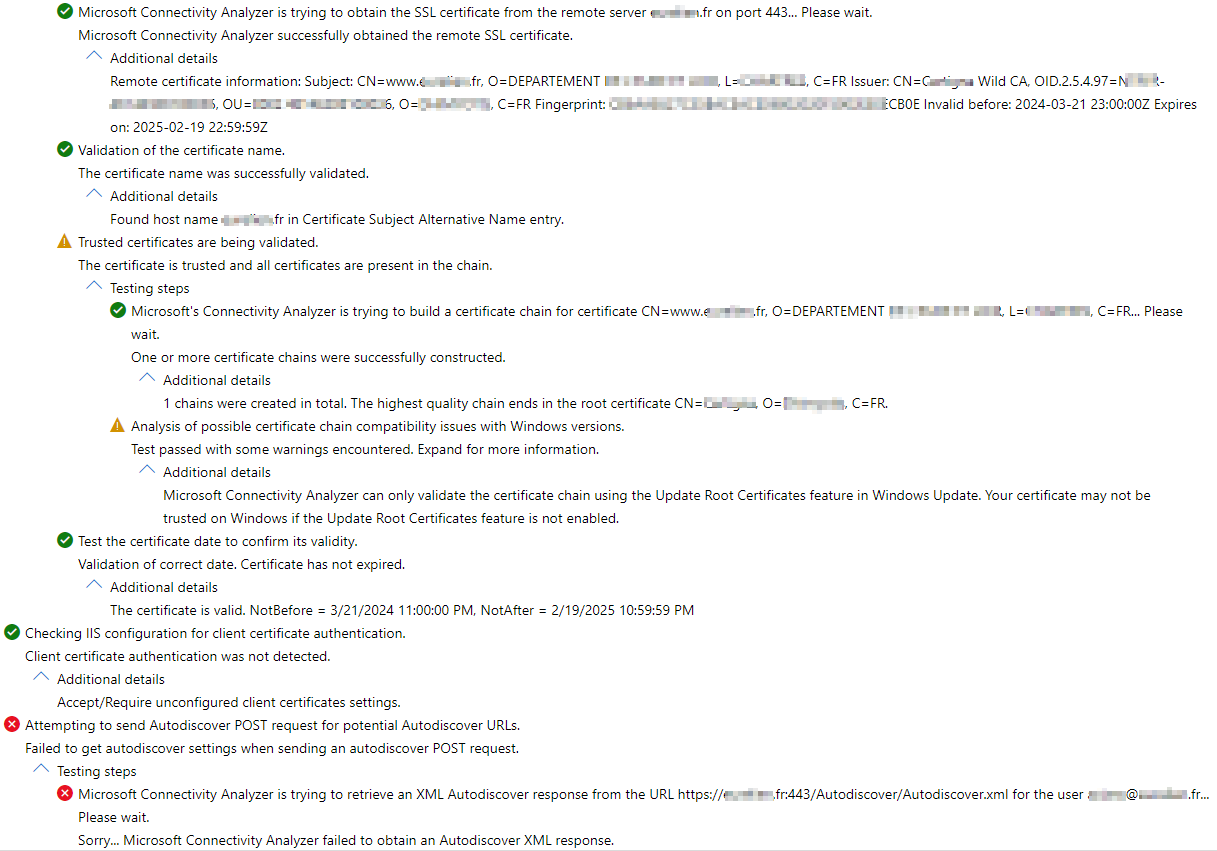
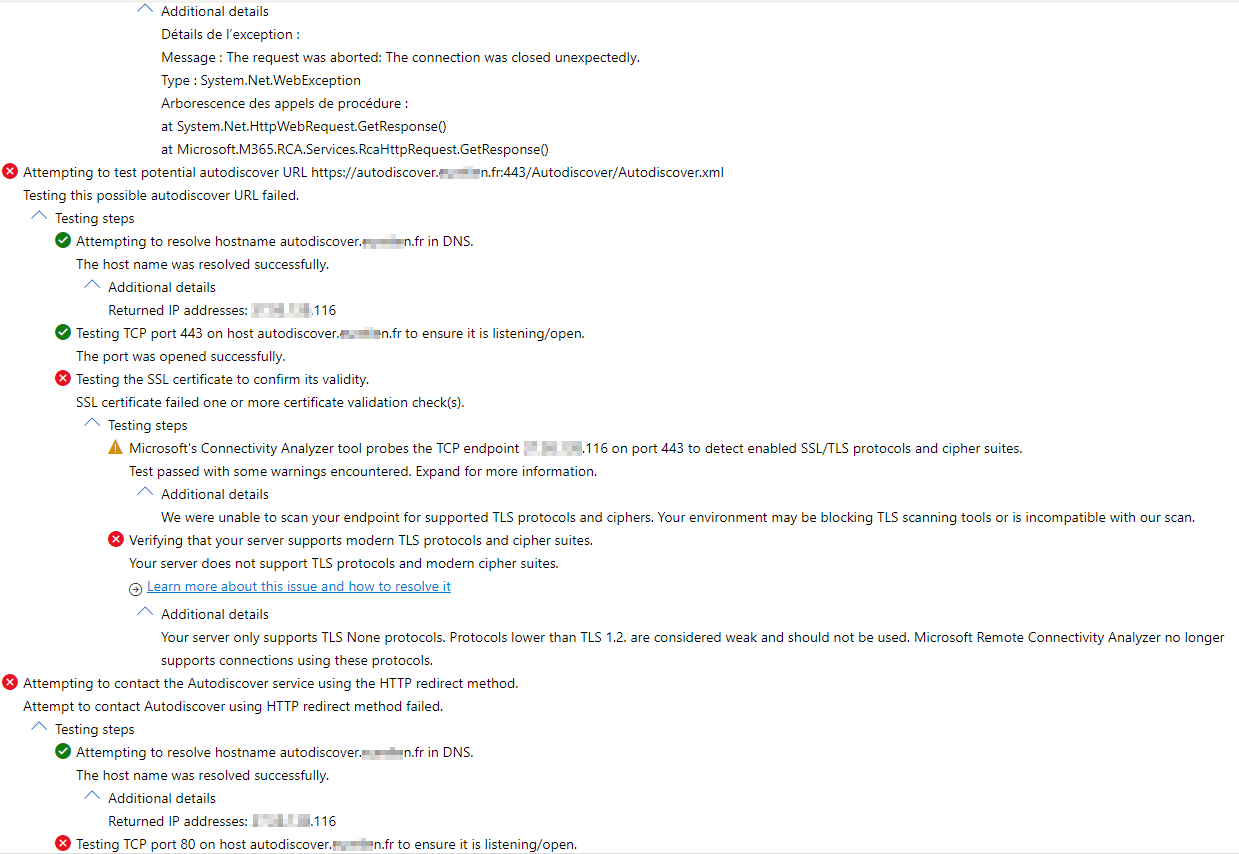
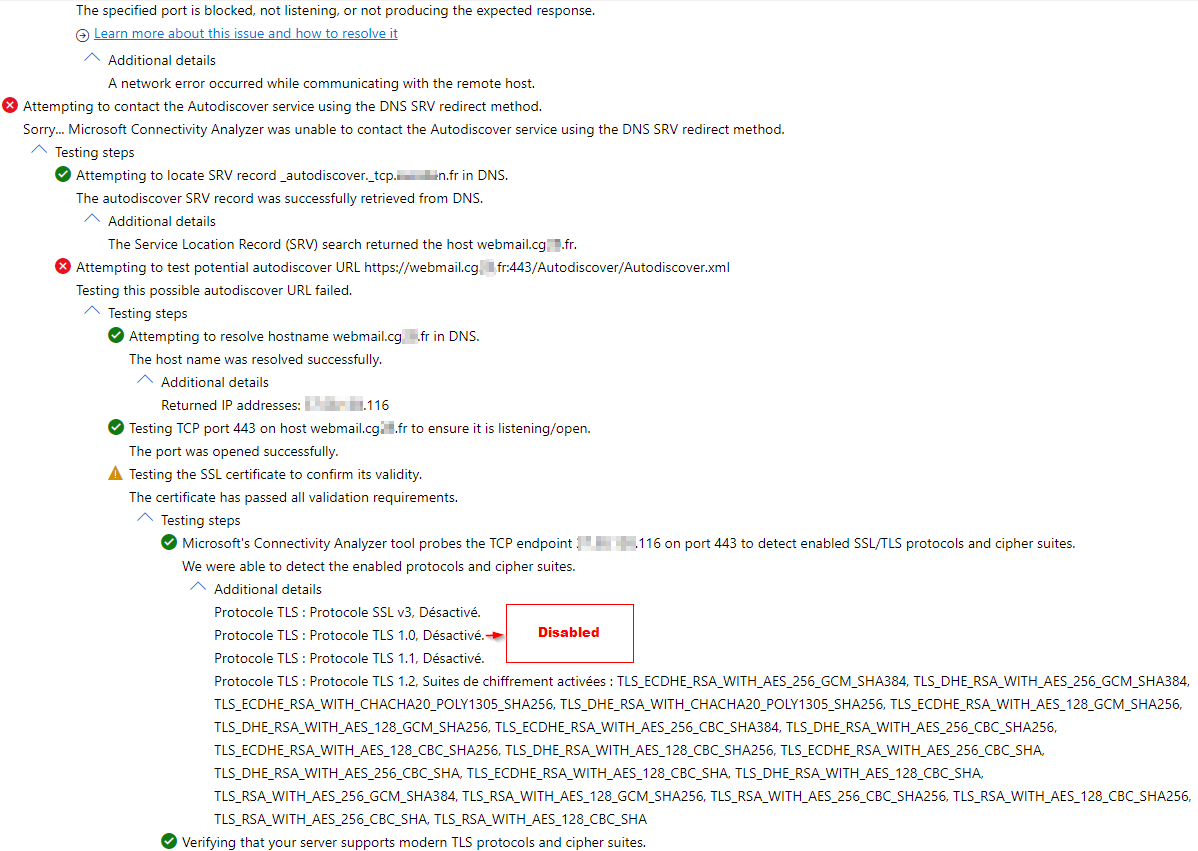

Hey Samba,
I am having the same issue! Have you been able to figure this one out? I am getting the same results with Test-MigrationServerAvailability and what not.
Please tell me you have fixed it.
Exchange
--
Questions
--
Followers
Top Experts
Exchange is the server side of a collaborative application product that is part of the Microsoft Server infrastructure. Exchange's major features include email, calendaring, contacts and tasks, support for mobile and web-based access to information, and support for data storage.
Create your account and start contributing!