
Microsoft Office
--
Questions
--
Followers
Top Experts

FOR WORD 2016...
I'm trying to add the Web Forward and Back buttons to my ribbon.
I went into OPTIONS -> CUSTOMIZE RIBBON.
Set the field "CHOOSE COMMANDS FROM" to "Commands Not in the Ribbon"
Found the Forward button in the command list.
Clicked [ADD].
The following error displayed:
Commands need to be added to custom groups. To create a new group, pick a tab in the list, then click new group
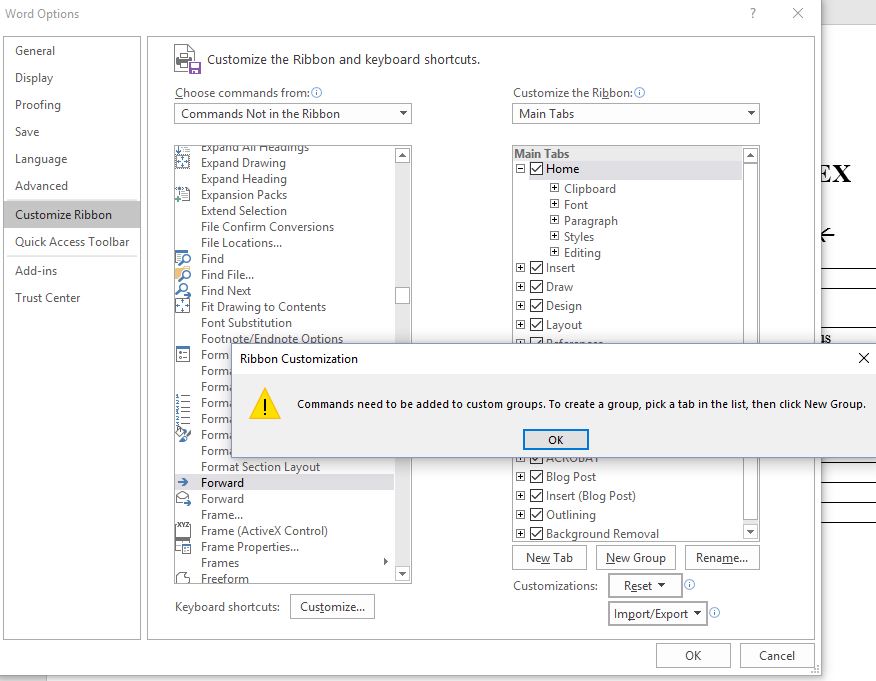
What does this mean? To what list are they referring?
Thanks,
Steve
Zero AI Policy
We believe in human intelligence. Our moderation policy strictly prohibits the use of LLM content in our Q&A threads.


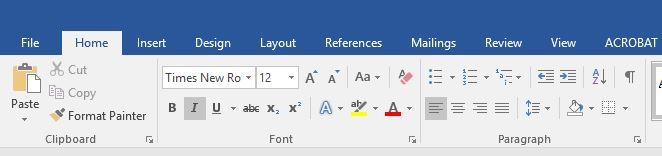
Crystal: Maybe b/c I did not choose an icon? Please see screenshot of ribbon below. Thanks.


EARN REWARDS FOR ASKING, ANSWERING, AND MORE.
Earn free swag for participating on the platform.
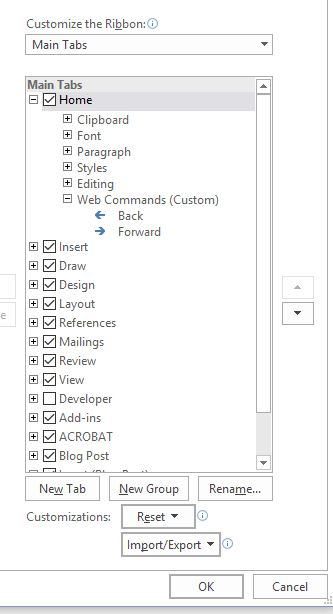
Steve
I also notice that the Developer ribbon is not visible -- check the box to show it
Get a FREE t-shirt when you ask your first question.
We believe in human intelligence. Our moderation policy strictly prohibits the use of LLM content in our Q&A threads.
Thank you! I had not looked far enough to the right.
Is there a reason to show the Developer ribbon? Not sure I need it at this time...
Thanks again!
Steve
> "Is there a reason to show the Developer ribbon? "
absolutely! Why hide things from yourself? ... you might want to use the Macro Recorder too ~
Steve
EARN REWARDS FOR ASKING, ANSWERING, AND MORE.
Earn free swag for participating on the platform.
I checked DEVELOPER. :)
But I don't see the the icons...

Now for Macro Recorder, are you saying I should create a macro to take me to the CUSTOMIZE RIBBON screen? (Hope you can read the above, it's small...)
Thanks!
your screen shot is the HOME ribbon tab ... DEVELOPER is now a new ribbon TAB that you didn't see before.
> "are you saying I should create a macro to take me to the CUSTOMIZE RIBBON screen"
no, I am suggesting you create a macro when you have a repetitive action to perform ....
Once you see the DEVELOPER ribbon tab, you can click on it sometimes to get comfortable with its commands, and then begin to learn how it can be more useful ~
Thanks again. Points coming soon...
Steve
Get a FREE t-shirt when you ask your first question.
We believe in human intelligence. Our moderation policy strictly prohibits the use of LLM content in our Q&A threads.
>>by the way, the shortcut key to go back in regular Word documents is Shift-F5
and this has a history ...<<
Maybe I'm seeing this but it seems to act oddly.
1. I brought up a doc I hadn't viewed in a while.
2. Scrolled to table of contents (TOC) and clicked on a link to take me to the section "Accounts Receivable".
3. Pressed [SHIFT-F5]
It took me NOT back to the TOC, but another place in the doc. Could that location be a leftover History entry from the last time I viewed the doc?
Thanks
Thanks,
Steve
EARN REWARDS FOR ASKING, ANSWERING, AND MORE.
Earn free swag for participating on the platform.
adding on to my last comment ... since now I think perhaps you don't know this? ...
Word can make an automatic TOC from Heading levels (default is to go to 3 and can be changed) -- the TOC can be updated as the document is changed with very little effort on your part.
It sound like perhaps your TOC is custom?
Do you mean manually entered? :)
My method (admittedly primitive):
For each section in my doc, create a bookmark.
In the TOC insert one hyperlink (pointing to the bookmark) for each section.
Something to keep in mind...is this anything like auto-numbered chapter headings which I'm using for a completely different project...
Thanks.
Get a FREE t-shirt when you ask your first question.
We believe in human intelligence. Our moderation policy strictly prohibits the use of LLM content in our Q&A threads.
probably
make a test doc with some paragraphs
tag Heading 1, 2, 3, ... in the doc. then go to the beginning and type [space][ctrl-enter]
this will create a space and a hard page break
than Ctrl-Home to go to top again
then:
REFERENCES ribbon, Table of Contents >
then, for instance, Automatic Table 1
every paragraph, whether you specifically tag it with a style name or not, has one ...
Thanks.
EARN REWARDS FOR ASKING, ANSWERING, AND MORE.
Earn free swag for participating on the platform.
Microsoft Office
--
Questions
--
Followers
Top Experts
Microsoft Office is an integrated suite of applications that includes Outlook, Word, Excel, Access, PowerPoint, Visio and InfoPath, along with a number of tools to assist in making the individual components work together. Coding within and between the projects is done in Visual Basic for Applications, known as VBA.